Help creating a 3D model of a hotwire cut airfoil.
-
Hello All,
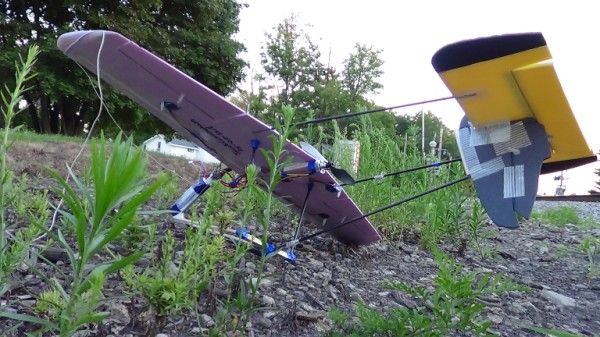
I developed this aircraft as a proof of concept of an Ultralight that I designed. I wanted to create plans for it so that others may build it as well. I am having troubles figuring out how to create the airfoil you see it isn't simply a "draw airfoil - extrude - scale other end".
The way this airfoil is produced is by taking two templates, one for the root chord of the wing ( center ) and one for the tip chord of the wing ( wing tips ). Then by use of a hotwire cutter, the airfoil is created by basically tangential cutting, so you see, by using a blend of both a washout of 2 degrees and a 0 degree incidence airfoil, you get a twisting "washout" effect.
I don't know how to make something like this in sketchup, can someone help me out?
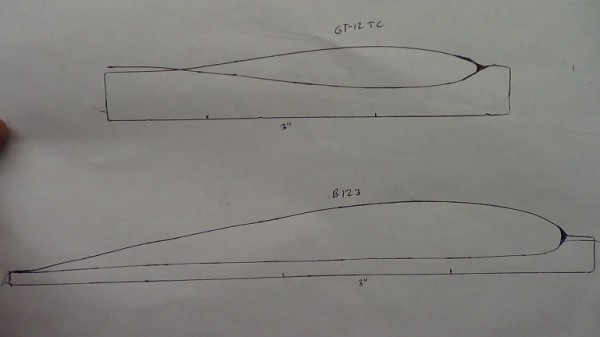
Here are the airfoils which I drew myself.
-
The main wing can be created in the same manner as I created this tail section.
[flash=800,600:1wwmb3e1]http://www.youtube.com/v/cpj6GZg_7V0[/flash:1wwmb3e1]
-
Hello Sam,
I watched your video. Unfortunately my wing is not as simple as your wing.
If you imagine the two templates above spaced 18" from each other, then a hot wire traces these two shapes, you can see how this shape is not something that can just be made by "scaling" one side, it is a shape that changes across the entire span of the wing.
One method I can think of is to cut sections from the wings and then trace those sections, align them and join them with the "draw-sandbox" tool but that defeats the purpose of designing since that would require a product that already exists to be reverse-designed into a CAD model.
I appreciate the response however.
Is it not possible to have two different shapes, then some sort of command creates a solid object as if a skin was rolled around these objects? Take an ellipse and a square then create a skin that joins these two shapes into a vase like structure.
-
Here is a method using only native SU tools (Arc, PushPull and Scale)
[flash=640,480:1o9428hs]http://www.youtube.com/v/QO_D3ltOilk[/flash:1o9428hs]
-
AIRFOIL.skpTake a look at Fredos curviloft tool. The attached used your info above, F spline fit to those, set scale of bottom to the 3" ref, did not set 2" of the top, 18 " separation. There are question about the station and position relation. Curves need clean up or provide x.y.z and station info.

-
@Gaieus:
That video has trouble starting. -
Did for me also but it did run>
-
Well, it's an oldie but a goodie. I remember it when I hopped on at SU v6.



Hello! It looks like you're interested in this conversation, but you don't have an account yet.
Getting fed up of having to scroll through the same posts each visit? When you register for an account, you'll always come back to exactly where you were before, and choose to be notified of new replies (either via email, or push notification). You'll also be able to save bookmarks and upvote posts to show your appreciation to other community members.
With your input, this post could be even better 💗
Register Login


Advertisement