Emissive and Reflective question
-
Hi,
This is probably easily solved but I can for the life of me get this to look correct. I'm wanting an emissive layer and reflective layer on the same material. Ive got the intensity set to 1.0 in a closed box with the physical camera off. Ive got fresnel property set in the reflective layer (set to 2.5). When I preview each layer in the material editor it looks correct, but when I test render as seen below, it doesn't look 3d at all and looks flat because there are no reflections.
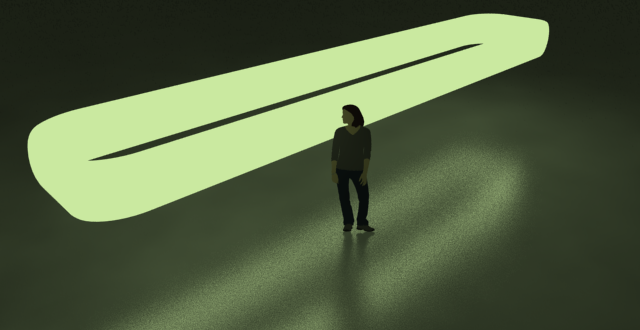
-
I should post more often to solve my own problems haha.. i just worked out it was the transparency setting of the BRDFLight layer. It was black and I changed it to a light grey.. seems to have made it look reasonable. Will play around with more settings to get it looking how I want..
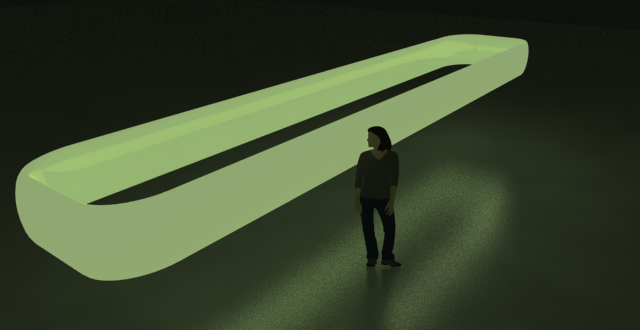
-
Also, if you have 1.49.01 you can move the reflection layer above your emmissive layer and you will get a light bulb effect. 1.05.30 cannot do this but I dont know why the heck anyone would still be using that version.
Hello! It looks like you're interested in this conversation, but you don't have an account yet.
Getting fed up of having to scroll through the same posts each visit? When you register for an account, you'll always come back to exactly where you were before, and choose to be notified of new replies (either via email, or push notification). You'll also be able to save bookmarks and upvote posts to show your appreciation to other community members.
With your input, this post could be even better 💗
Register Login


Advertisement