sketchucation logo sketchucation
    • Login
    Oops, your profile's looking a bit empty! To help us tailor your experience, please fill in key details like your SketchUp version, skill level, operating system, and more. Update and save your info on your profile page today!
    Mac User? | Join the Rayscaper Beta for Mac Learn More

    AutoCAD question,been using Sketch-up to long

    Scheduled Pinned Locked Moved Newbie Forum
    sketchup
    10 Posts 4 Posters 1.3k Views 4 Watching
    Loading More Posts
    • Oldest to Newest
    • Newest to Oldest
    • Most Votes
    Reply
    • Reply as topic
    Log in to reply
    This topic has been deleted. Only users with topic management privileges can see it.
    • HumpmetwiceH
      Humpmetwice
      last edited by

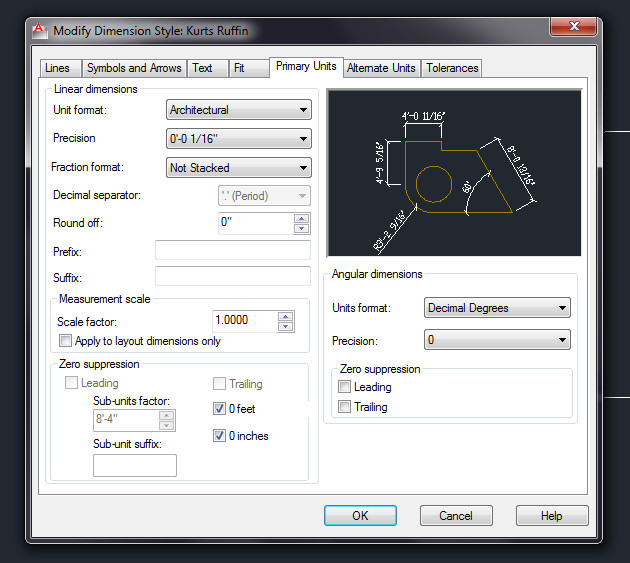
      Been using Sketch-up to long and have forgot some simple things in Auto-Cad.my auto-cad dimension only shows 20' instead of 20'-0" but works fine with 20'-1", I figured with all the cad people here I might could get a quick answer.

      Thanks Kurt

      1 Reply Last reply
      Reply Quote 0
      • TIGT
        TIG Moderator
        last edited by

        You can suppress leading and trailing zeros in the numeric portion of AutoCAD's dimension text.
        You can also specify the sub unit for the dimension distance.

        If you suppress leading zeros in decimal dimensions, 0.500 becomes .500.
        If you suppress trailing zeros, 0.500 becomes 0.5. You can suppress both leading and trailing zeros so that 0.5000 becomes .5 and 0.0000 becomes 0.

        For dimension distances less than one unit, you can set the dimension distance to display in sub-units.
        If the distance is shown in m, you can set to display distances less than one m in cm or mm.

        Below shows the effect of selecting each option and provides examples of the architectural units style.
        If feet are included with a fractional inch, the number of inches is indicated as zero,
        no matter which option you select.

        Thus, the dimension 4'-3/4" becomes 4'-0 3/4".

        Click Home tab > Annotation panel > Dimension Style.
        In the Dimension Style Manager, select the style you want to change.
        Click Modify.
        In the Modify Dimension Style dialog box, Primary Units tab or Alternate Units tab, under Zero Suppression, select from the following:
        Sub-units factor: Suppresses leading zeros in decimal values.
        Trailing. Suppresses trailing zeros in decimal values.
        0 Feet. Suppresses display of 0 feet in feet and inches values.
        0 Inches. Suppresses display of 0 inches in feet and inches values.
        Click OK.
        Click Close to exit the Dimension Style Manager.

        TIG

        1 Reply Last reply
        Reply Quote 0
        • KrisidiousK
          Krisidious
          last edited by

          Looks like Tig knows his autocad as well as he does his sketchup... Tig were you an Autolisper?

          By: Kristoff Rand
          Home DesignerUnique House Plans

          1 Reply Last reply
          Reply Quote 0
          • HumpmetwiceH
            Humpmetwice
            last edited by

            This is what I have Tig and its still not doing right but thanks!
            Maybe I still have something set up wrong?

            2012-04-19_140014.jpg

            1 Reply Last reply
            Reply Quote 0
            • TIGT
              TIG Moderator
              last edited by

              @krisidious said:

              Looks like Tig knows his autocad as well as he does his sketchup... Tig were you an Autolisper?
              I AM an AutoLisper if that's what ticks your box πŸ˜‰

              TIG

              1 Reply Last reply
              Reply Quote 0
              • TIGT
                TIG Moderator
                last edited by

                humpmetwice- try messing on with the settings until you get what you are after...

                TIG

                1 Reply Last reply
                Reply Quote 0
                • KrisidiousK
                  Krisidious
                  last edited by

                  and where might I find your Autolisp goodie box?

                  By: Kristoff Rand
                  Home DesignerUnique House Plans

                  1 Reply Last reply
                  Reply Quote 0
                  • TIGT
                    TIG Moderator
                    last edited by

                    @krisidious said:

                    and where might I find your Autolisp goodie box?
                    PM with requests... πŸ˜‰

                    TIG

                    1 Reply Last reply
                    Reply Quote 0
                    • andybotA
                      andybot
                      last edited by

                      @unknownuser said:

                      This is what I have Tig and its still not doing right but thanks!
                      Maybe I still have something set up wrong?

                      It's right there in your screen-grab - bottom left - uncheck the box for "0 inches"

                      http://charlottesvillearchitecturalrendering.com/

                      1 Reply Last reply
                      Reply Quote 0
                      • HumpmetwiceH
                        Humpmetwice
                        last edited by

                        @andybot said:

                        @unknownuser said:

                        This is what I have Tig and its still not doing right but thanks!
                        Maybe I still have something set up wrong?

                        It's right there in your screen-grab - bottom left - uncheck the box for "0 inches"

                        Thanks andybot, just didn't realize that was the problem!

                        1 Reply Last reply
                        Reply Quote 0

                        Hello! It looks like you're interested in this conversation, but you don't have an account yet.

                        Getting fed up of having to scroll through the same posts each visit? When you register for an account, you'll always come back to exactly where you were before, and choose to be notified of new replies (either via email, or push notification). You'll also be able to save bookmarks and upvote posts to show your appreciation to other community members.

                        With your input, this post could be even better πŸ’—

                        Register Login
                        • 1 / 1
                        • First post
                          Last post
                        Buy SketchPlus
                        Buy SUbD
                        Buy WrapR
                        Buy eBook
                        Buy Modelur
                        Buy Vertex Tools
                        Buy SketchCuisine
                        Buy FormFonts

                        Advertisement


