Push and pull problem
-
ive got this annoying problem with the push and pull say if i want to make a tunnel i draw a shape on the surface i use the push and pull tool and what happens is when i get to the end of the object instead of dissapering it remains there ive never come across this before can someone help me
-
If the two faces on opposite sides of the form are not parallel then the back face doesn't punch a hole, no matter how carefully you snap to the back.
Also if the back face is divided into facets - even with them all being parallel and the edges hidden or smoothed - then it won't punch either.
In these circumstances continue PushPulling the extrusion until it projects out of the back by some distance.
Then select the faces of the extrusion that are passing through the back face and right-click context-menu 'Intersect' so they are cut by the back face.
Now Erase the edges forming the part of the extrusion you don't want to keep, and finally erase the face[s] in the back face to expose the back-face end of the tunnel...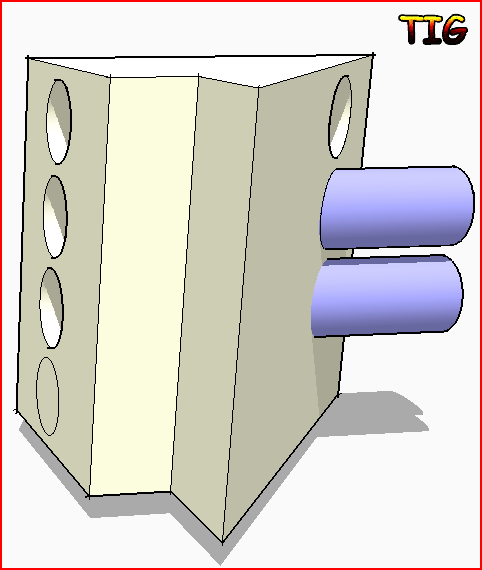
-
thanks for the help

Hello! It looks like you're interested in this conversation, but you don't have an account yet.
Getting fed up of having to scroll through the same posts each visit? When you register for an account, you'll always come back to exactly where you were before, and choose to be notified of new replies (either via email, or push notification). You'll also be able to save bookmarks and upvote posts to show your appreciation to other community members.
With your input, this post could be even better 💗
Register Login


Advertisement