Transparent edges
-
Hard to say... without details...
Is your geometry miles away from the 'origin'?
Do you have 'Xray' mode ON?
Do you have 'WireFrame' mode ON?
Have you 'Hidden' large parts of your model?
Do you have 'View' > 'Hidden Geometry' ON?
Does the wall's material have 'transparency'
What are your 'Style' settings [for back-edges should be OFF, etc] ?
etc etc...It might even bee a 'Graphics Card' issue - have you tried [temporarily] adjusting your 'OpenGL' settings under 'Window' > 'Preferences', to see what happens?
You can always post the SKP as an attachment if it's <4Mb [you can also zip it to compress it] - use Model Info > Statistics > Purg Unused... to keep the file size optimized...
-
I believe it's back edges...
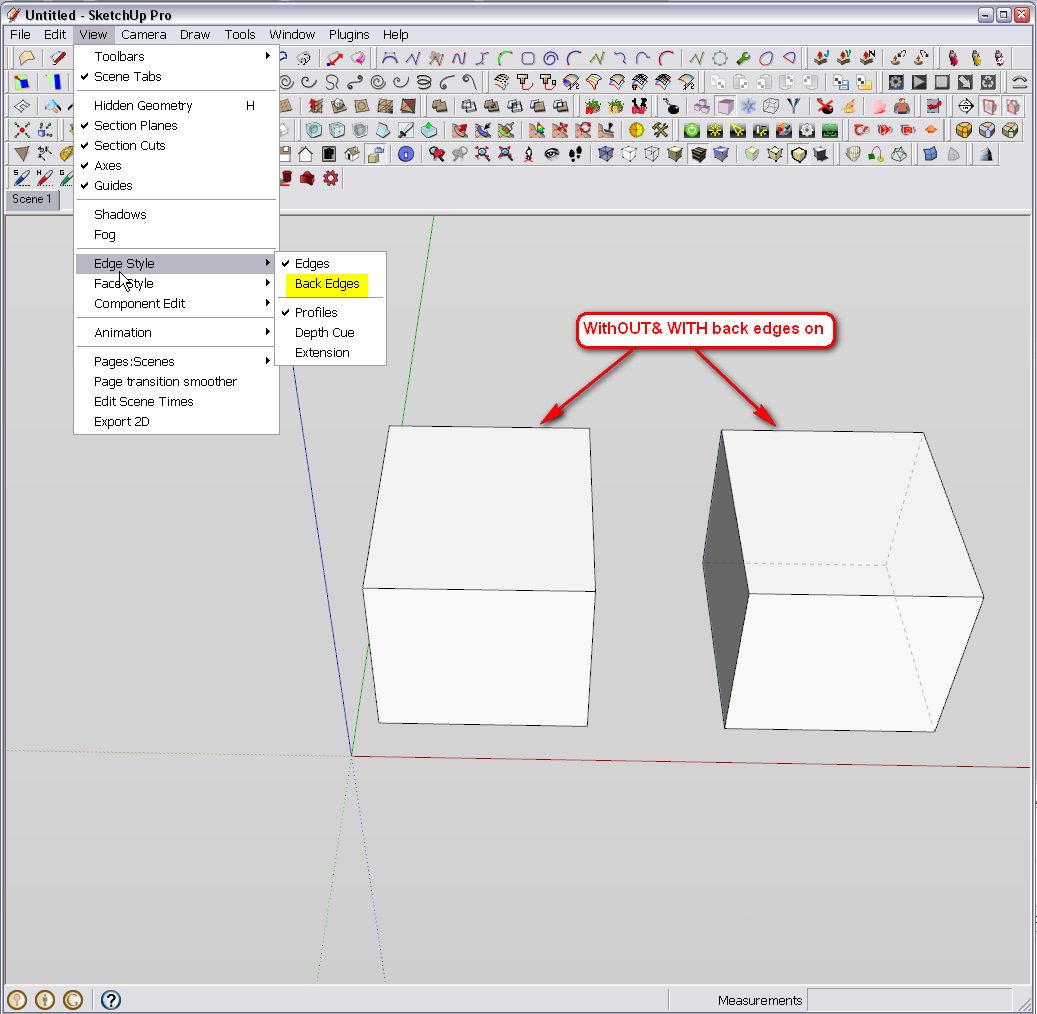
If it's always on, turn it off, update your current style and save an empty model as template under File... Use this template as your default (if you do not like this new feature).


Hello! It looks like you're interested in this conversation, but you don't have an account yet.
Getting fed up of having to scroll through the same posts each visit? When you register for an account, you'll always come back to exactly where you were before, and choose to be notified of new replies (either via email, or push notification). You'll also be able to save bookmarks and upvote posts to show your appreciation to other community members.
With your input, this post could be even better 💗
Register Login


Advertisement