Wall plugins: looking for one that works really well
-
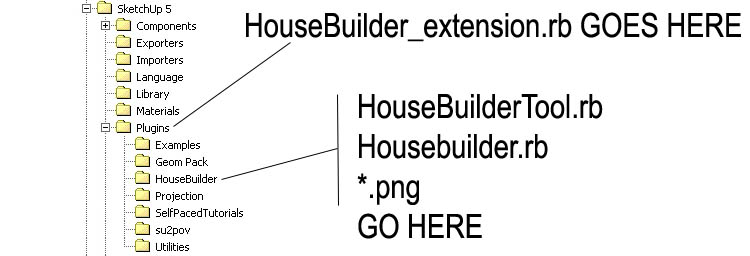
Not really sure I first started using HB on XP just now looking at folder it shows a jpg of a Win install
-
-
Hi Walt,
Sorry for late reply. I have no problem installing HB plugin on Win except for the beep.
I am using the metric modified by Didier Bur. Sometimes it makes some context menu grayed.
I can deal with it by restarting SU sometimes. -
@irwanwr said:
...Sometimes it makes some context menu grayed.
I can deal with it by restarting SU sometimes...This is the "gray-out-issue" caused by having too many commands loading [keep it <1000, i.e. one command for each potential menu/toolbar item].
Sketchup can't cope if you have too many commands loading, so it starts to 'throw away' earlier ones to make room [they go gray] !
Only have the plugin tools loading/activated that you really use.
If you rename a tool changing its file-type - e.g. 'xxx.rb' >>> 'xxx.rb!' - you can always load it manually for that session when it's needed - in the Ruby Console typeload 'xxx.rb!'- it will load manually, but not automatically like a .rb/.rbs file. If you find you do need it more often than not, then rename if back without the '!', so thereafter it auto-loads again.
It's very tempting to have too many tools loading - try to do some house-keeping and control your passions...
-
Actually I don't have much on the desktop or SU toolbar.
I found most of the plugins are too complex to have or to use.Another good reason is what people like Csaba, Alan, Jean or any other SCF seniors often say
something like "... try to make use and learn of those native tool. most of the time, those native tools are sufficient for any purpose... you need to learn the basic before advancing to more complex tool... "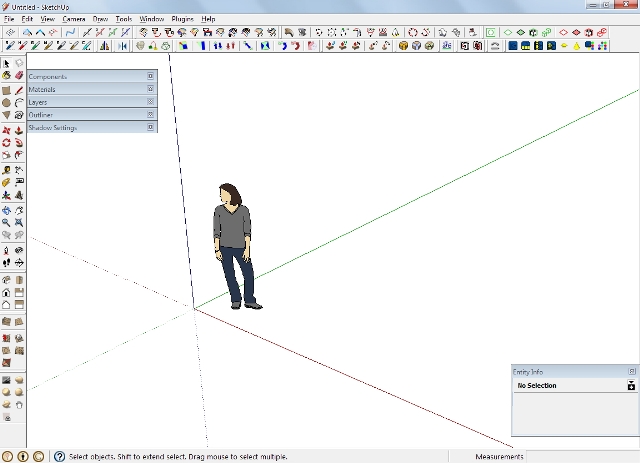
there are some other plugins not seen on the screen, as they are either disabled on toolbar view, not loaded from the start, or not even in the plugin directory either. 2D Tools, Tools on Surface, Teapot, Quad Face Tools, Building Structure Tools, Make Fur, Component Spray, Window Tools, Door Tools, and Bezier Tools. Roof.rb doesn't have toolbar. House Builder isn't in the Plugin directory atm. Toggle Units and TT CleanUp are always there but not seen on the screen. I don't use BTM Sculpt often, because I seldom create ground from a mesh.
-
It's not if the toolbars are visible - if the commands are loaded for some unseen toolbars or unused menu items, then that is sufficient to overload the system...
-
I see.
I've been thinking on how to use Additional Plugins by Fredo in the proper way.
But it wont work with certain plugins. So, some plugins aren't installed or placed in the Plugin's directory.
I have to install them anytime whenever I think they are necessary.
I like the way Bezier and Quad Face Tools can be disabled from the Preference menu. Just uncheck the box and it wont be loaded next time SU restarted.
Thank you for the help sir -
That won't affect what's loading.
It just allows you to have all/some plugins inside an extra folder elsewhere, which is added to the Sketchup Ruby$LOAD_PATH, therefore they auto-load from there too.
Any .rb/.rbs files that are found within the folders that are specified in the$LOAD_PATHarray are automatically loaded into Sketchup as it starts.
By default these are Plugins and Tools, they load in that order so a file that's in Plugins will load first and a file of the same name won't load again from Tools [that's why it's important not to install old copies of duplicate files in Plugins, because they will prevent the newer 'true' Tools version loading later]. Some tools loading from Plugins need functions provided by files that are in Tools, and these haven't yet loaded; such scripts have a line at the beginning saying things likerequire 'sketchup.rb', this finds 'sketchup.rb' in any of the folders listed in$LOAD_PATH, if it hasn't yet been loaded by an earlier 'require', if it is already loaded it's skipped over.The only way to stop a .rb/.rbs file from auto-loading if it is in one of these folders is to move it into another folder; OR alternatively [better], if you leave it where it is and rename it with a .rb**!/.rbs!** file-type suffix then it is not auto-loaded. The advantage of this approach is that if you find that you do want to use a tool you can load it manually for that session only by typing into the Ruby Console:
load "xxx.rb!"+<enter>. If you later find that you want it to always load, then rename it back as a .rb file etc...The files inside subfolders need not be changed at all, the 'loading' ruby file inside Plugins [for a more complex tools] is all that needs to be 'disabled', as it won't then run and load the other files in the subfolder anyway.
Note that if a script is an 'Extension' deactivating if from Preferences means that it won't make its commands after a restart [it only makes a 'marker' referring to it], until you reactivate it. Thus you can leave deactivated Extensions alone [i.e. no need to 'rename' them], just use the Preferences options for activating/deactivating them as needed within Sketchup...
-
Thank you sir
I'll see what I can do about that. Interesting on that renaming and recalling them back with Ruby Console.
Although, that might be a bit scary for me. Since I don't dare to do anything with the console before
-
just to update you on my search: I have been using the wall tool in Building Structure Tool by tak2hata for creating continuous walls. so far so good.

-
Hi Edson,
Yes I agree, tak2hata BST plugin is very useful for concrete building.
I've been using the same Wall tool quite a while. And it also adjustable on the thickness.
The RC Column probably need adjustment, but need to edit the profile to do that.House Builder still good for wooden structure I guess. I hope someone will take the initiative to improve either one. BST might have a good chance to improve, since tak2hata still around and quite active in the forum. Let's just hope so.



Hello! It looks like you're interested in this conversation, but you don't have an account yet.
Getting fed up of having to scroll through the same posts each visit? When you register for an account, you'll always come back to exactly where you were before, and choose to be notified of new replies (either via email, or push notification). You'll also be able to save bookmarks and upvote posts to show your appreciation to other community members.
With your input, this post could be even better 💗
Register Login


Advertisement