Deleting Section Plane
-
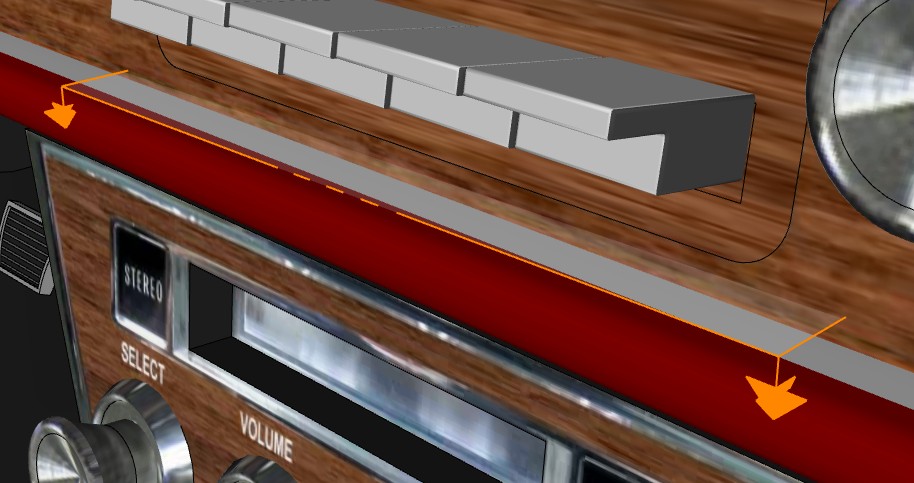
I haven't had that many occasions to use the Section Plane, but I was fiddling around with it tonight and although I didn't actually use it for anything (or so I thought) I later discovered that not only was it still there, but it had somehow deleted my radio. I can't get rid of the thing, and can't find any info on the web about how to get rid of it. Any help would be much appreciated.
-
From the picture, it seems to be inside a group/component. You should edit it to be able to select/delete the section plane.
-
Thanks, that got rid of the Section "Pain"
 . Unfortunately my radio is still gone
  , but that's not a problem, I'll just copy and paste it from a previous version (I like my music). Funny thing is, when I was messing around with the thing I was nowhere near the radio. Guess I should spend some time working with the thing on a simple model until I'm comfortable with using it.
Thanks again.
-
I am having a similar issue. I am very sketchup savvy but this is driving me crazy. I am dealing with a very complex model and have taken a single section cut. I hid the section plane to export a clear image as to not have the gray haze over everything. I saved the file with the section plane hidden. When I open it back up I am unable to unhide the section plane. I have tried everything tha I can think of to get it to show up so I can delete it, but I'm still stuck. Anybody have any suggestions?
Thanks
-
Sounds like the same problem, did you create the section inside a group? If so you need to be in that group before the unhide will work.
-
@unknownuser said:
........I hid the section plane to export a clear image as to not have the gray haze over everything. I saved the file with the section plane hidden. When I open it back up I am unable to unhide the section plane......
Whenever you get in a situation that you can't find something in your model, then turn ON:
- all geometry (SU's menu View > check 'Hidden Geometry')
- all layers (SU's menu Window > Layers > check all layers)
- all section planes (SU's menu View > check 'Section Planes')
Now your entire model should is visible (guides not yet included!)
As you can see, section planescan be hidden + on an invisible layer+ turned OFF.
This may make them hard to find.To also display guides and guide points, see View > check 'Guides'.




Hello! It looks like you're interested in this conversation, but you don't have an account yet.
Getting fed up of having to scroll through the same posts each visit? When you register for an account, you'll always come back to exactly where you were before, and choose to be notified of new replies (either via email, or push notification). You'll also be able to save bookmarks and upvote posts to show your appreciation to other community members.
With your input, this post could be even better 💗
Register Login


Advertisement