[idea plugin] push + group + move
-
Idea for a plugin:
I find it interesting to create stairs, tables, etc ... using as a base drawing in 2D.
operating01 - run the plugin> set starting height and thickness.
02 - to click on a face> create a group with the thickness and height set will.
03 - Pressing the Ctrl key, and I click on other side> creates a group with the thickness and heightx2 set will.something like this plugin
http://hinoado.com/index.cgi?id=4&eid=136is it possible? interesting?
-
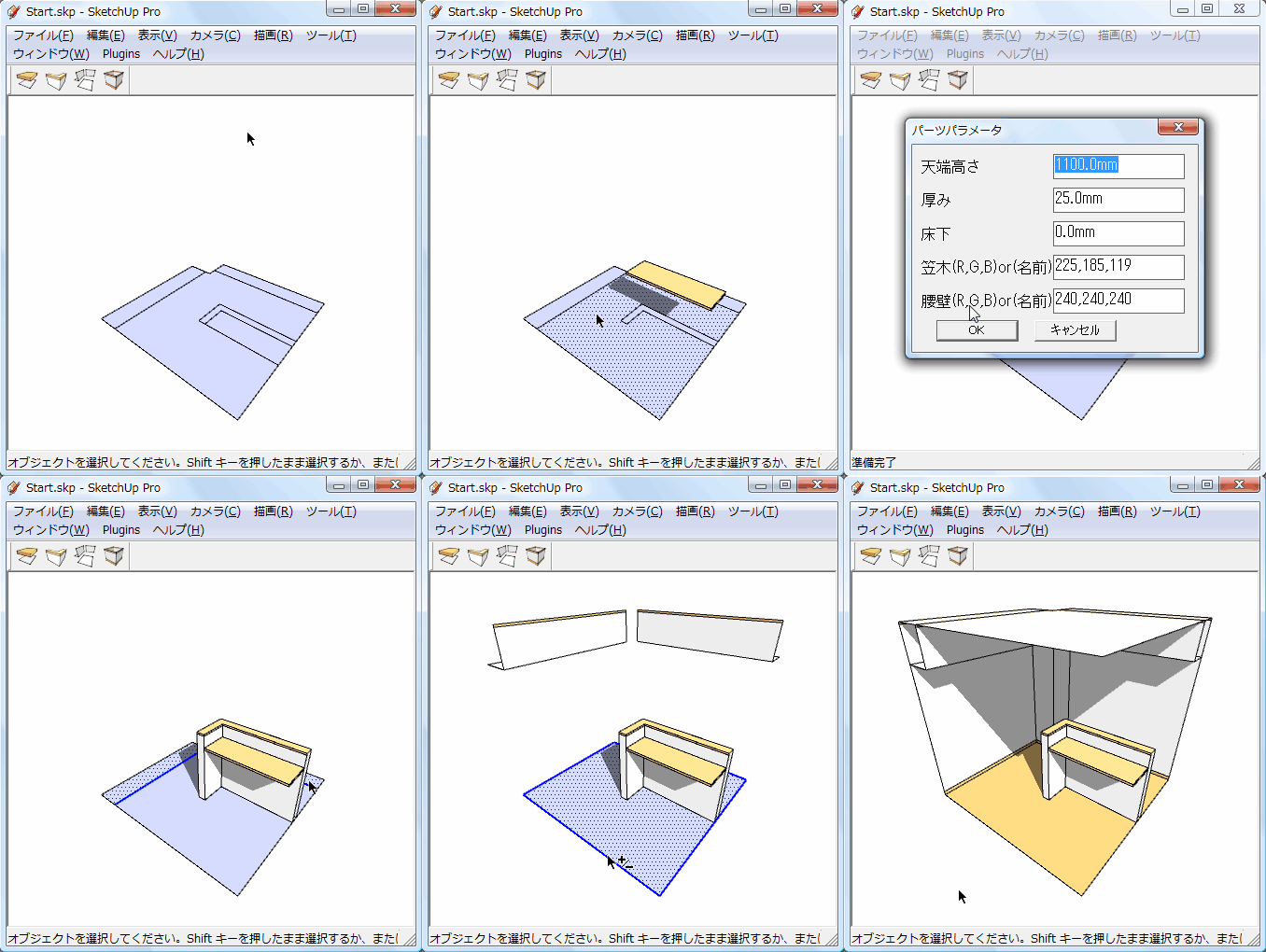
Trying to understand what the plugin in the link does. It looks to give four ways to handle 2D CAD lines depending on what they represent. Does that sound right. I can't read chinese, so I'm just guess based on this .gif in the link you gave. Are you trying to get a plugin that does the same thing or something a little different? Can you provide an image describing what you are asking for? Might be easier to get it accomplished if the masters here have something more to go on.
-
Actually it's in Japanese...


But these tools already seem to do what you want... so why not use them ?
The scripts are editable and the meaning of the Japanese words is pretty clear from their variable names and use in the dialogs - so making an English version is not so hard [or ask the author if there's an English version ??]... I see that the scripts do use an awful lot of $ global variables... which are never recommended - it's a clash waiting to happen - and these would be best recast as @ or @@ variables with their classes... -
Thank for responding
The Japanese plugin is interesting, but it generates that sketchup is closed sometimes.My idea is a similar plugin, but:
first> set starting parameters of push-pull and move
second> click on the face ( this creates push-pull and move x1)
third> to click on another face + key Ctrl(this creates push-pull and move x2)
quarter> click on another face + key Ctrl(this creates push-pull and move x3)
fifth> click on another face + key Ctrl(this creates push-pull and move x4)
..... etcThis idea seems good to create stairs using the basis of a 2D drawing (eg imported from autocad)
understand my idea?
-
Yes.
So why don't you just write it [and launch it] as aTool[class] so that the dialog only appears the first time the tool in activated, then after the OK the@statechanges... with that new@stateeach picked point finds a face to process and uses the dialog's values, repeating until another tool is activated...
The processing is quite simple too. Use apick_helperto get the face below the clicked point. Clone the face into the entities of a newgroup=model.active_entities.add_group()[you could limit a 'valid face' to be one within theactive_entities, or alternatively transform it's info to suit, if it's inside a group/instance]. The cloning should copy all inner_loopsand theface.outer_loop, and remove holes ensure the sameface.normaldirection andface.material,face.back_material,face.layeretc etc... Then make a new transformationtr=Geom::Transformation.translation([0,0,dialogZ])[here I assume you only want to move the face 'up' by a give Z]. Then use it to transform the face to where its wanted withgroup.entities.transform_entities(tr,face.vertices)and thenface.pushpull(dialogThickness)... Repeat -
Mr. Tig. Thank you very much for the explanation.
Unfortunately I do not understand programming. : (It's asking a lot, you program this plugin?
Thank you very much for your time


Hello! It looks like you're interested in this conversation, but you don't have an account yet.
Getting fed up of having to scroll through the same posts each visit? When you register for an account, you'll always come back to exactly where you were before, and choose to be notified of new replies (either via email, or push notification). You'll also be able to save bookmarks and upvote posts to show your appreciation to other community members.
With your input, this post could be even better 💗
Register Login


Advertisement