How do I change the size of a texture in Kerky?
-
I use VRay at work and I can't afford VRay at home yet so Kerky is my next stop.
However I can't seem to find how to change the size of a texture in Kerky and a search of the forum hasn't revealed anything.
Please help a complete idiot (coz i'm sure its something very simple)
-

Well, I knew it would be too simple!!
Thanks
-
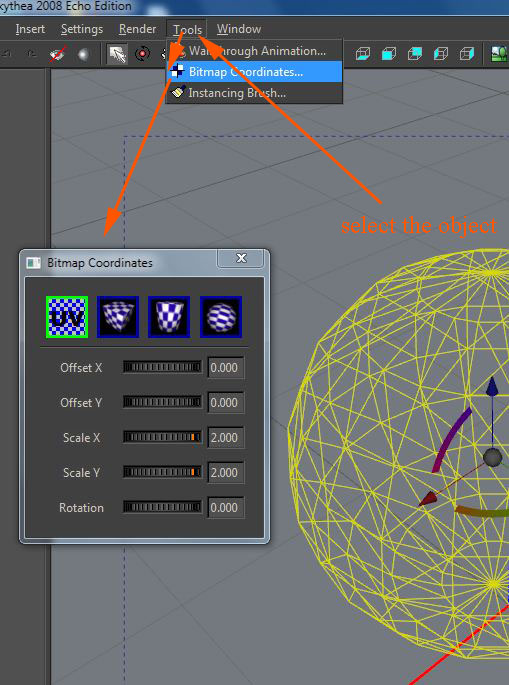
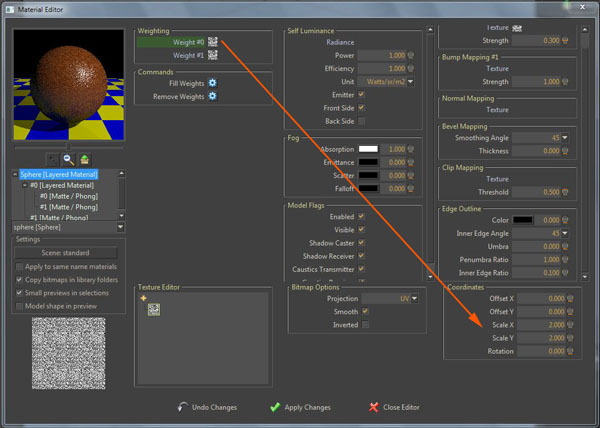
In the first way you can change all the maps applied to an object at once (diffuse, bump etc) while in the second you can change them one by one.
Remember that the number you see shows the times the texture is repeated on a surface, so higher the number smaller the texture.


Hello! It looks like you're interested in this conversation, but you don't have an account yet.
Getting fed up of having to scroll through the same posts each visit? When you register for an account, you'll always come back to exactly where you were before, and choose to be notified of new replies (either via email, or push notification). You'll also be able to save bookmarks and upvote posts to show your appreciation to other community members.
With your input, this post could be even better 💗
Register Login


Advertisement