Searching for a plugin better than "Follow Me"
-
Hey guys, I'm working on a freeform structure made of wooden glulam beams.
I made a geometric structure (IMG01), and I need to get the profile on the structure, but Follow Me is not really helpful for me - it does a lot of mess and connections are "ugly" and it took me a lot of time to follow all the paths in th structure...
I found some plugins (lines2tubes...) but they don't help me, since they work only with circular profile, and I need rectangular profile (120/500).
I would appreciate a plugin, which could "extrude" a selected profil onto the whole structure in few links.
TY for any help, as I'm in hurry.


-
Find my 'Extrusion Tools' zipped set, and use ExtrudeEdgesbyFace... you draw the face 'profile' flat on the ground and select the face with an optional cpoint to fix its 'origin' and the 'lattice' of edges and it extrudes the face along each line as desired, with the face's Y/green axis == 'up'.....
-
I think profile builder would make all selected lines into the rectangular shapes you seek.
-
@tig said:
Find my 'Extrusion Tools' zipped set, and use ExtrudeEdgesbyFace... you draw the face 'profile' flat on the ground and select the face with an optional cpoint to fix its 'origin' and the 'lattice' of edges and it extrudes the face along each line as desired, with the face's Y/green axis == 'up'.....
What is an "cpoint" please? I selected the face and three continual edges and nothing happend, only the trogress bar states "Making extrusion". If I select some discontinouos edges, there comes a question to continue and after clicking yes nothing happens as well. What's the problem, please?
And here's the ruby console error I get:
Error; #<TypeError; wrong argument type (expected Sketchup;;Entity)> C;/PROGRA~2/Google/GOOGLE~1/Plugins/extrudeEdgesByFace.rb;176;in `add_group' C;/PROGRA~2/Google/GOOGLE~1/Plugins/extrudeEdgesByFace.rb;176;in `copy_edges_and_face' C;/PROGRA~2/Google/GOOGLE~1/Plugins/extrudeEdgesByFace.rb;144;in `activate' C;/PROGRA~2/Google/GOOGLE~1/Plugins/extrudeEdgesByFace.rb;484;in `select_tool' C;/PROGRA~2/Google/GOOGLE~1/Plugins/extrudeEdgesByFace.rb;484;in `extrudeEdgesByFace' C;/PROGRA~2/Google/GOOGLE~1/Plugins/extrudeEdgesByFace.rb;477;in `each' C;/PROGRA~2/Google/GOOGLE~1/Plugins/extrudeEdgesByFace.rb;477;in `extrudeEdgesByFace' C;/PROGRA~2/Google/GOOGLE~1/Plugins/extrudeEdgesByFace.rb;511 -
A 'cpoint' is a 'guide-point' [originally called Construction-POINTs].
Are you drawing a flat face and selecting some 3D lines ?
EEbyFace should work...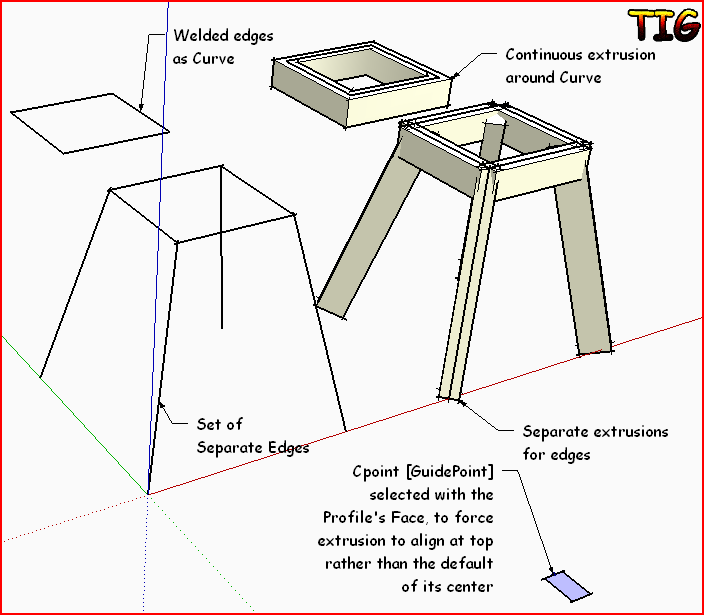
-
Does it work for SU8? I downloaded SU7.1 and did the same and it worked. Or maybe there was some crash with other plugins?
Thank you, TIG!
-
I did that example in v8... there should b no issues or clashes that I know of... did you install all of the files/subfolders, are there any error messages in the Ruby Console if you try EEbyF in v8 ??
-
Alternatives for the Cpoint insertion: Didier Bur's Projections Tool? ThomThom's Guide Tools?



Hello! It looks like you're interested in this conversation, but you don't have an account yet.
Getting fed up of having to scroll through the same posts each visit? When you register for an account, you'll always come back to exactly where you were before, and choose to be notified of new replies (either via email, or push notification). You'll also be able to save bookmarks and upvote posts to show your appreciation to other community members.
With your input, this post could be even better 💗
Register Login


Advertisement