Soften edges
-
does this just hide the line? I'm drawing a door handle and want to remove the sharpness from the edges.
-
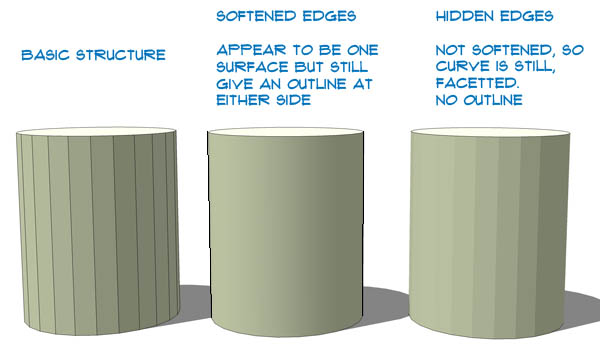
Soften and hide are different.
-
Soften appears to "subvert" the edge so that when View Hidden Geometry is unchecked, the adjacent faces are "seen" as one surface, so that a single texture can be applied to the "single" surface. It appears as a single surface on selection and the highlight spans the softened edge. This is just my observation/interpretation related to your question.
-
The difference between the two is probably best explained on a simple cylinder.



Hello! It looks like you're interested in this conversation, but you don't have an account yet.
Getting fed up of having to scroll through the same posts each visit? When you register for an account, you'll always come back to exactly where you were before, and choose to be notified of new replies (either via email, or push notification). You'll also be able to save bookmarks and upvote posts to show your appreciation to other community members.
With your input, this post could be even better 💗
Register Login


Advertisement