Showing thicknesses in scale
-
If you had to show two 1/4" plates that a separated by a 1/8" gap, in scale, how would you do it? A simple task but I am only getting 1 pixel outlines.
-
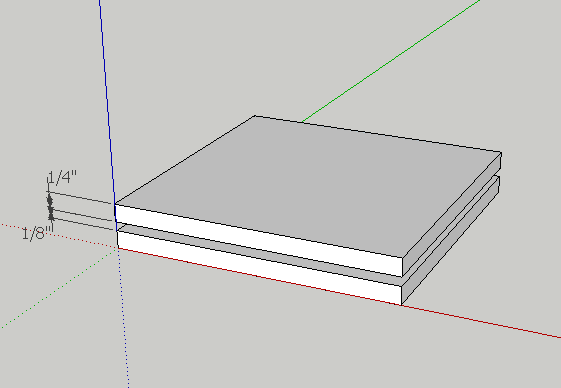
While there are probably better way to do so, create the first plate by push/pull. Use the "tape measure tool" to draw a line 1/8" abobe the first plate, then draw another plate above it.
-
Can we get an image? I'm not really clear about what you're asking.
-
zoom in

-
Thanks. That helps me explain the problem. I need a cross-section.
-
Using HD's image, just choose a standard view. Front view would work in his example.
-
It's too small to tell what's going on. Any chance you could post the SKP?
It looks like clipping but I can't tell for sure. What else do you have in the model space?
-
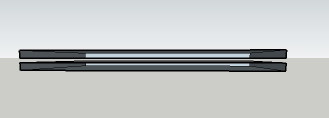
If I view a cross-section of the above, I get this. I need to show the two plates as solids.
-
Nope, no clipping. Just a simple problem: I need to show the solids in cross section as solids.
-
I figured it out! In this SU world of 1 pixel virtual surfaces, I realized the obvious solution. Color the inside of the solid!
-
Yes. You can do that, too. It's still not a "solid" but the viewer won't be able to tell. And what if you want to make it look like the edge of a piece of plywood or some material with texture?
-
I need only to show that this is solid material, so it could be painted with any color or texture just to indicate.
-
Alright, it's not clipping. It's because you have used a section plane. And as you must know, SketchUp doesn't create solids. It creates hollow structures. You have two options. Either get rid of the section plane and show the outside edges of the plates. The other option would be to use TIG's plugin to create a face on the section plane.




Hello! It looks like you're interested in this conversation, but you don't have an account yet.
Getting fed up of having to scroll through the same posts each visit? When you register for an account, you'll always come back to exactly where you were before, and choose to be notified of new replies (either via email, or push notification). You'll also be able to save bookmarks and upvote posts to show your appreciation to other community members.
With your input, this post could be even better 💗
Register Login


Advertisement