Customizing my toolbar
-
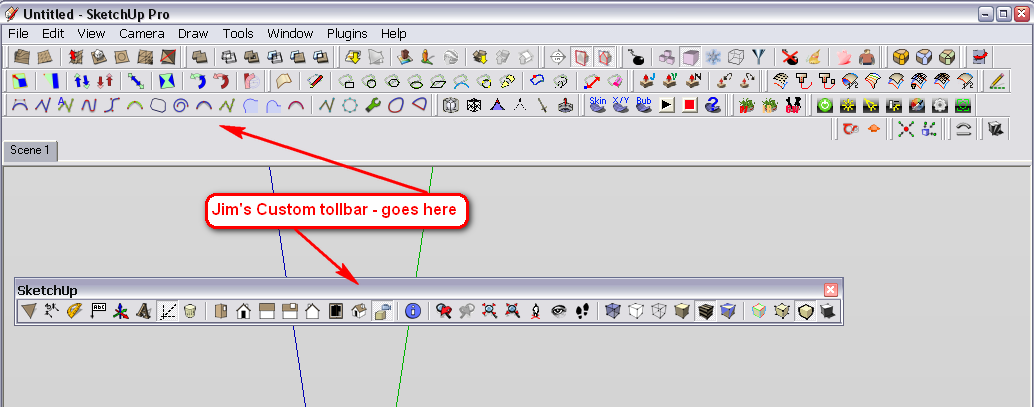
Trying to get my SU desktop just right, and am having a problem with my toolbars. I've got them running across the top ok, but is there any way to get rid of some individual tools that I don't want there, such as zoom, pan, orbit, etc, all the ones I use keyboard shortcuts for, and add the ones I do want there, such as scale, etc.? Can you pick and choose which tools you want in your toolbar?
-
You can use Jim's Custom Toolbar plugin: http://sketchuptips.blogspot.com/2008/06/custom-toolbars-release-08-06-01.html
-
Thanks
-
I also use it. Saves a lot of real estate in my toolbar area. What it does not (currently) contain from the native SU tools (at least that I would use) are:
- Google toolbar
- Sandbox tools
- Section toolbar
- Solid tools (this is later than the plugin itself anyway)
It does contain a bunch of tools that otherwise would not have buttons like toggle hidden geometry, profiles, endpoints, edges by colour, perspective/parallel view etc. I rarely use these to remember a shortcut but often enough to have them at hand and no need to dig into the menus.



Hello! It looks like you're interested in this conversation, but you don't have an account yet.
Getting fed up of having to scroll through the same posts each visit? When you register for an account, you'll always come back to exactly where you were before, and choose to be notified of new replies (either via email, or push notification). You'll also be able to save bookmarks and upvote posts to show your appreciation to other community members.
With your input, this post could be even better 💗
Register Login


Advertisement