Help with Slicer 3
-
Hi, I'm new to this forum. I've been using Sketch UP 7.0 since May of this year, and right now I'm trying SU 8.
I was following this tut
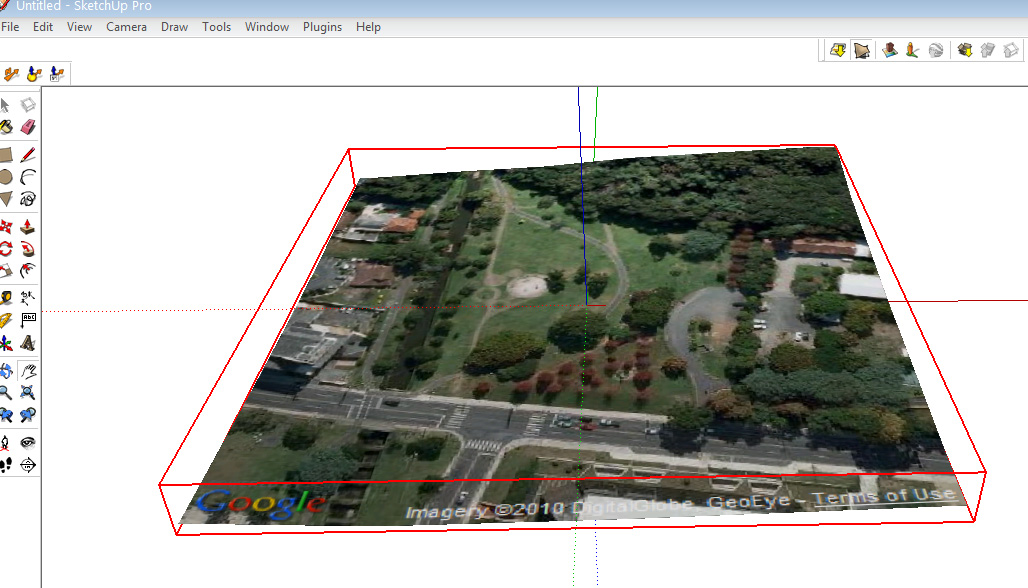
Yet I'm stuck, I can't make it work. I load a map, make it curve (toggle terrain), make a box and place it in the map, click 3 times on it, selecting the box and then I click Intersect Faces > With Model. After that apparently nothing happens, the box is cut, but not like in the tutorial. I explode the group of the box and select the faces and delete them, yet it doesn't work as it should. I then try using slicer 3 but it says that its not a solid object. Does anyone as any idea of what I'm doing wrong. Below some pictures:
Anyway, thanks in advance
-
You are missing the second step in the Tutorial...
Get the mesh face THEN make it a Solid - to do this draw some vertical lines down from the four corners and then some horizontals the form a faced solid object. Move the flat bottom face up so the minimum height corner is quite small otherwise you'll get lots of rectangular slices at the base! A flat-ish cuboid with a 'wavy top' if you will...
NOW group it all and use the Slicer tool on that group.
It should now 'slice' OK...
Slicer won't make slices of a single surface mesh because there is literally nothing to slice!
There is Slicer's stablemate 'ContourMaker' that will make contours lines through the mesh... but these aren't 'slices'

Hello! It looks like you're interested in this conversation, but you don't have an account yet.
Getting fed up of having to scroll through the same posts each visit? When you register for an account, you'll always come back to exactly where you were before, and choose to be notified of new replies (either via email, or push notification). You'll also be able to save bookmarks and upvote posts to show your appreciation to other community members.
With your input, this post could be even better 💗
Register Login


Advertisement