sketchucation logo sketchucation
    • Login
    Oops, your profile's looking a bit empty! To help us tailor your experience, please fill in key details like your SketchUp version, skill level, operating system, and more. Update and save your info on your profile page today!
    ⚠️ Update | Sketchucation Tools 5.0.8 released with licensing improvements and bugfixes Download

    Is There A Way To Do This?

    Scheduled Pinned Locked Moved Newbie Forum
    sketchup
    13 Posts 7 Posters 959 Views 7 Watching
    Loading More Posts
    • Oldest to Newest
    • Newest to Oldest
    • Most Votes
    Reply
    • Reply as topic
    Log in to reply
    This topic has been deleted. Only users with topic management privileges can see it.
    • soloS
      solo
      last edited by

      If you are rendering then no problem, use bump and displacement.

      If you want the model to look like that then I'm afraid SU is gonna die as the poly's alone will cripple SU.

      I'd suggest z-brush or 3D Coat.

      http://www.solos-art.com

      If you see a toilet in your dreams do not use it.

      1 Reply Last reply
      Reply Quote 0
      • J
        Jim
        last edited by

        Assuming you don't mean to create that rough texture, you could use SketchyFFD to deform a sphere.

        404 Not Found

        favicon

        (forums.sketchucation.com)

        Hi

        1 Reply Last reply
        Reply Quote 0
        • S
          SketchUpNoobie
          last edited by

          Yeah, I didn't need the texture so much as just the general shape. I didn't make that clear in my post. Sorry Solo. Thanks Jim. I'll try this plugin out. 😄

          --

          SketchUpNoobie: the complete noob in all things SketchUp.

          1 Reply Last reply
          Reply Quote 0
          • mitcorbM
            mitcorb
            last edited by

            I understand you to mean you wish to deform a sphere.
            Window>Components>scroll and select SimpleSphere02 for instance. This is a UV type sphere with latitude and longitude lines.
            Place it in the model space.
            Right click edit component.
            Select any part, move, pushpull or whatever.
            Alternatively, use Scale, or Fredoscale on preselected loops perhaps.
            You can finagle the selection box by tilting(twisting) the camera with Ctrl+Orbit to select loops very accurately.
            Once selected, you can move the geometry selectively and sequentially along the red green or blue axes. If it refuses to budge, hit Alt key+ move.

            I take the slow, deliberate approach in my aimless wandering.

            1 Reply Last reply
            Reply Quote 0
            • shuraS
              shura
              last edited by

              To model the roughness you could use Randomize TIN plugin or just Random Select plugin and scale holding contol key...

              1 Reply Last reply
              Reply Quote 0
              • S
                SketchUpNoobie
                last edited by

                I can't seem to find the Random Select plugin. And I don't have Pro so the first plugin is not an option.

                --

                SketchUpNoobie: the complete noob in all things SketchUp.

                1 Reply Last reply
                Reply Quote 0
                • shuraS
                  shura
                  last edited by

                  Random select by TIG is here:

                  http://rhin.crai.archi.fr/RubyLibraryDepot/plugin_details.php?id=322

                  1 Reply Last reply
                  Reply Quote 0
                  • soloS
                    solo
                    last edited by

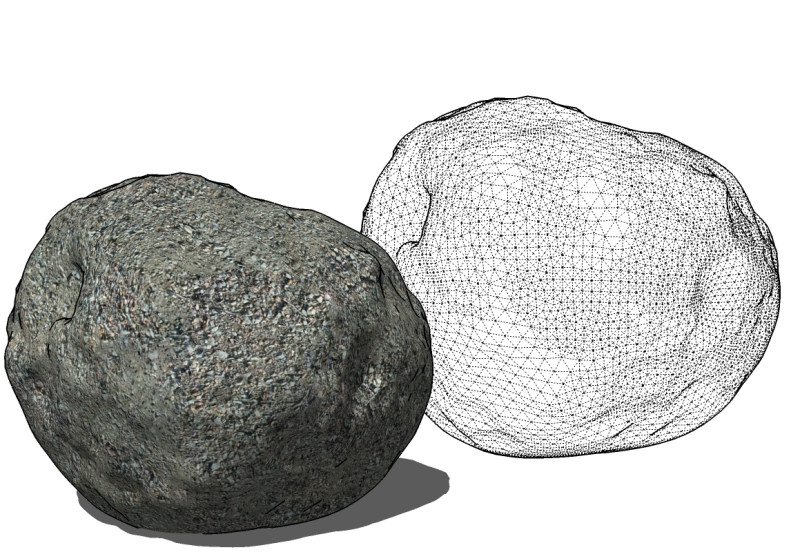
                    Ah, I thought you wanted this:

                    made with a cool new plugin not available yet


                    SU stone.jpg


                    stone thing.zip

                    http://www.solos-art.com

                    If you see a toilet in your dreams do not use it.

                    1 Reply Last reply
                    Reply Quote 0
                    • D
                      d12dozr
                      last edited by

                      Nice!

                      When will the cool new plugin be available??

                      3D Printing with SketchUp Book
                      http://goo.gl/f7ooYh

                      1 Reply Last reply
                      Reply Quote 0
                      • soloS
                        solo
                        last edited by

                        Dunno as it's still in alpha.

                        http://www.solos-art.com

                        If you see a toilet in your dreams do not use it.

                        1 Reply Last reply
                        Reply Quote 0
                        • Rich O BrienR
                          Rich O Brien Moderator
                          last edited by

                          Where's my glasses?

                          Download the free D'oh Book for SketchUp 📖

                          1 Reply Last reply
                          Reply Quote 0
                          • S
                            SketchUpNoobie
                            last edited by

                            What is it called? What does it do? Who wrote it? How'd you get it? Does it work nicely? 😮

                            I want it. 😄

                            --

                            SketchUpNoobie: the complete noob in all things SketchUp.

                            1 Reply Last reply
                            Reply Quote 0

                            Hello! It looks like you're interested in this conversation, but you don't have an account yet.

                            Getting fed up of having to scroll through the same posts each visit? When you register for an account, you'll always come back to exactly where you were before, and choose to be notified of new replies (either via email, or push notification). You'll also be able to save bookmarks and upvote posts to show your appreciation to other community members.

                            With your input, this post could be even better 💗

                            Register Login
                            • 1 / 1
                            • First post
                              Last post
                            Buy SketchPlus
                            Buy SUbD
                            Buy WrapR
                            Buy eBook
                            Buy Modelur
                            Buy Vertex Tools
                            Buy SketchCuisine
                            Buy FormFonts

                            Advertisement