[Plugin] Group PushPull 2DFaces (v0.4) Oct 20, 2010
-
This was a request for a plugin to automatically divide up a solid into individual solids. The use would be importing out game levels. I guess the game engine can't deal with holes, like a wall with a window opening. What this plugin does is not divide up a solid, but works on 2D divided faces and pushpulls them into individual grouped solids. The thickness value needs to be manually changed in the beginning of the ruby. Default is 0.25
Original request thread is here: http://forums.sketchucation.com/viewtopic.php?f=323&t=31112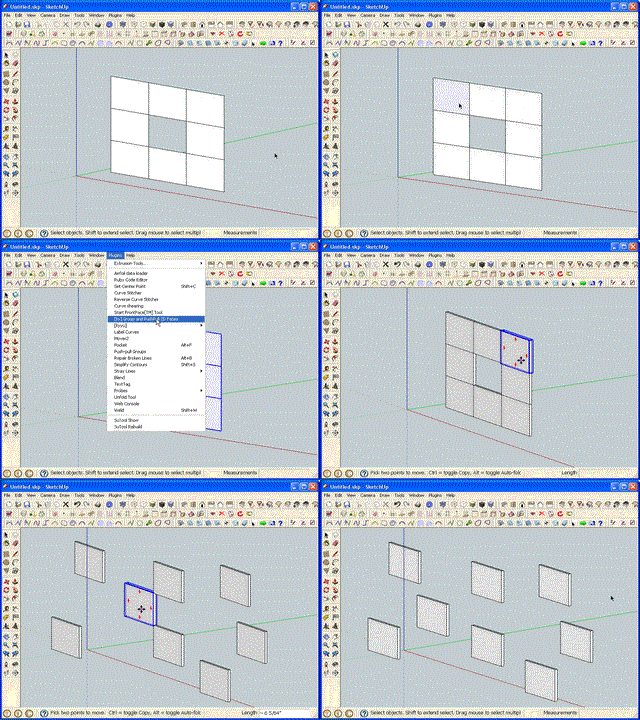

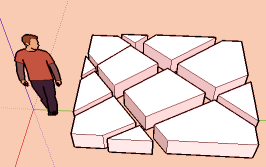
[Original Version 0.1][Version 0.2]
I added an input box. Click ok to accept the default pushpull depth or enter new value. You can manual change two things in the code:
-change the value "thickness_default", to set the default thickness
-change to "use_input_box = false", if you don't want a input box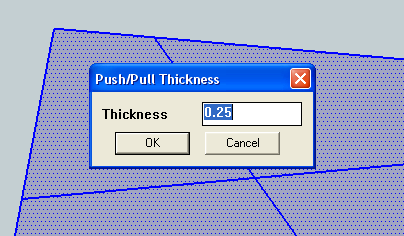
[version 0.3b]
The plugin now has the option of making components instead of groups. A component option has been added to the input box. Like the other values, you can change the default in the code. Just read the comments at the beginning of the code, for instructions.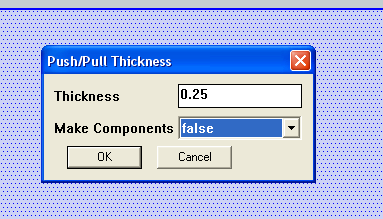
Version 0.3b - added component option
[New version 0.4]
Now, saves changed input box values, for the entire sketchup session. -
thanks, very handy tool.
Be possible to add the option pushpull thickness, using VCV?
-Operation
-Select faces
Tool-run
-PushPull thickness
I press ENTER, or double-click
Some suggestions:
Entered value last remember?
if the value is 0, not does generate pushpull. Generates only groups of faces?
You can enter negative values?
pushpull possibility of center on the selected face? -
Radial move is here
 by CPlassais & Pilou
 -
Making them into components instead of groups would be a better option. This would allow you to run ThomThom's "Replace Similar" script and have them replaced where applicable.
-
@earthmover said:
Making them into components instead of groups would be a better option. This would allow you to run ThomThom's "Replace Similar" script and have them replaced where applicable.
+1 on that.
-
-
I don't normally use components, so don't even know how to code for it. If anyone wants to, feel free to modify this plugin for components. And I will post it above, as an alternative.
This was just a quick writeup, that I never intended to improve on. But what I plan to do is incorporate this plugin into my PushPull & Group Plugin, which already has most of the features requested by DIEGO-RODRIGUEZ. I did try my PushPull & Group Plugin, originally, but it could not handle faces that touched (adjacent). You guys can check out this video, of the current incarnation of the PushPull & Group Plugin: http://www.youtube.com/watch?v=lQgeMuFdpKU
-Kwok
-
@earthmover said:
Making them into components instead of groups would be a better option. This would allow you to run ThomThom's "Replace Similar" script and have them replaced where applicable.
0.2.0 supports groups.
-
-
At the moment, yes ... I think. But Selection Toys can convert them into components.
-
This is good for old game engines due to the fact they only work with groups and basic solids, That way I can create my walls with doors and windows in a flash
 !
! -
Updated to v0.2. Input box added.
-
Updated to v0.3. You now have the option to make components.
-
thank you very much
-
Your welcome, DIEGO-RODRIGUEZ.
Everyone, I found a bug and have released a quick update. (from v0.3 to v0.3b ) Please, get the new version. The bug I fixed only has effect, if you chose the option not to use the input box.
-Kwok
-
thanks.
you can add the option to remember the last setting used? -
@diego-rodriguez said:
thanks.
you can add the option to remember the last setting used?Done, new version 0.4 posted.
-
thank you very much
-
Nice addition,Thanks for sharing. it will be good as mention to
have component option. -
Hello I was wondering how could I put this in my right click menu? that way its easier to get to Thanks! I was also wondering if you could add more saved options that way I can have 2 measurements instead of going back and forth having to change it all the time





Hello! It looks like you're interested in this conversation, but you don't have an account yet.
Getting fed up of having to scroll through the same posts each visit? When you register for an account, you'll always come back to exactly where you were before, and choose to be notified of new replies (either via email, or push notification). You'll also be able to save bookmarks and upvote posts to show your appreciation to other community members.
With your input, this post could be even better 💗
Register Login


Advertisement