sketchucation logo sketchucation
    • Login
    Oops, your profile's looking a bit empty! To help us tailor your experience, please fill in key details like your SketchUp version, skill level, operating system, and more. Update and save your info on your profile page today!
    ⚠️ Important | Libfredo 15.6a introduces important bugfixes for Fredo's Extensions Update

    How to Extrude?

    Scheduled Pinned Locked Moved SketchUp Discussions
    sketchup
    6 Posts 4 Posters 331 Views 4 Watching
    Loading More Posts
    • Oldest to Newest
    • Newest to Oldest
    • Most Votes
    Reply
    • Reply as topic
    Log in to reply
    This topic has been deleted. Only users with topic management privileges can see it.
    • J Offline
      Jim57
      last edited by

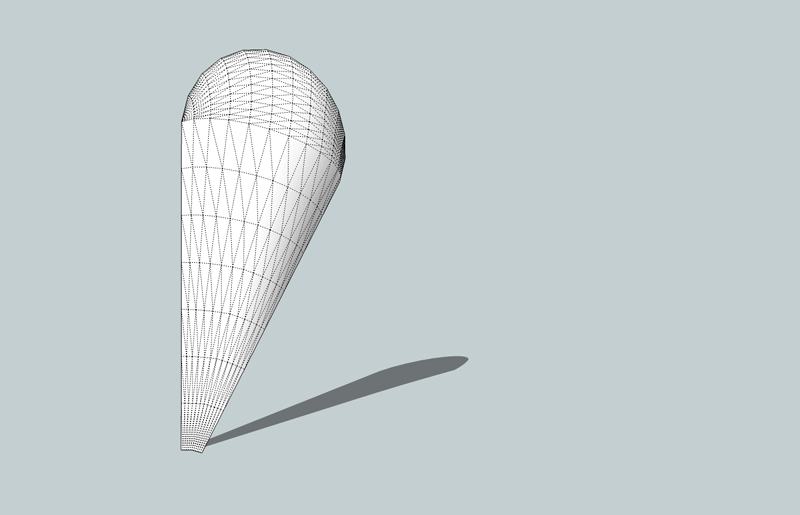
      I'm trying to model a carving to show a CNC operator. I've outlined it and made a profile that I'd like to extrude over the outline. Problem is, I can only extrude the round end. No matter which Extrusion Tool I use, I can't select the straight sides.

      I'm suspecting Extrusion Tools were not made to work a straight side. Can anyone give me a hint about how to form this?

      Thanks,

      Jim


      Petal.skp

      1 Reply Last reply Reply Quote 0
      • jeff hammondJ Offline
        jeff hammond
        last edited by

        those lines need to be curves/polylines..

        right click a line then divide it into say 6 or seven parts then weld the segments together..
        you'll now be able to use it with extrude edges..
        Petal.jpg

        dotdotdot

        1 Reply Last reply Reply Quote 0
        • J Offline
          Jim57
          last edited by

          Cool.

          Thanks, Jeff.

          Jim

          1 Reply Last reply Reply Quote 0
          • Dave RD Offline
            Dave R
            last edited by

            It's probably too late now but I made a similar shape using Chris Fullmer's Simple Loft which didn't require dividing the straight lines. I only created half the shape as a component and then copied and flipped the copy to keep the file size smaller. I was making 12 copies of the shape, though.

            http://farm5.static.flickr.com/4077/4765155705_67ff3aa172_z.jpg

            I did a tutorial showing how I made this which I can link to if anyone wants to see it.

            Etaoin Shrdlu

            %

            (THERE'S NO PLACE LIKE)

            G28 X0.0 Y0.0 Z0.0

            M30

            %

            1 Reply Last reply Reply Quote 0
            • S Offline
              Sawduster
              last edited by

              Yeah, I'd like to run through that tutorial, sir.

              May all your dimensions be the sum of their total.

              Jerry

              http://www.sawdustersplace.com

              1 Reply Last reply Reply Quote 0
              • Dave RD Offline
                Dave R
                last edited by

                Sir? You make me feel like a real old guy, Jerry. πŸ˜„

                Take a look at this. Clearly it isn't the only way but it works for me.

                Pardon me. It's time for me to take my Geritol. πŸ˜†

                Etaoin Shrdlu

                %

                (THERE'S NO PLACE LIKE)

                G28 X0.0 Y0.0 Z0.0

                M30

                %

                1 Reply Last reply Reply Quote 0
                • 1 / 1
                • First post
                  Last post
                Buy SketchPlus
                Buy SUbD
                Buy WrapR
                Buy eBook
                Buy Modelur
                Buy Vertex Tools
                Buy SketchCuisine
                Buy FormFonts

                Advertisement

