sketchucation logo sketchucation
    • Login
    Oops, your profile's looking a bit empty! To help us tailor your experience, please fill in key details like your SketchUp version, skill level, operating system, and more. Update and save your info on your profile page today!
    ⚠️ Important | Libfredo 15.6b introduces important bugfixes for Fredo's Extensions Update

    Componnent Replacer

    Scheduled Pinned Locked Moved Plugins
    25 Posts 4 Posters 1.6k Views 4 Watching
    Loading More Posts
    • Oldest to Newest
    • Newest to Oldest
    • Most Votes
    Reply
    • Reply as topic
    Log in to reply
    This topic has been deleted. Only users with topic management privileges can see it.
    • E Offline
      ericschimel
      last edited by

      Ok, I'll have to try that one again. The last time I used it, I don't think there was such a feature... But it was a while ago...

      Thanks again Thomthom!

      -Eric
      http://plugin.sketchthis.net
      Sketchup Kitchen Design Plugin
      Custom Models

      1 Reply Last reply Reply Quote 0
      • thomthomT Offline
        thomthom
        last edited by

        It's one of the very early functions. But it's only available from the context menu.

        Thomas Thomassen — SketchUp Monkey & Coding addict
        List of my plugins and link to the CookieWare fund

        1 Reply Last reply Reply Quote 0
        • E Offline
          ericschimel
          last edited by

          Its not working for me. Remember that the components I am trying to select are children of their parent DC. When the Parent DC changes the children, each child gets a number added to its name, therefore making it a different component in the eyes of Sketchup.

          Is there a way that I can select components with a wildcard? Say "DOOR*" so that all components that start with the name DOOR will be selected, regardless of what follows in their names?

          -Eric
          http://plugin.sketchthis.net
          Sketchup Kitchen Design Plugin
          Custom Models

          1 Reply Last reply Reply Quote 0
          • thomthomT Offline
            thomthom
            last edited by

            @unknownuser said:

            Its not working for me. Remember that the components I am trying to select are children of their parent DC. When the Parent DC changes the children, each child gets a number added to its name, therefore making it a different component in the eyes of Sketchup.

            Yes - Selection Toys handles this. I reads the attributes of the DC to determine which DC the instances inherit from.
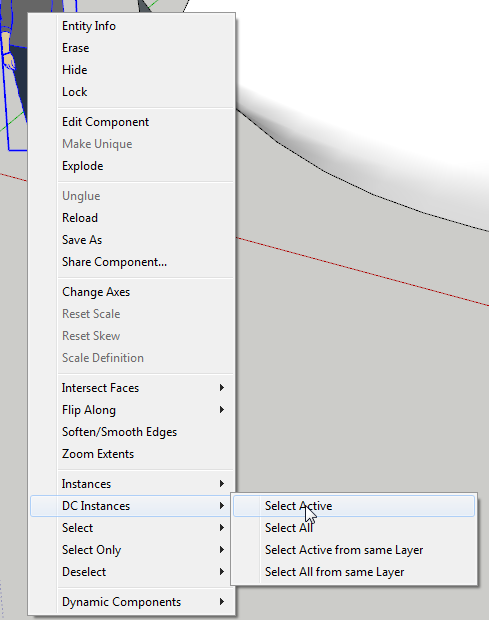
            dc select.png

            Thomas Thomassen — SketchUp Monkey & Coding addict
            List of my plugins and link to the CookieWare fund

            1 Reply Last reply Reply Quote 0
            • E Offline
              ericschimel
              last edited by

              Yup, I did that, it doesn't select anything else, either a child, or a parent.

              These DC's that I use get a name change the second I modify them in any way....

              So even though I have two DC's that have the same name (Like Single Door Wall Cabinet) they aren't the same component after I changes the DC options for one. They are in my model as separate components, with separate names.

              When I choose that option in your tool on one of the wall cabinets, it won't select the others.

              If I have identical copies of DC's (ones that are identical in every way) then I can select both using that method.

              -Eric
              http://plugin.sketchthis.net
              Sketchup Kitchen Design Plugin
              Custom Models

              1 Reply Last reply Reply Quote 0
              • thomthomT Offline
                thomthom
                last edited by

                Can you post a sample model?

                I'm not seeing any issues selecting DCs of the same type.

                Thomas Thomassen — SketchUp Monkey & Coding addict
                List of my plugins and link to the CookieWare fund

                1 Reply Last reply Reply Quote 0
                • E Offline
                  ericschimel
                  last edited by

                  There you go, should be pretty self explanatory when you open it.

                  Thanks for looking!


                  Selction Toys Example.skp

                  -Eric
                  http://plugin.sketchthis.net
                  Sketchup Kitchen Design Plugin
                  Custom Models

                  1 Reply Last reply Reply Quote 0
                  • thomthomT Offline
                    thomthom
                    last edited by

                    I have no problems selecting the DC.

                    Are you sure you are not using the "Instances" instead of the "DC Instances" sub menu?
                    Observe my last screenshot.

                    Thomas Thomassen — SketchUp Monkey & Coding addict
                    List of my plugins and link to the CookieWare fund

                    1 Reply Last reply Reply Quote 0
                    • E Offline
                      ericschimel
                      last edited by

                      When I do "Instances" and "Select active" on the two identical pulls, they both get highlight. When I go to "DC instances" and then to "Select Active, it highlights every component and group in the model.

                      In that example I sent you, I want to be able to click on, and select all those pieces of hardware, even though I have changed the options in one of them.

                      -Eric
                      http://plugin.sketchthis.net
                      Sketchup Kitchen Design Plugin
                      Custom Models

                      1 Reply Last reply Reply Quote 0
                      • thomthomT Offline
                        thomthom
                        last edited by

                        ugh... seems to be a bug here...

                        Thomas Thomassen — SketchUp Monkey & Coding addict
                        List of my plugins and link to the CookieWare fund

                        1 Reply Last reply Reply Quote 0
                        • thomthomT Offline
                          thomthom
                          last edited by

                          Found the cursed bug! I'd missed an underscore character... 😳

                          I'll upload a patch tomorrow.

                          Thomas Thomassen — SketchUp Monkey & Coding addict
                          List of my plugins and link to the CookieWare fund

                          1 Reply Last reply Reply Quote 0
                          • E Offline
                            ericschimel
                            last edited by

                            I am glad it was easy for you, I was just hoping that it wasn't me being stupid!

                            -Eric
                            http://plugin.sketchthis.net
                            Sketchup Kitchen Design Plugin
                            Custom Models

                            1 Reply Last reply Reply Quote 0
                            • E Offline
                              ericschimel
                              last edited by

                              Let me know when you upload it. I'll be the first to try it out! 😄

                              -Eric
                              http://plugin.sketchthis.net
                              Sketchup Kitchen Design Plugin
                              Custom Models

                              1 Reply Last reply Reply Quote 0
                              • bmikeB Offline
                                bmike
                                last edited by

                                Stumbled on this... sounds like what I need (although I would use it infrequently)!
                                I'll watch for a bug fix.

                                Can you post a link back to the original when you have time to get it updated?

                                mike beganyi design + consulting llc

                                1 Reply Last reply Reply Quote 0
                                • thomthomT Offline
                                  thomthom
                                  last edited by

                                  http://forums.sketchucation.com/viewtopic.php?f=323&t=14975

                                  Thomas Thomassen — SketchUp Monkey & Coding addict
                                  List of my plugins and link to the CookieWare fund

                                  1 Reply Last reply Reply Quote 0
                                  • E Offline
                                    ericschimel
                                    last edited by

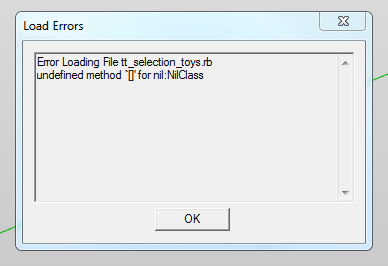
                                    I am getting this:
                                    TT.PNG

                                    -Eric
                                    http://plugin.sketchthis.net
                                    Sketchup Kitchen Design Plugin
                                    Custom Models

                                    1 Reply Last reply Reply Quote 0
                                    • thomthomT Offline
                                      thomthom
                                      last edited by

                                      😲

                                      Thomas Thomassen — SketchUp Monkey & Coding addict
                                      List of my plugins and link to the CookieWare fund

                                      1 Reply Last reply Reply Quote 0
                                      • thomthomT Offline
                                        thomthom
                                        last edited by

                                        Type load 'tt_selection_toys.rb' in the Ruby console and post back the full message.

                                        Thomas Thomassen — SketchUp Monkey & Coding addict
                                        List of my plugins and link to the CookieWare fund

                                        1 Reply Last reply Reply Quote 0
                                        • thomthomT Offline
                                          thomthom
                                          last edited by

                                          Never mind - I realised what it was.
                                          Download again.

                                          Thomas Thomassen — SketchUp Monkey & Coding addict
                                          List of my plugins and link to the CookieWare fund

                                          1 Reply Last reply Reply Quote 0
                                          • E Offline
                                            ericschimel
                                            last edited by

                                            Brilliant. It works perfectly now Thomthom!

                                            -Eric
                                            http://plugin.sketchthis.net
                                            Sketchup Kitchen Design Plugin
                                            Custom Models

                                            1 Reply Last reply Reply Quote 0
                                            • 1
                                            • 2
                                            • 1 / 2
                                            • First post
                                              Last post
                                            Buy SketchPlus
                                            Buy SUbD
                                            Buy WrapR
                                            Buy eBook
                                            Buy Modelur
                                            Buy Vertex Tools
                                            Buy SketchCuisine
                                            Buy FormFonts

                                            Advertisement