sketchucation logo sketchucation
    • Login
    Oops, your profile's looking a bit empty! To help us tailor your experience, please fill in key details like your SketchUp version, skill level, operating system, and more. Update and save your info on your profile page today!
    ⚠️ Update | Sketchucation Tools 5.0.8 released with licensing improvements and bugfixes Download

    Error when manually entering color. SU8

    Scheduled Pinned Locked Moved SketchUp Bug Reporting
    sketchup
    9 Posts 4 Posters 1.6k Views 4 Watching
    Loading More Posts
    • Oldest to Newest
    • Newest to Oldest
    • Most Votes
    Reply
    • Reply as topic
    Log in to reply
    This topic has been deleted. Only users with topic management privileges can see it.
    • D
      DIEGO-RODRIGUEZ
      last edited by

      windows xpsp3 español
      sketchup 8 español
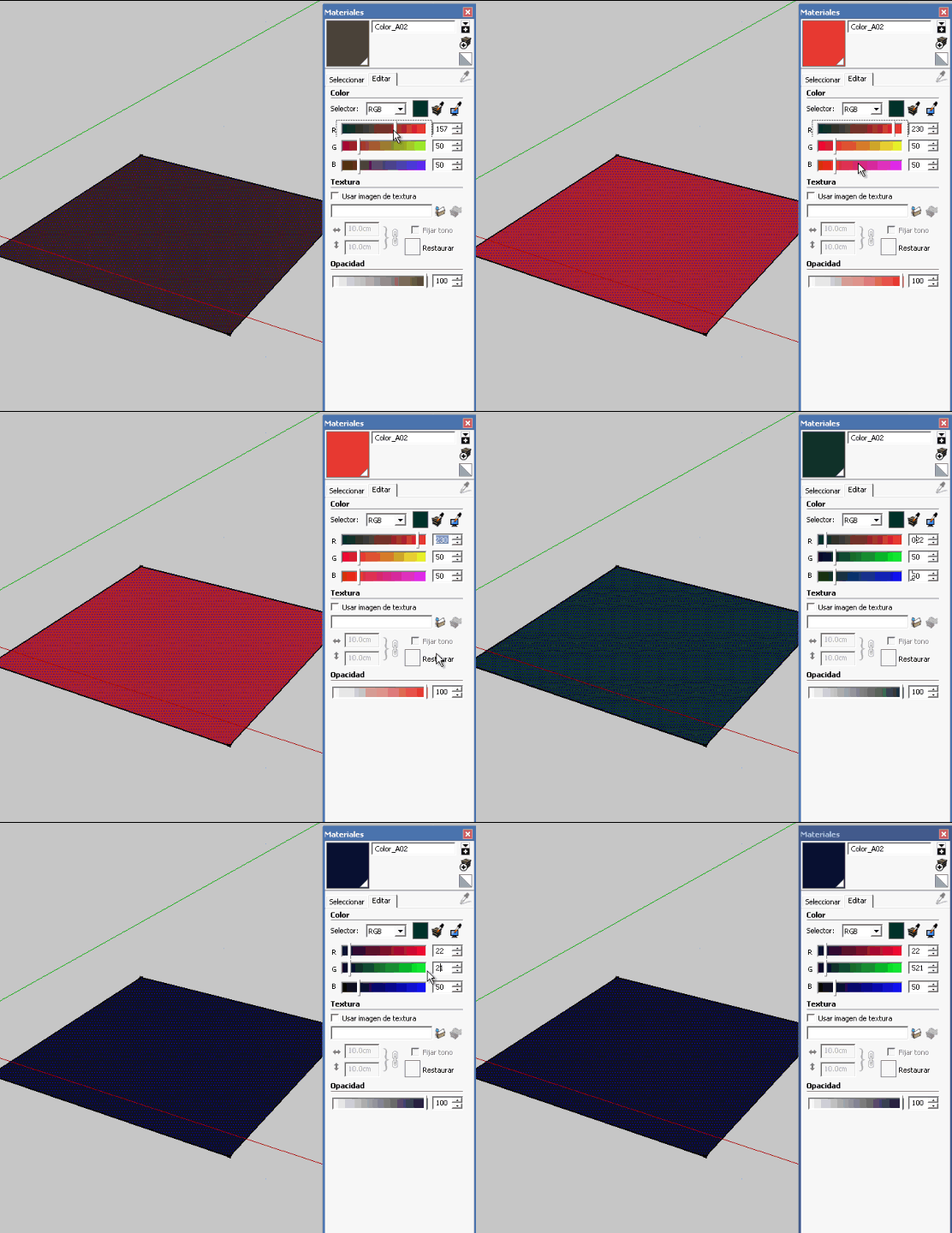

      Untitled.gif

      1 Reply Last reply
      Reply Quote 0
      • GaieusG
        Gaieus
        last edited by

        What is the error message? (I can only see part of it).

        But indeed, mine (English) also gives an error message but that's correct. When using the RGB values, they must be between 0 and 255 and you are entering 521 in the red channel.

        Gai...

        1 Reply Last reply
        Reply Quote 0
        • D
          DIEGO-RODRIGUEZ
          last edited by

          @gaieus said:

          When using the RGB values, they must be between 0 and 255 and you are entering 521 in the red channel.

          yes, I know Gaieus
          but, the problem is when enter the numbers back to front. 😄

          for example if I enter 125
          I write the number 521

          1 Reply Last reply
          Reply Quote 0
          • ely862meE
            ely862me
            last edited by

            Maybe is ur keyboard or ur system that cause the reversed typing .

            Elisei (sketchupper)


            Before no life was done on Earth it was THE LIFE ITSELF...GOD
            Come and See EliseiDesign

            1 Reply Last reply
            Reply Quote 0
            • D
              DIEGO-RODRIGUEZ
              last edited by

              Strange.
              in sketchup 7, everything works fine
              in sketchup 8, does not work

              1 Reply Last reply
              Reply Quote 0
              • GaieusG
                Gaieus
                last edited by

                ah, I see, okay. If that wasn't intentional, it's weird indeed (as if Spanish were a rtl language)

                Gai...

                1 Reply Last reply
                Reply Quote 0
                • thomthomT
                  thomthom
                  last edited by

                  Do you by any chance have VfSU installed? I think the recent version interfere with the input of colours.

                  Thomas Thomassen — SketchUp Monkey & Coding addict
                  List of my plugins and link to the CookieWare fund

                  1 Reply Last reply
                  Reply Quote 0
                  • D
                    DIEGO-RODRIGUEZ
                    last edited by

                    yes thom. I'm using the beta-test version 1.48.94


                    if the problem is with vray.
                    delete vfs.rb file and now the colors work fine.

                    would have to report this error to the company vray, no?

                    1 Reply Last reply
                    Reply Quote 0
                    • thomthomT
                      thomthom
                      last edited by

                      @diego-rodriguez said:

                      would have to report this error to the company vray, no?

                      Yes, report this.

                      Btw, no need to delete vfs.rb - just disable VfSU under extensions.
                      (If you keep VfSU disabled under extensions you can use V-Ray Toys to load VfSU on demand when you need it.)


                      Thomas Thomassen — SketchUp Monkey & Coding addict
                      List of my plugins and link to the CookieWare fund

                      1 Reply Last reply
                      Reply Quote 0

                      Hello! It looks like you're interested in this conversation, but you don't have an account yet.

                      Getting fed up of having to scroll through the same posts each visit? When you register for an account, you'll always come back to exactly where you were before, and choose to be notified of new replies (either via email, or push notification). You'll also be able to save bookmarks and upvote posts to show your appreciation to other community members.

                      With your input, this post could be even better 💗

                      Register Login
                      • 1 / 1
                      • First post
                        Last post
                      Buy SketchPlus
                      Buy SUbD
                      Buy WrapR
                      Buy eBook
                      Buy Modelur
                      Buy Vertex Tools
                      Buy SketchCuisine
                      Buy FormFonts

                      Advertisement
