Tree Clipping 'white edging' issue
-
Hi
PLs see below render, everytime i render the trees (using the method of adding the alpha image in transperancy) I seem to be getting a weird 'white edging' effect around the trees. Particulary the tree on the far left and on the far right near the garage door. Is there a way to eliminate this within sketchup/vray?
Using Sketchup 7.1 and Vray 1.05.30
Thanks
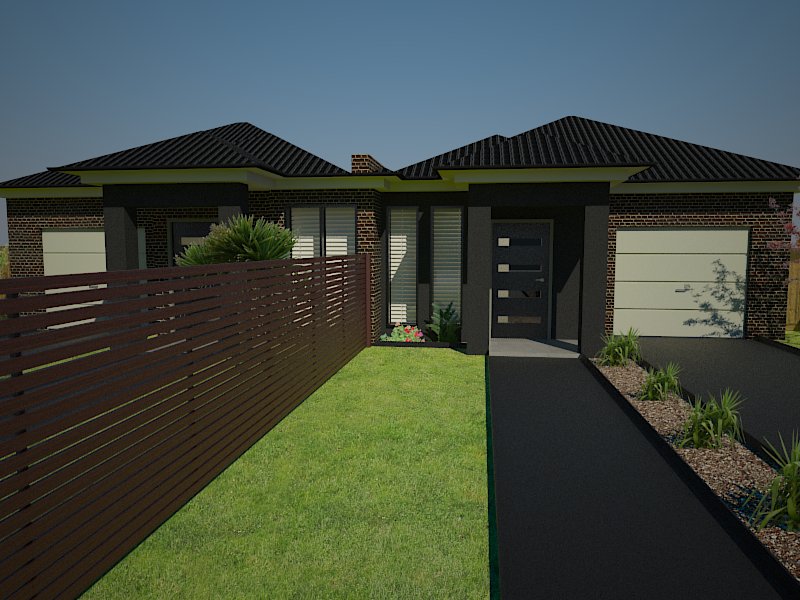
-
Just in case,
Styles>Edit>Face Settings Enable Transparency (ticked) Transparency Quality > NICER
Yes?
-
It's probably more related to the resolution of the image and the accuracy at which it was "cut out" originally. It's really a tough fix and one that I typically will cheat post render in photoshop. Typically using a combination of the burn tool and replace color.
Susan tip is great for Sketchup renders, but doesn't help with how Vray is reading the pixel data.
-
Try setting the image transparency to 98%...sure helps my tree png's.
-
@tomsdesk said:
Try setting the image transparency to 98%...sure helps my tree png's.
Thanks to you both.
Tom - im at work so I dont have access to my programs. By transparancy do you mean adjusting it within the transparancy option thats next to the diffuse option within the materials editor in Vray? ie sliding it from white into the black by 2%?

Hello! It looks like you're interested in this conversation, but you don't have an account yet.
Getting fed up of having to scroll through the same posts each visit? When you register for an account, you'll always come back to exactly where you were before, and choose to be notified of new replies (either via email, or push notification). You'll also be able to save bookmarks and upvote posts to show your appreciation to other community members.
With your input, this post could be even better 💗
Register Login


Advertisement