[Bug] NaN in a normal's value
-
I have attached a skp file that contains a face that gives NaN in a normals at a vertex with index 2.
Surprisingly SU doesn't find an error in the model.
When such a normal is exported it can result in errors in a target application (i.e. rendering).When one selects the face and writes down following line will receive NaN for all three vector components.
Sketchup.active_model.selection.first.mesh(7).normal_at(2)
>>Vector3d(-1.#IND, -1.#IND, -1.#IND)
I hope Google will make SU recognize such a face as degenerated.
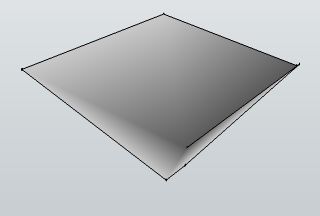
A face that is not being reported as faulty, but gives NaN in vertex normals
-
With your snippet I get
Vector3d(-1.11463e-006, 1.65399e-006, -1)which is pretty near [0,0,1] and it does effectively face Z_AXIS.reverse ???
For several mesh values I getVector3d(0, 0, 0)
Vector3d(0, 0, 0)
Vector3d(0, 0, 0)
Vector3d(0, 0, 0)
Vector3d(-1.11463e-006, 1.65399e-006, -1)
Vector3d(-1.11463e-006, 1.65399e-006, -1)
Vector3d(-1.11463e-006, 1.65399e-006, -1)
Vector3d(-1.11463e-006, 1.65399e-006, -1)
at all the same for normal_at 1, 2, 3 etc
I am puzzled ? -
Strange. Have you exploded the components?
I am getting
Vector3d(-1.#IND, -1.#IND, -1.#IND)
for the second vertex. -
I have tested it on SU Pro 7.1.6860 Win without a single plugin and it gives INT.
Same in SU6 Free Win.
Why our results are different? -
@unknownuser said:
I have tested it on SU Pro 7.1.6860 Win without a single plugin and it gives INT.
Same in SU6 Free Win.
Why our results are different?That's weird. When I just put the face in edit mode, I get a result consistent with Tomasz's, but when I explode the 2 components, I get the same result as TIG.
EDIT: I should also note that the face renders smoothed when I just put it in edit mode, but renders normally when I explode it.
-
Do not explode the face. When exploded the wrong shading is gone and the problem all together.
mesh=Sketchup.active_model.selection.first.mesh(7) 1.upto(7) {|x| p mesh.normal_at(x)} Vector3d(-7.14257e-007, 1.60024e-006, -1) Vector3d(-1.#IND, -1.#IND, -1.#IND) Vector3d(-7.14257e-007, 1.60024e-006, -1) Vector3d(-7.14257e-007, 1.60024e-006, -1) Vector3d(-7.14257e-007, 1.60024e-006, -1) Vector3d(-7.14257e-007, 1.60024e-006, -1) Vector3d(-7.14257e-007, 1.60024e-006, -1) -
I exploded the inner component and got my 'good' result within the edit of the originally outer container...
If I don't explode at all and edit two levels deep, or I explode the outer container and edit what was the the inner one then I DO get the #INT error ??? Very strange - I suspect it's to do with trying to get the nested transformations?
Looking at the face itself you have managed to form a face with a double edged zero area inner 'loop' ??? If you select all and cut and paste in place it then reports a 'proper' vector again - even when it's still nested... Obviously some minor glitch in the database ??? -
@tig said:
Looking at the face itself you have managed to form a face with a double edged zero area inner 'loop' ???
I have separated this face from a big file received from an user. I don't know how he managed to achieve it.
I will have to run a NaN check while exporting to prevent errors in an exported file.
It would be much better if SU could fix the face using 'ModelInfo\Statistics\FixProblems'.

Hello! It looks like you're interested in this conversation, but you don't have an account yet.
Getting fed up of having to scroll through the same posts each visit? When you register for an account, you'll always come back to exactly where you were before, and choose to be notified of new replies (either via email, or push notification). You'll also be able to save bookmarks and upvote posts to show your appreciation to other community members.
With your input, this post could be even better 💗
Register Login


Advertisement