Tools on surface-24 segment circle
-
Hi hot blooded sketchuppers.

i have just been using the plugin ' tools on surface'
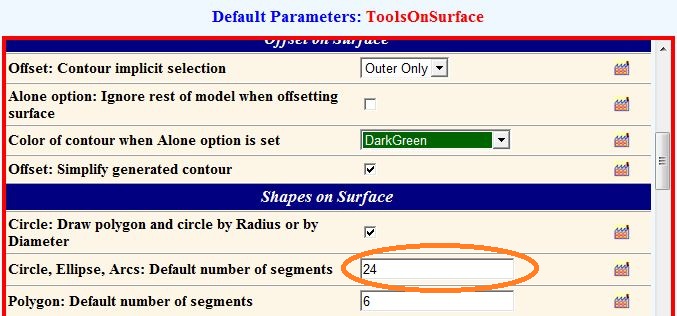
the circle on surface comes with a default of 24 segments.is there way to raise these 24 segments to higher number.

-
Create your circle then type 50s and enter, or whatever number you want, S stands for sides [segments].
-
If there is no preset(I didn't check), you certainly can re-segment by Window>EntityInfo>edit the segment field.
If I get a chance to check it I will edit this reply, unless someone else responds faster.
Best wishes.Edit before final submit: See what I mean?
-
Hi sketchup73, you can change the preset number of segments (and many other presets) by going to tools-->Fredo6 collection-->Tools on surface-->default parameters.
Then you need to restart Sketchup in order to make that change effective.



Hello! It looks like you're interested in this conversation, but you don't have an account yet.
Getting fed up of having to scroll through the same posts each visit? When you register for an account, you'll always come back to exactly where you were before, and choose to be notified of new replies (either via email, or push notification). You'll also be able to save bookmarks and upvote posts to show your appreciation to other community members.
With your input, this post could be even better 💗
Register Login


Advertisement