NO DWG IN SKETCHUP
-
HELLO
I GOT A BIG PROJECT AND TRYING OPEN AN AUTOCAD DWG FILE INTO SKETCHUP PRO
AND CAN NOT. WHEN I AM IN SKETCHUP AND OPENING FILE TYPE ,DWG AUTOCAD FILES DO NOT EXIST .PLS HELP
OFECS@WINDOWSLIVE.COM -
In SU 7, the dwg import option is only in the pro version.
-
http://sketchup.google.com/support/bin/answer.py?answer=161784
here's the DWG importer for Sketchup 7.1 free, Enjoy.
-
He says he has pro, I think the problem is you don't open it, you Import it.
Go File/Import and you will find it there.
-
YOU SHOULD TALK IN ALL CAPS ALL THE TIME!
Look for the pull down. If using Pro, you should be able to open DWG.
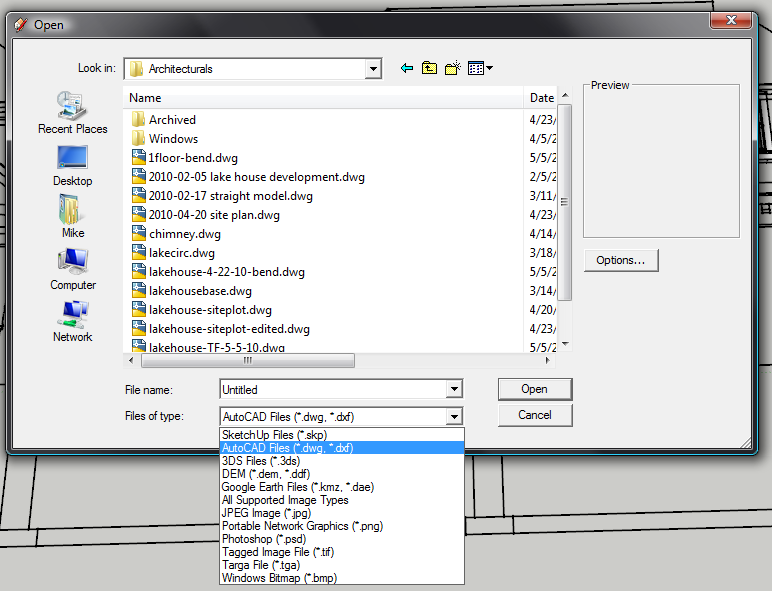
-
When I first started using sketchup I was working in ADT, I found that I couldn't import that type of drawing into
sketchup, but I did find out if I worked in the standard autocad, i.e. say release 2004 it would important
and I had no problems after that.



Hello! It looks like you're interested in this conversation, but you don't have an account yet.
Getting fed up of having to scroll through the same posts each visit? When you register for an account, you'll always come back to exactly where you were before, and choose to be notified of new replies (either via email, or push notification). You'll also be able to save bookmarks and upvote posts to show your appreciation to other community members.
With your input, this post could be even better 💗
Register Login


Advertisement