Scene / style entanglement
-
The very common 'odd' behavior is such that when layer visibility is set and a new scene is being created, upon hitting <enter> for the name change from the default supplied 'scene X', or in the immediately following picks, the layer visibility is changed so that some which were here (visible), now aren't. Resetting same can be a little time consuming, subject to error and very tedious. I think one problem is that there may be 3 places where a scene name may be displayed and picked at a give time and that there may be conflict or confusion about which is active or being monitored for input or which is governing: at the scene tabs, and at two spots in the manager: at name entry text box and at the list of existing scenes. I understand that they are supposed to be the same, generally, unless a new one is being created.
-
Thanks, Chris. I think I have been on board with your advice, I just seem to get odd behavior at times.
Thanks for the reminder that style changes will apply to any scenes using that style, and that perhaps a new style is more what is wanted. I agree very much about the utility of scenes and that is why I would really like better scene management facilities, but I guess that is another subject.
-
That's interesting. I could see a bug possibly living there. The scene manager does do a few quirky things sometimes when it comes to naming scenes and deleting scenes. If you can come up with a solid repeateable case where it happens (preferably from scratch in a clean model) then that would be cool to pass on as a bug.
Chris
-
@unknownuser said:
So lets you you are using the default style, and you make a scene. The default style is assocaited with that scene. But not lets say you turn off edges. Now you have altered the active style.
Got it (though I would prefer that I have simply changed my display rather than the style (not 'in' a scene, not 'in' a style), but I have not updated my scene, so I should be able to reload my scene and have the original unaltered style in effect but it does not work that way, the un-updated style, with the changes, tracks through even though neither has been updated. If I load another scene and come back, things are as they should be, the un-saved style changes have been discarded. (I'm glad I'm not in a position of having to decipher this little hill of glass noodles.) -
Yup, I think that was a fairly accurate assessment of what is going there Brooke. Changes made to the viewing style are only temporarily applied to the current style, until the style is changed (and all changes get discarded), or the changes are applied to the current style by clicking the Style icon when it has the circular arraows on it. Then the changes are applied to the current style, which updates the style gobally. So any scenes that use that style will now display with the applied changes.
So really you are ALWAYS "in a style". There is no display settings per se. You are in a style (though notice I still don't consider scenes as being "in a style". They merely reference an existing style). And changing the display settings is really temporarily tweakin the current style. Then you have to decide if you want to adopt those tweaks into the style by updating it. Or discard them.
Chris
-
It would be nice if the style manager advised as to what has been changed and thus why the update icon is overlaid; and that the scene manager advised similarly when and if something has been changed, perhaps with a similar device ("next he'll be asking for something to tell him exactly how the scene has been changed").
I know that is really a request, and sorry for the t e d i u m n e s sof it all. I think I can manage; it's really not that complicated. We can only hope that I am done.
Thanks, Chris.
-
Hehe, well good luck Brooke. I know that the SU team is always looking for improvements. So always feel free to post specific ideas about how something could be better or more clear. It might make its way into an upcoming verision.
Chris
-
@brookefox said:
It would be nice if ... the scene manager advised similarly when and if something has been changed...
Hi Brooke,
There is a wy to do it: turn on "Warn of style changes..." in your preferences > general tab:
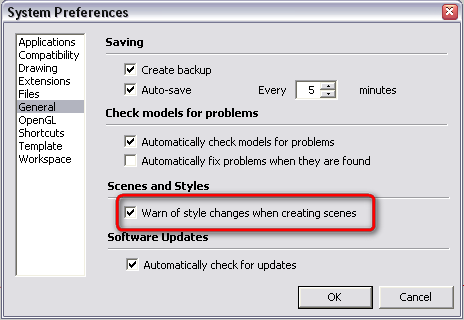
Then you will get a warning popup with a list of choices (save as new style, update style, do nothing...) when you have changed anything style related and want to update your scene. -
Thanks, Gaieus. That little warning I am not fond of, though it fairly reveals the entanglement. I'd like both managers to advise that changes have been made to their own realms, and as well the nature of those changes.
-
By "Both Managers" do you mean Scenes and Styles? The styles manager would be annoying if it warned you everytime a style was changed. because that would be everytime you flip on or off "view hidden", or x-ray mode, or face style, etc etc. So I could see that getting annoying very quickly.
BUT I do like the idea of the warning bo that pops up from the scene mangere if it gave you an "advanced" view that showed the style settings that were adjust. Their previous values and their new values. That would be helpful to determine if I REALLY wanted to make a new style, or just ignore the small changes I had temporarily made. I like that idea,
Chris
-
@unknownuser said:
By "Both Managers" do you mean Scenes and Styles?
Yes.@unknownuser said:
The styles manager would be annoying if it warned you everytime a style was changed.
I take that update arrow circle thingy as a warning, and then one might even be explicitly warned if that setting is in place.



Hello! It looks like you're interested in this conversation, but you don't have an account yet.
Getting fed up of having to scroll through the same posts each visit? When you register for an account, you'll always come back to exactly where you were before, and choose to be notified of new replies (either via email, or push notification). You'll also be able to save bookmarks and upvote posts to show your appreciation to other community members.
With your input, this post could be even better 💗
Register Login


Advertisement