Autocad import scale
-
I'm sure this is an old topic but I did a search and could get an answer I need.
When I import a 20m cube from autocad to sketchup it ends up as a 6.1m cube. I have matched the units of both programs and still get the same result. Can some one tell me what is going on and how to sort it. When I scale the model up to size I get a texture problem. Scaling the autocad imported model to size causes the texture scales that don't match texture scales of additional parts I might add in sketchup. Basicly I end up with 2 texture sets for the completed model. Can anyone tell me where I'm going wrong? -
That's because you are importing it in feet.
There's an additional button on the Import dialog named 'Options' - when you are using certain file types like DWG - click here to set the Units [', ", mm, cm or m] as used in the original DWG [and some other stuff - like not preserving the origin IF the DWG is miles away from 0,0,0] - CAD doesn't use 'real' units like SUp, they are just 'relative' and can be anything... and so you need to help out SUp to understand them...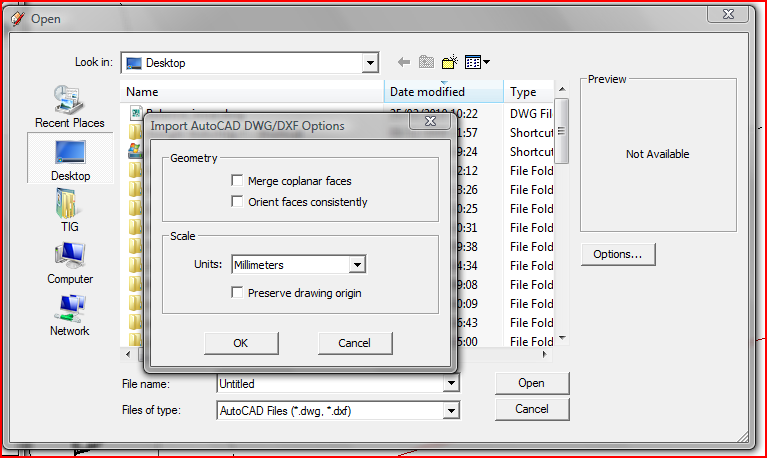
-
Thankyou Tig.
I knew I was missing something.

Hello! It looks like you're interested in this conversation, but you don't have an account yet.
Getting fed up of having to scroll through the same posts each visit? When you register for an account, you'll always come back to exactly where you were before, and choose to be notified of new replies (either via email, or push notification). You'll also be able to save bookmarks and upvote posts to show your appreciation to other community members.
With your input, this post could be even better 💗
Register Login


Advertisement