How to? Centre point & "crosshairs"
-
Hey everyone!
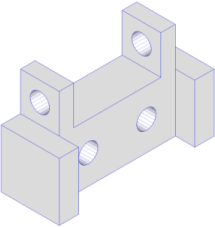
I'm modeling some pieces for woodworking, and when I make a pattern for cutting and drilling, I often forget to put a centre point / crosshair at the centre of my arc and circles. This has led to some inaccurate drilling. I just finished designing a piece that has four holes that I need to drill, but it seems like such a pain to go back and place a centre point and extend some construction lines out from there (crosshair) so that I can clearly see where to drill.Has anyone come across a script/plugin that does this? If not, what would be your suggested workflow for doing this most efficiently as I model?
-
Is this what could help?
-
OR this one:
http://sketchuptips.blogspot.com/2008/03/plugin-auto-centerpoint.html
once you activate it, you can forget about it... -
i just make guidelines part of component


Hello! It looks like you're interested in this conversation, but you don't have an account yet.
Getting fed up of having to scroll through the same posts each visit? When you register for an account, you'll always come back to exactly where you were before, and choose to be notified of new replies (either via email, or push notification). You'll also be able to save bookmarks and upvote posts to show your appreciation to other community members.
With your input, this post could be even better 💗
Register Login


Advertisement