[Plugin] Dimension and Leader Text - Toggle Visibility
-
Been busy all day... But, how about this...dimsvis.rb If you want to add other things to be switched on/off - like 'text' - add extra lines into the typename==... hidden=... parts...
Name : dimsvis.rb
Description : Toggles dimensions on/off [hidden/shown]
Menu Item : Plugins -> Dimension Visibility Toggle
For ease of use it's best with a shortcut key...
Author : TIG
Usage : Pick off menu or shortcut key
(or type dimsvis in the Ruby console).
Then all dimensions are either shown or hidden.
If it's the first time it's used that session then the
dimensions are shown, so if you want to hide then
initially use it twice the first time...
One step undo-able...
Version : 1.0 First draft. 20090404
1.1 Undo added. Mining groups/definitions. 20090405Feedback please...
-
This addresses only linear dimensions.
I tried to guess at editing the script to add radial dimensions, but failed.
Also would like separate menu items for Leader text and Screen text .... and possibly All text. Could someone help, please?
Thanks
-
@jclements said:
This addresses only linear dimensions.
I tried to guess at editing the script to add radial dimensions, but failed.
Also would like separate menu items for Leader text and Screen text .... and possibly All text. Could someone help, please?
ThanksThis script is readily edited with Notepad...
The lines that set thingshidden=trueorhidden=false
e.hidden=true if e.typename=="DimensionLinear"
and
e.hidden=false if e.typename=="DimensionLinear"
can be augmented OR changed...
e.g. add lines below them to affect other 'types' of thing, so for radial dimensions try copying the lines down and changing... e.typename=="DimensionLinear"
to
... e.typename=="DimensionRadial"
To find thetypenameof any entity just select one and type/copy+paste this line of text into the Ruby ConsoleSketchup.active_model.selection[0].typename
It returns itstypename- it is case-sensitive - so if you have highlighted a radial dim it will sayDimensionRadialThis way you can find and add/edit to switch any 'class' of entity on/off
For example substituting"Text"affects all Text...To make another script to work on Text called '
textvis' simply copy this script with that new name and edit it with Notepad - find and replace alldimsviswithtextvis- so that is the new command for it...
Change strings like"Dimension Visibility Toggle"to suit - e.g."Text Visibility Toggle"
The lines regarding 'dimensions' can be either commented out [just add a # to the start of them] or they can be edited to read '... e.typename=="Text"'.
To differentiate between leader-text and screen-text you need to test more things with [ruby:3dkzk6n1]and[/ruby:3dkzk6n1],
e.g. [ruby:3dkzk6n1]e.hidden=true if e.typename=="Text" and e.leader_type==1[/ruby:3dkzk6n1]
To select only Leader-Text.
or [ruby:3dkzk6n1]...and e.leader_type!=1[/ruby:3dkzk6n1]
To select Text that is NOT [!] Leader-Text - i.e 'on screen'...
[It's 0 for 'None' [on screen], 1 for 'View based' [with leader], and 2 for 'Pushpin' "leader_types"]Hope this helps - we'll make aRuby Guru of you yet...

-
def dimsvis()
If I copy dimsvis.rb and make two new .rb's such as dimsLinearvis.rb and dimsRadialvis.rb, then do I have to make a two new definitions such as def dimsRadialvis() and def dimsLinearvis (),respectively, and do a search and replace of the remaining "dimsvis" occurances in each script?
-
These two toggle one another is wierd ways.
I see they both have "$ dim_visible ..." entries so I'm guessing they are trespassing on another.
How to fix?
What does the "$" symbol do/indicate?
-
-
@jclements said:
These two toggle one another is wierd ways.
I see they both have "$ dim_visible ..." entries so I'm guessing they are trespassing on another.
How to fix?
What does the "$" symbol do/indicate?Change
$dim_visibleto$text_visiblein the text version
In fact find any text that says 'dim' in the text-version of the script and change it to read 'text' to be on the safe side.
BUT I now see you have different 'text' togglers - then the global variables should differ between them - so use say$textLeader_visibleand$textScreen_visibleto separate them...
The$makes a 'global variable' that can be read by scripts at any time during that session - that's why you have sometimes to switch the toggle twice on start up as it isn't set the very first time. -
TIG:
I got them all to work now. Thanks for the handholding.
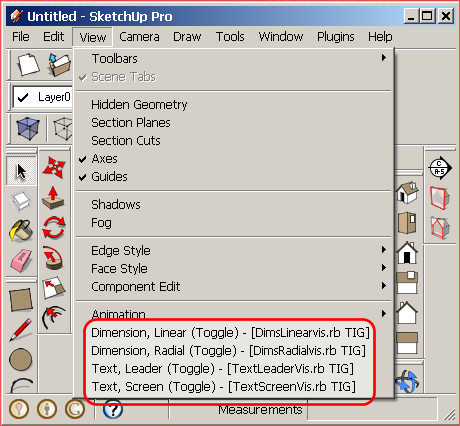
I did notice that models with several groups and/or levels of embedded groups it can take quite a while to execute a toggle. ?Is there a way to trigger feedback via a progress bar or a "please wait" in the Task Bar?
-
To speed it up you could recast it so that it was a tool to find all Text or Dims etc and then put it onto a TEXT-LEDR, TEXT-SCRN or DIMS-LINR, DIMS-RADL etc
Then make a tool that toggles those layers on/off - they'll vanish/appear much quicker ? -
I am not sure if I understand what you are asking and why it would be faster. Do you mean a script similar to how your move|delete Construction Objects is structured?
If so, then I think NOT having it in a context (right-click) menu would be better and be given choices like: context (nothing selected), context_&_recursive, or selection_recursive for each type of text object; then change toggle their visibility. Most of the timeI would not want to move text items to a specific layers because I primarily use layers to isolate equipment and structures by process or project phases and text with leaders and dimensions would need to stay on the layer of the objects they pertain too.
The original scripts above do their job, they are just sluggish in large models and sometimes it seems as if they are not working when they in fact are.
-
OK
So to at least show progress add a 'ticker' to each def of code like this...
I've added lines ending with ###ADDdef TextScreenVisOFF(ents) ticker="." ###ADD ents.each{|e| Sketchup;;set_status_text("Processing"+ticker) ###ADD e.hidden=true if e.typename=="Text" TextScreenVisOFF(e.entities)if e.typename=="Group" TextScreenVisOFF(e.definition.entities)if e.typename=="ComponentInstance" ticker=ticker+"." ###ADD } end#defThese additions will add some text to the VCB line:
Processing.
Processing..
Processing...
Processing....
Processing..... etc
as it does groups/definitions it stars again at 'Processing.'...
At least the VCB will be doing something to show it's processing... -
TIG:
Worked great, thanks.
That was Lesson - Processing Ticker 101. Can we go to Lesson - Processing Ticker 102?
Can a ticker display and increment a digit, once every second (or whatever time increment)?
Would this be the proper way of do this: Ruby would somehow have to access the PC's "clock" (or does that function exist as a command already ?), create a variable with a value of 0 and then increase its value by a value of 1 every second, then refresh display (so the prompts don't run off the screen) and re-display it with the new value.
-
To make a counter try this - it just counts the number of operations...
I've added lines ending with ###ADDdef TextScreenVisOFF(ents) ticker="1" ###ADD ents.each{|e| Sketchup;;set_status_text("Processing "+ticker) ###ADD e.hidden=true if e.typename=="Text" TextScreenVisOFF(e.entities)if e.typename=="Group" TextScreenVisOFF(e.definition.entities)if e.typename=="ComponentInstance" ticker=ticker.next ###ADD } end#defThese additions will add some text to the VCB line:
Processing.
Processing 1
Processing 2
Processing 3
Processing 4 etc
as it does groups/definitions it stars again at 'Processing 1'...
At least the VCB will be doing something to show it's processing...
-
Works ok. Thanks again.



Hello! It looks like you're interested in this conversation, but you don't have an account yet.
Getting fed up of having to scroll through the same posts each visit? When you register for an account, you'll always come back to exactly where you were before, and choose to be notified of new replies (either via email, or push notification). You'll also be able to save bookmarks and upvote posts to show your appreciation to other community members.
With your input, this post could be even better 💗
Register Login


Advertisement