sketchucation logo sketchucation
    • Login
    Oops, your profile's looking a bit empty! To help us tailor your experience, please fill in key details like your SketchUp version, skill level, operating system, and more. Update and save your info on your profile page today!
    ⚠️ Update | Sketchucation Tools 5.0.8 released with licensing improvements and bugfixes Download

    How to save a model SU 7 (cp1251)

    Scheduled Pinned Locked Moved Developers' Forum
    11 Posts 3 Posters 1.1k Views 3 Watching
    Loading More Posts
    • Oldest to Newest
    • Newest to Oldest
    • Most Votes
    Reply
    • Reply as topic
    Log in to reply
    This topic has been deleted. Only users with topic management privileges can see it.
    • S
      sahi
      last edited by

      Hi
      how to save a model in SU 7 code cp1251

      
      # SU 5
      model.save "filename.skp" #>> works
      model.save "названиефайла.skp" #>> works 
      
      # SU 7
      model.save "filename.skp" #>> works
      model.save "названиефайла.skp" #>> error


      as possible to save in a cyrillic alphabet?

      1 Reply Last reply
      Reply Quote 0
      • thomthomT
        thomthom
        last edited by

        hmm... odd.
        You can open the file, Sketchup.open_file "c:/названиефайла.skp"
        But not save. More odd as you it worked in SU5.
        I tried in 7.1 and 6.1 and it didn't work in any there.

        I know that SU's ruby implementation doesn't support non-ASCII characters in the file names. But I had tested Sketchup.open_file "c:/названиефайла.skp" which does work, as it calls SU's file methods instead of Ruby's file methods. Though I never tested the save method. Think I'll add this to the bug report.

        Thomas Thomassen — SketchUp Monkey & Coding addict
        List of my plugins and link to the CookieWare fund

        1 Reply Last reply
        Reply Quote 0
        • S
          sahi
          last edited by

          @thomthom said:

          Think I'll add this to the bug report.

          Add and it

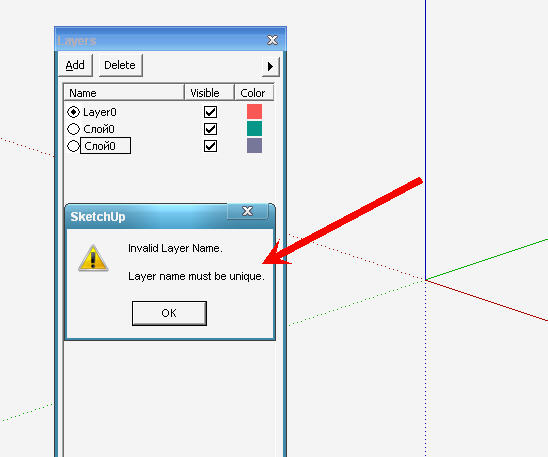
          naz_sloya= MODEL.layer.name
                       layers = model.layers
                       activelayer = model.active_layer=layers[naz_sloya]
          

          SU 5
          SU 5
          SU 7
          SU 7
          http://forums.sketchucation.com/viewtopic.php?f=53&t=16967&p=157190#p157190

          1 Reply Last reply
          Reply Quote 0
          • thomthomT
            thomthom
            last edited by

            @sahi said:

            naz_sloya= MODEL.layer.name
            >              layers = model.layers
            >              activelayer = model.active_layer=layers[naz_sloya]
            

            I don't understand this one...

            Thomas Thomassen — SketchUp Monkey & Coding addict
            List of my plugins and link to the CookieWare fund

            1 Reply Last reply
            Reply Quote 0
            • thomthomT
              thomthom
              last edited by

              And I can't reproduce the identical names on layer either.

              Thomas Thomassen — SketchUp Monkey & Coding addict
              List of my plugins and link to the CookieWare fund

              1 Reply Last reply
              Reply Quote 0
              • S
                sahi
                last edited by

                Russian version SU
                video_03.rar
                The names are a layer "Слой0" - does not see him and creates a new layer with the same name

                1 Reply Last reply
                Reply Quote 0
                • thomthomT
                  thomthom
                  last edited by

                  I see. And that snippet of code is producing that?

                  But what is the first line doing? naz_sloya= MODEL.layer.name
                  What is MODEL ? An entity?

                  And why are you referencing the layer name and looking up the Layer object in Layers again?

                  what about?
                  activelayer = model.active_layer = MODEL.layer.name

                  PS: Your tool, in the video I see that it doesn't draw properly. Looks like you haven't implemented .getExtents http://code.google.com/apis/sketchup/docs/ourdoc/tool.html#getExtents

                  Thomas Thomassen — SketchUp Monkey & Coding addict
                  List of my plugins and link to the CookieWare fund

                  1 Reply Last reply
                  Reply Quote 0
                  • S
                    sahi
                    last edited by

                    @thomthom said:

                    PS: Your tool, in the video I see that it doesn't draw properly. Looks like you haven't implemented .getExtents

                    http://i.smiles2k.net/computer_smiles/open_file.gif
                    did not help to correct a mistake

                    # SU 7
                    model.save "filename.skp" #>> works
                    model.save "названиефайла.skp" #>> error
                    cryp = ("названиефайла").crypt("hf")
                    model.save "#{cryp}.skp" #>> works
                    

                    it not quite that it was desirable - but it works.

                    1 Reply Last reply
                    Reply Quote 0
                    • thomthomT
                      thomthom
                      last edited by

                      @sahi said:

                      did not help to correct a mistake

                      how did you implement it?
                      The example given in the manual is pretty useless. the clipping only occurs when you draw outside the model bounds - so returning model.bounds,as the example do, is pointless. you must create your own bound that covers the area you draw to.

                      Thomas Thomassen — SketchUp Monkey & Coding addict
                      List of my plugins and link to the CookieWare fund

                      1 Reply Last reply
                      Reply Quote 0
                      • S
                        sahi
                        last edited by

                        @thomthom said:

                        how did you implement it?

                        it is part plugins
                        create_brik.rar
                        and it is video (SU 5 and SU 6 (ru)
                        video_03.rar

                        1 Reply Last reply
                        Reply Quote 0
                        • TIGT
                          TIG Moderator
                          last edited by

                          Within a Tool's class have this

                          
                          def getExtents
                              bbox=Sketchup.active_model.bounds
                              bbox.add(@ip.position) if @ip and @ip.valid?
                              bbox.add(@ip1.position)if @ip1 and @ip1.valid?
                              bbox.add(@ip2.position)if @ip2 and @ip2.valid?
                              bbox.add(@ip3.position)if @ip3 and @ip3.valid?
                              ### etc
                              return bbox
                          end


                          where the various @ip's are input points that are called from mouse moves etc, as you move/pick with the tool...
                          The tool auto-runs getExtents() so you don't do anything else ?
                          Works for me in my tools

                          TIG

                          1 Reply Last reply
                          Reply Quote 0

                          Hello! It looks like you're interested in this conversation, but you don't have an account yet.

                          Getting fed up of having to scroll through the same posts each visit? When you register for an account, you'll always come back to exactly where you were before, and choose to be notified of new replies (either via email, or push notification). You'll also be able to save bookmarks and upvote posts to show your appreciation to other community members.

                          With your input, this post could be even better 💗

                          Register Login
                          • 1 / 1
                          • First post
                            Last post
                          Buy SketchPlus
                          Buy SUbD
                          Buy WrapR
                          Buy eBook
                          Buy Modelur
                          Buy Vertex Tools
                          Buy SketchCuisine
                          Buy FormFonts

                          Advertisement