sketchucation logo sketchucation
    • Login
    Oops, your profile's looking a bit empty! To help us tailor your experience, please fill in key details like your SketchUp version, skill level, operating system, and more. Update and save your info on your profile page today!
    Mac User? | Join the Rayscaper Beta for Mac Learn More

    [Plugin] VisMap Pro Beta Available, Free

    Scheduled Pinned Locked Moved Plugins
    14 Posts 4 Posters 10.4k Views 4 Watching
    Loading More Posts
    • Oldest to Newest
    • Newest to Oldest
    • Most Votes
    Reply
    • Reply as topic
    Log in to reply
    This topic has been deleted. Only users with topic management privileges can see it.
    • M
      MartinRinehart
      last edited by

      @jclements said:

      Will this work with SU6?

      I foolishly let SU7 replace my SU6. Try it and tell me.

      Author, Edges to Rubies - The Complete SketchUp Tutorial at http://www.MartinRinehart.com/models/tutorial.

      1 Reply Last reply
      Reply Quote 0
      • JClementsJ
        JClements
        last edited by

        Martin, it doesn't work in SU6 or SU7.0.

        It can send data but in can NOT GET DATA.

        Simple Test file attached.


        Vismap test.skp

        John | Illustrator | Beaverton, Oregon

        1 Reply Last reply
        Reply Quote 0
        • M
          MartinRinehart
          last edited by

          @jclements said:

          Martin, it doesn't work in SU6 or SU7.0.

          Odd. It was developed in 7.0. I haven't upgraded yet.

          Thanks for the test model, but it got and sent fine on my machine. What problem was I supposed to see?

          Author, Edges to Rubies - The Complete SketchUp Tutorial at http://www.MartinRinehart.com/models/tutorial.

          1 Reply Last reply
          Reply Quote 0
          • JClementsJ
            JClements
            last edited by

            Get Data From Model doesn't update after using it the first time.

            So,
            open file.
            Open VisPro
            Get Data from Model
            Make changes via the Layers Window
            Get Data From Model ... changes are not picked up.

            Likewise, close model and reopen, make visibility changes, open VisPro, Get Data From Model doesn't change anything.

            John | Illustrator | Beaverton, Oregon

            1 Reply Last reply
            Reply Quote 0
            • M
              MartinRinehart
              last edited by

              @jclements said:

              Make changes via the Layers Window
              Get Data From Model ... changes are not picked up.

              I bet you didn't Update. Scene changes aren't part of the model until you Update the scene.

              Author, Edges to Rubies - The Complete SketchUp Tutorial at http://www.MartinRinehart.com/models/tutorial.

              1 Reply Last reply
              Reply Quote 0
              • JClementsJ
                JClements
                last edited by

                But I didn't change any scenes. I merely opened the file, made layer visibility changes, and tried to update VisPro.

                John | Illustrator | Beaverton, Oregon

                1 Reply Last reply
                Reply Quote 0
                • M
                  MartinRinehart
                  last edited by

                  @jclements said:

                  But I didn't change any scenes. I merely opened the file, made layer visibility changes, and tried to update VisPro.

                  VisMap can't "see" any changes until you update a scene. Internally, it marches through your scenes one at a time asking "who's visible here?" So, until you change a scene it can't see what you've done. This is in the "Gotchas" in the VisMap doc. Maybe I should repeat that in the VisMap Pro doc.

                  If it will make you feel any better, you are not the first person bitten by this "bug." You are corresponding with the man who has that honor.

                  Author, Edges to Rubies - The Complete SketchUp Tutorial at http://www.MartinRinehart.com/models/tutorial.

                  1 Reply Last reply
                  Reply Quote 0
                  • EdsonE
                    Edson
                    last edited by

                    martin,

                    i have tried it on a simple model and it worked but on larger files i get the old message and no layers appear.
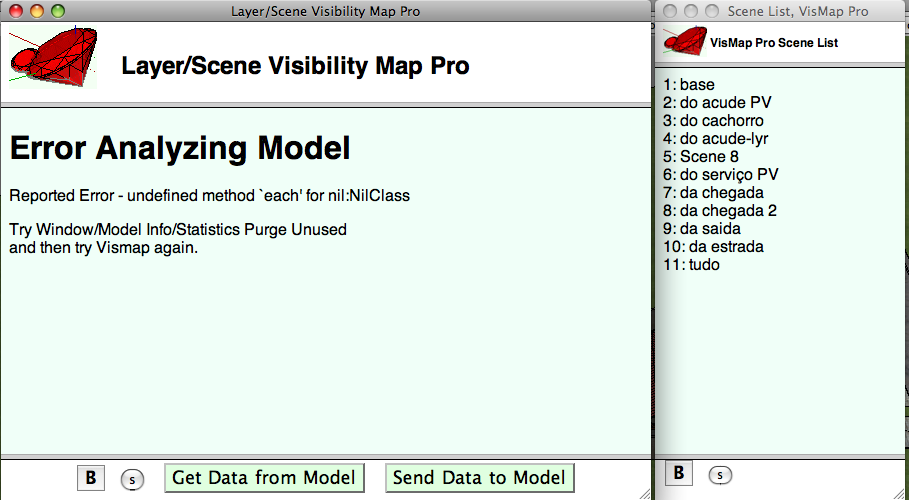

                    vismapOCT08.png

                    edson mahfuz, architect| porto alegre • brasil
                    http://www.mahfuz.arq.br

                    1 Reply Last reply
                    Reply Quote 0
                    • JClementsJ
                      JClements
                      last edited by

                      Can't you just add a ruby snippet which performs a Scene update to a scene called "VisPro Updater Proxy".

                      It would just be a proxy with no attributes associated with it so the rest of the VisPro script could get around the "bug".
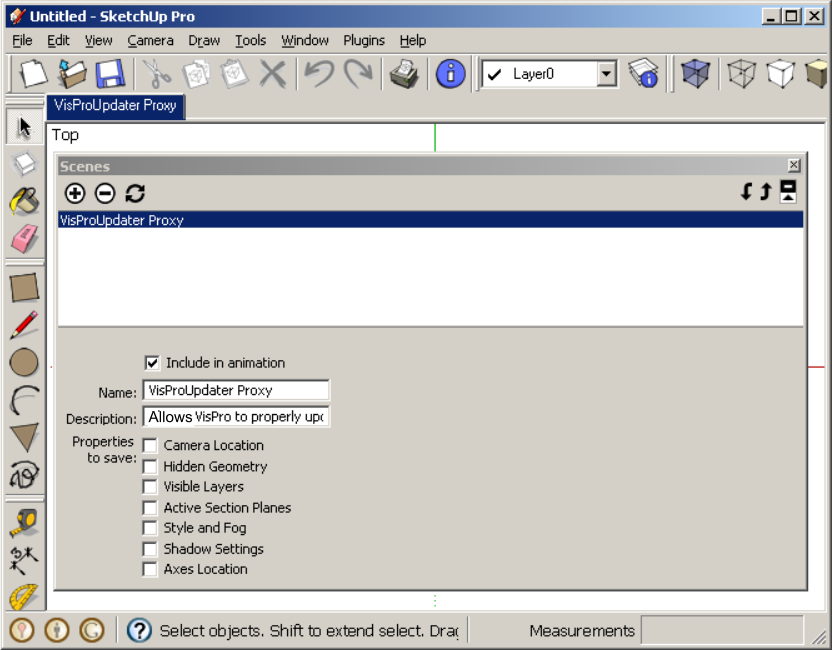
                      VisProUpdate Scene Proxy.png

                      If no scene named "VisProUpdater Proxy" existed it would be created and if it does exist then an update function would be performed and the rest of your existing script would be executed

                      John | Illustrator | Beaverton, Oregon

                      1 Reply Last reply
                      Reply Quote 0
                      • M
                        MartinRinehart
                        last edited by

                        @jclements said:

                        If no scene named "VisProUpdater Proxy" existed it would be created and if it does exist then an update function would be performed and the rest of your existing script would be executed

                        A Scene0, roughly analogous to Layer0? What you're looking at? Hmmm.

                        Author, Edges to Rubies - The Complete SketchUp Tutorial at http://www.MartinRinehart.com/models/tutorial.

                        1 Reply Last reply
                        Reply Quote 0
                        • chrisglasierC
                          chrisglasier
                          last edited by

                          @jclements said:

                          Get Data From Model doesn't update after using it the first time.

                          So,
                          open file.
                          Open VisPro
                          Get Data from Model
                          Make changes via the Layers Window
                          Get Data From Model ... changes are not picked up.

                          Likewise, close model and reopen, make visibility changes, open VisPro, Get Data From Model doesn't change anything.

                          Seems Martin hasn't got to the bit about observers just yet.
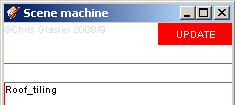
                          cgScenes update.png

                          With TBA interfaces we can analyse what is to be achieved so that IT can help with automation to achieve it.

                          1 Reply Last reply
                          Reply Quote 0
                          • JClementsJ
                            JClements
                            last edited by

                            Yup. I used the name VisPro with a detailed description so the user would know its origin.

                            I guess you could delete the Proxy Scene at the tail end of the script. Not sure creating and deleting would slow things down tho.


                            John | Illustrator | Beaverton, Oregon

                            1 Reply Last reply
                            Reply Quote 0

                            Hello! It looks like you're interested in this conversation, but you don't have an account yet.

                            Getting fed up of having to scroll through the same posts each visit? When you register for an account, you'll always come back to exactly where you were before, and choose to be notified of new replies (either via email, or push notification). You'll also be able to save bookmarks and upvote posts to show your appreciation to other community members.

                            With your input, this post could be even better 💗

                            Register Login
                            • 1 / 1
                            • First post
                              Last post
                            Buy SketchPlus
                            Buy SUbD
                            Buy WrapR
                            Buy eBook
                            Buy Modelur
                            Buy Vertex Tools
                            Buy SketchCuisine
                            Buy FormFonts

                            Advertisement