Sketchup Window too Small at Startup
-
This is an old problem -- just wondering if anyone has a solution.
I am using SketchUp 7 on a Windows PC, with XP. I've been using SketchUp for a long time (since version 2) and have noticed this problem from time to time.
I set up my window size maximized on my screen, with toolbars where I want them. When I exit and then restart, sometimes the application window opens correctly (full size) and sometimes it opens up small. I can't see any logic to it. When it opens small, I have to reposition all the toolbars, because they have been moved around to fit on the small window.
Any ideas as to how to fix this? I am using a template file when I start up.
-
If you resize the 'small' version of the SU window to near full screen (by dragging a corner, not maximising it) SU should remember this size and so not mess up your plugins when it decides to open in small mode.
Ive never been able to work out what makes SU open in small mode though, as you say it seems pretty random.
-
I think I may have figured it out -- after years of dealing with it, making the post here motivated me to start thinking...
My template that I use was created some time ago. Since then I have added a couple of plug-ins that add toolbars. By replacing the template with a new version that has all the new toolbars where I want them, the problem seems to go away (at least for now).
Perhaps the extra toolbars were messing things up?
Anyway, I hope this works from now on.
-
There must be something else. The template is just a good, old, plain skp file and has (or at least should have
 ) nothing to do with the SU window.
 -
@jteselle said:
This is an old problem -- just wondering if anyone has a solution.
I am using SketchUp 7 on a Windows PC, with XP. I've been using SketchUp for a long time (since version 2) and have noticed this problem from time to time.
I set up my window size maximized on my screen, with toolbars where I want them. When I exit and then restart, sometimes the application window opens correctly (full size) and sometimes it opens up small. I can't see any logic to it. When it opens small, I have to reposition all the toolbars, because they have been moved around to fit on the small window.
Any ideas as to how to fix this?
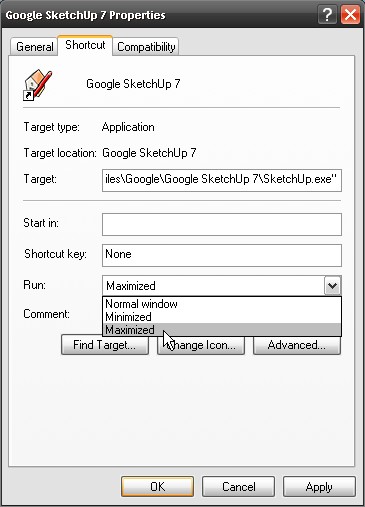
Have you tried right clicking on the shortcut and selecting run Maximized?
Or is that what you are explaining you have done.
Best,
C

Hello! It looks like you're interested in this conversation, but you don't have an account yet.
Getting fed up of having to scroll through the same posts each visit? When you register for an account, you'll always come back to exactly where you were before, and choose to be notified of new replies (either via email, or push notification). You'll also be able to save bookmarks and upvote posts to show your appreciation to other community members.
With your input, this post could be even better 💗
Register Login


Advertisement