sketchucation logo sketchucation
    • Login
    Oops, your profile's looking a bit empty! To help us tailor your experience, please fill in key details like your SketchUp version, skill level, operating system, and more. Update and save your info on your profile page today!
    โš ๏ธ Update | Sketchucation Tools 5.0.8 released with licensing improvements and bugfixes Download

    [Plugin] UV Toolkit

    Scheduled Pinned Locked Moved Plugins
    377 Posts 86 Posters 398.4k Views 86 Watching
    Loading More Posts
    • Oldest to Newest
    • Newest to Oldest
    • Most Votes
    Reply
    • Reply as topic
    Log in to reply
    This topic has been deleted. Only users with topic management privileges can see it.
    • MALAISEM
      MALAISE
      last edited by

      Never be to far from the Forum then you miss so useful Rubies.....

      Thanks Thom Thom ๐Ÿ‘ ๐Ÿ‘ ๐Ÿ‘

      MALAISE

      La Connaissance n'a de valeur que partagรฉe

      1 Reply Last reply
      Reply Quote 0
      • troyhomeT
        troyhome
        last edited by

        Thom Thom,
        Thank you so much for this ruby- it MUST appear in the next release of SU!!!

        IOviz.com
        SU Pro 2024 PC

        1 Reply Last reply
        Reply Quote 0
        • N
          notareal
          last edited by

          Nice one, thanks. Wish there was a way to "force" SU to use only quad-faces when using "auto-fold" or other tools.

          Welcome to try Thea Render, Thea support | kerkythea.net -team member

          1 Reply Last reply
          Reply Quote 0
          • A
            Aerilius
            last edited by

            Thanks!
            It's really good that someone makes texture tools that are not in this interlaced context menu.

            For future tools: It would be useful to transform a projected texture in a normal one (= to get the texture coordinates). So we could edit projected textures. I have often deleted the original face, so when another face with projected texture is not coplanar, there's now way to move edit the texture.

            1 Reply Last reply
            Reply Quote 0
            • GaieusG
              Gaieus
              last edited by

              Dandyman's OT posts split off and moved here:
              http://forums.sketchucation.com/viewtopic.php?f=80&t=19497&p=160663#p160663

              Gai...

              1 Reply Last reply
              Reply Quote 0
              • free agentF
                free agent
                last edited by

                thom is ther any way of making mirror textures global? max retains the mapping better if the textures are on both faces and its a schlep to go through each group

                http://i167.photobucket.com/albums/u143/FreeAgent84/bug.gif

                1 Reply Last reply
                Reply Quote 0
                • thomthomT
                  thomthom
                  last edited by

                  @unknownuser said:

                  thom is ther any way of making mirror textures global? max retains the mapping better if the textures are on both faces and its a schlep to go through each group

                  A function that will mirror the material of all faces in a selection, drilling down into nested groups/components?

                  Thomas Thomassen โ€” SketchUp Monkey & Coding addict
                  List of my plugins and link to the CookieWare fund

                  1 Reply Last reply
                  Reply Quote 0
                  • free agentF
                    free agent
                    last edited by

                    yup...can i get fries with that?

                    http://i167.photobucket.com/albums/u143/FreeAgent84/bug.gif

                    1 Reply Last reply
                    Reply Quote 0
                    • urgenU
                      urgen
                      last edited by

                      ...thanks Thomas! ๐Ÿ‘.

                      --pupil forever...------

                      1 Reply Last reply
                      Reply Quote 0
                      • GaieusG
                        Gaieus
                        last edited by

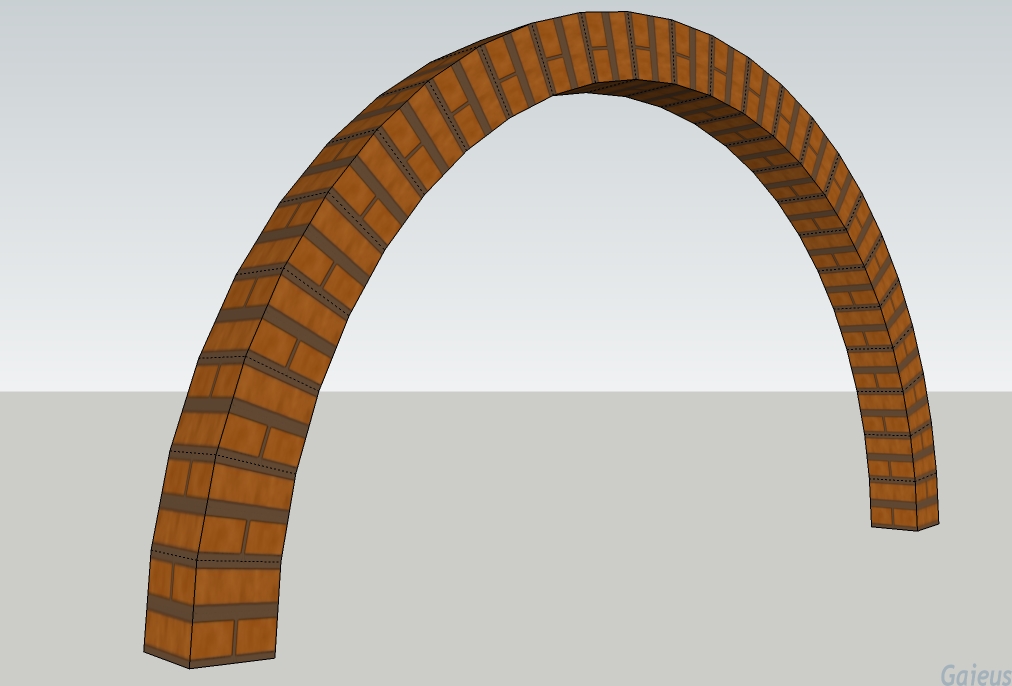
                        Well, Thom, time has come that I NEED the plugin and kept playing around with it. Simply amazing, I can tell. Thank you a lot again and here is something I've been playing around with (and a "special" material for the arch - included in the model probably along with a bunch of unpurged materials of Sang). ๐Ÿ˜„

                        Although for my (relatively thin bricks) in Roman arches, I'll need about twice as many quads than this one, it's already perfect (25 segments to make it smooth and the top segment flat but in fact, it didn't need to be flat as I realised). The rotate 90 and 80 degree commands (working on whole, smooth surface as well) are really handy and invaluable!

                        Arch.jpg


                        Arch.skp

                        Gai...

                        1 Reply Last reply
                        Reply Quote 0
                        • thomthomT
                          thomthom
                          last edited by

                          Glad to see it working. ๐Ÿ˜„

                          Thomas Thomassen โ€” SketchUp Monkey & Coding addict
                          List of my plugins and link to the CookieWare fund

                          1 Reply Last reply
                          Reply Quote 0
                          • G
                            gamore
                            last edited by

                            Nice Tool ,Thanks

                            1 Reply Last reply
                            Reply Quote 0
                            • A
                              accabrera
                              last edited by

                              Nice job!

                              Big thank you

                              1 Reply Last reply
                              Reply Quote 0
                              • R
                                remon_v
                                last edited by

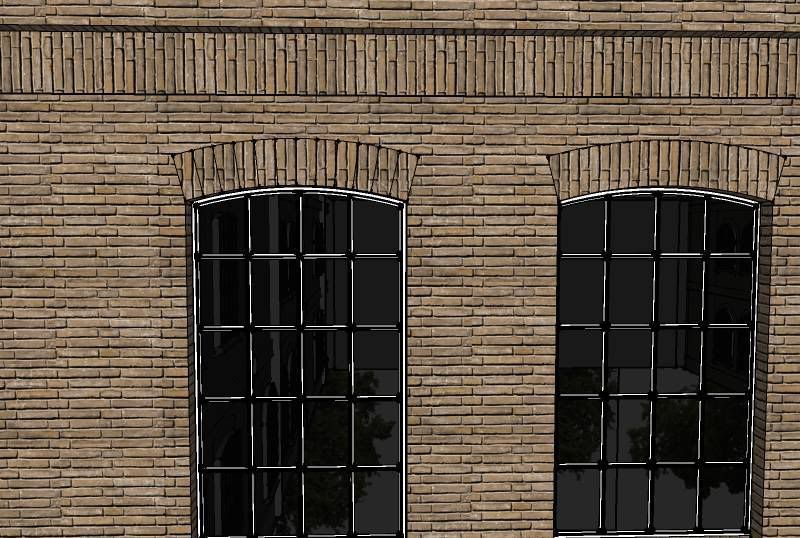
                                hey guys... I see some arch texturing here. I subdivided my arch in faces and now I want to texture my arch. I could do it manually by rotating the texture but maybe there's an easier way?
                                http://i22.photobucket.com/albums/b336/remon_v/uv-mapping.jpg

                                thnx in advance

                                1 Reply Last reply
                                Reply Quote 0
                                • thomthomT
                                  thomthom
                                  last edited by

                                  If you want to use it for rendering then you're better off creating a unique texture for it. V-Ray doesn't render skewed textures properly.

                                  Thomas Thomassen โ€” SketchUp Monkey & Coding addict
                                  List of my plugins and link to the CookieWare fund

                                  1 Reply Last reply
                                  Reply Quote 0
                                  • R
                                    remon_v
                                    last edited by

                                    oke thnx

                                    1 Reply Last reply
                                    Reply Quote 0
                                    • GaieusG
                                      Gaieus
                                      last edited by

                                      I think this plugin deserves some further attention and care so I made a little tutorial how you can get the final arch texture nicely mapped on a single face (not a series of facets divided by interior edges).

                                      See it here (and thanks Thom for this useful plugin again)

                                      Gai...

                                      1 Reply Last reply
                                      Reply Quote 0
                                      • N
                                        notareal
                                        last edited by

                                        Great tutorial Gaieus.

                                        Welcome to try Thea Render, Thea support | kerkythea.net -team member

                                        1 Reply Last reply
                                        Reply Quote 0
                                        • thomthomT
                                          thomthom
                                          last edited by

                                          Made some internal adjustments after learning how to get UV data from distorted textures. Bumped out of beta.

                                          @unknownuser said:

                                          1.0.0 - 15.10.2009

                                          * Merge with Mirror UV.

                                          * Correct sampling of UV data. Distorted textures now works.

                                          * Mirror material speed increase.

                                          Thomas Thomassen โ€” SketchUp Monkey & Coding addict
                                          List of my plugins and link to the CookieWare fund

                                          1 Reply Last reply
                                          Reply Quote 0
                                          • GaieusG
                                            Gaieus
                                            last edited by

                                            Thanks - updated my plugin folder!

                                            ๐Ÿ˜‰

                                            Gai...

                                            1 Reply Last reply
                                            Reply Quote 0

                                            Hello! It looks like you're interested in this conversation, but you don't have an account yet.

                                            Getting fed up of having to scroll through the same posts each visit? When you register for an account, you'll always come back to exactly where you were before, and choose to be notified of new replies (either via email, or push notification). You'll also be able to save bookmarks and upvote posts to show your appreciation to other community members.

                                            With your input, this post could be even better ๐Ÿ’—

                                            Register Login
                                            • 1
                                            • 2
                                            • 3
                                            • 4
                                            • 5
                                            • 18
                                            • 19
                                            • 3 / 19
                                            • First post
                                              Last post
                                            Buy SketchPlus
                                            Buy SUbD
                                            Buy WrapR
                                            Buy eBook
                                            Buy Modelur
                                            Buy Vertex Tools
                                            Buy SketchCuisine
                                            Buy FormFonts

                                            Advertisement