sketchucation logo sketchucation
    • Login
    Oops, your profile's looking a bit empty! To help us tailor your experience, please fill in key details like your SketchUp version, skill level, operating system, and more. Update and save your info on your profile page today!
    โš ๏ธ Update | Sketchucation Tools 5.0.8 released with licensing improvements and bugfixes Download

    The "Duh!" thread (aka the Doh! thread)

    Scheduled Pinned Locked Moved SketchUp Discussions
    sketchup
    696 Posts 135 Posters 579.5k Views 135 Watching
    Loading More Posts
    • Oldest to Newest
    • Newest to Oldest
    • Most Votes
    Reply
    • Reply as topic
    Log in to reply
    This topic has been deleted. Only users with topic management privileges can see it.
    • M
      museummaker
      last edited by

      I have duh moments every time I watch videos of people drawing. I am always amazed that there is more than one way to do things, sometimes quicker and easier.

      My biggest duh was learning that I could change the axis. I was drawing a railroad depot for GE that was off axis. I fought with it two days hand forcing the off axis shapes thinking there was something wrong with the program... turns out it was me.

      1 Reply Last reply
      Reply Quote 0
      • pilouP
        pilou
        last edited by

        @unknownuser said:

        My Spacebar doesn't deselect - disappointed.

        You right : I was no precise! ๐Ÿ˜ณ
        That deselect "tools" ! ๐Ÿ˜„

        Deselect selected is of course clicked an empty space ๐Ÿ˜‰

        Frenchy Pilou
        Is beautiful that please without concept!
        My Little site :)

        1 Reply Last reply
        Reply Quote 0
        • pilouP
          pilou
          last edited by

          Discover Triple click (select all connected) and Spacebar (Deselect selected tools) very late! ๐Ÿ˜ณ
          Another Duhduh
          The "orient face" (select one face then right click "orient face" makes all the object's faces orientation similar) ๐Ÿ˜ณ

          Frenchy Pilou
          Is beautiful that please without concept!
          My Little site :)

          1 Reply Last reply
          Reply Quote 0
          • thomthomT
            thomthom
            last edited by

            Some Duh! moments I've had:

            Realising the Taper tool could be used to scale a model.

            Realising that I could change the radius of a circle that's been extruded.

            Thomas Thomassen โ€” SketchUp Monkey & Coding addict
            List of my plugins and link to the CookieWare fund

            1 Reply Last reply
            Reply Quote 0
            • R
              remus
              last edited by

              Using groups for the first time was a big one for me, i spent ages fiddling about trying to get geometry not to stick before that.

              the organiser was another big un as well, so useful for anything where youve got more than a few groups/components.

              http://remusrendering.wordpress.com/

              1 Reply Last reply
              Reply Quote 0
              • H
                HFM
                last edited by

                Big Duh moment for me was when someone else [not at all familiar with SU] put 5 in 'sides' for the circle tool creating a perfect pentagon ๐Ÿ˜ฒ

                1 Reply Last reply
                Reply Quote 0
                • P
                  Prisoner
                  last edited by

                  @thomthom said:

                  Some Duh! moments I've had:
                  Realising the Taper tool could be used to scale a model.
                  ...

                  Thanks Thom for my Duh! moment of today.
                  Didnt know this till now, could have used it a so often, will be so much happier from now on

                  1 Reply Last reply
                  Reply Quote 0
                  • N
                    NewOne
                    last edited by

                    Duh! ๐Ÿ˜ฒ moment yesterday!
                    Smoove tool can be used for smoove different shapes than circular...just use your mouse drag selection area over needed vertexes and use smoove tool over them.Play with size of smoove circle to see how it affects selected area.

                    1 Reply Last reply
                    Reply Quote 0
                    • soloS
                      solo
                      last edited by

                      Now that you mention that, I have an embarrasing one for you, my kid who was 11 at the time of me teaching him the ins and outs of SU when one day I was teaching him how to map textures to a sphere and I asked him to get an image of the earth to map from our server texture folder, he opened up the folder on the second monitor and dragged it onto the sphere, I exclaimed 'What on earth are you doing" and before I could complete my setence with the all to fimiliar 'you dumbass' the texture was mapped onto the sphere, sure it was not UV mapped correctly but I had not known that was possible. Being a wise-ass he replied "like every karate movie, the studend with enough practice becomes the master"
                      I had to create another cartoon character that day to show him who's boss.

                      http://www.solos-art.com

                      If you see a toilet in your dreams do not use it.

                      1 Reply Last reply
                      Reply Quote 0
                      • thomthomT
                        thomthom
                        last edited by

                        @hfm said:

                        Big Duh moment for me was when someone else [not at all familiar with SU] put 5 in 'sides' for the circle tool creating a perfect pentagon ๐Ÿ˜ฒ

                        Ah, that remind me:
                        Being able to put in "s5" in the VCB to control the number of sides before I create a circle or arc... Big Duh!

                        Thomas Thomassen โ€” SketchUp Monkey & Coding addict
                        List of my plugins and link to the CookieWare fund

                        1 Reply Last reply
                        Reply Quote 0
                        • soloS
                          solo
                          last edited by

                          @unknownuser said:

                          Being able to put in "s5" in the VCB to control the number of sides before I create a circle or arc... Big Duh!

                          What? really... DUH!, I never knew that one.

                          learning all the time.

                          http://www.solos-art.com

                          If you see a toilet in your dreams do not use it.

                          1 Reply Last reply
                          Reply Quote 0
                          • pilouP
                            pilou
                            last edited by

                            @unknownuser said:

                            Smoove tool can be used for smoove different shapes than circular...just use your mouse drag selection area over needed vertexes and use smoove tool over them.

                            Stay again a Super Duh ๐Ÿ˜ฎ
                            Can you put an image of the process?
                            (mousse drag selection is very mysterious) ๐Ÿ˜ณ

                            Use of Smoove tool for other thing than a Tin from Sand Box was also a DuhDuh ๐Ÿ˜„
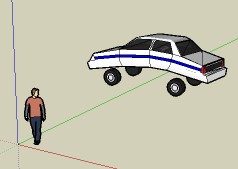

                            car.jpg

                            Frenchy Pilou
                            Is beautiful that please without concept!
                            My Little site :)

                            1 Reply Last reply
                            Reply Quote 0
                            • G
                              Gjenio
                              last edited by

                              @newone said:

                              Duh! ๐Ÿ˜ฒ moment yesterday!
                              Smoove tool can be used for smoove different shapes than circular...just use your mouse drag selection area over needed vertexes and use smoove tool over them.Play with size of smoove circle to see how it affects selected area.

                              Really great Duh! Incredible! Sometimes the esiest things are the hardest to find

                              1 Reply Last reply
                              Reply Quote 0
                              • N
                                NewOne
                                last edited by

                                @unknownuser said:

                                Can you put an image of the process?
                                (mousse drag selection is very mysterious) ๐Ÿ˜ณ

                                Drag with your mouse over the surface and select a rectangular area. I used Ctrl pressed to add to selection so I've made that L shape.

                                Pilou! that car is fun! In same way I think we can make bed cloth.
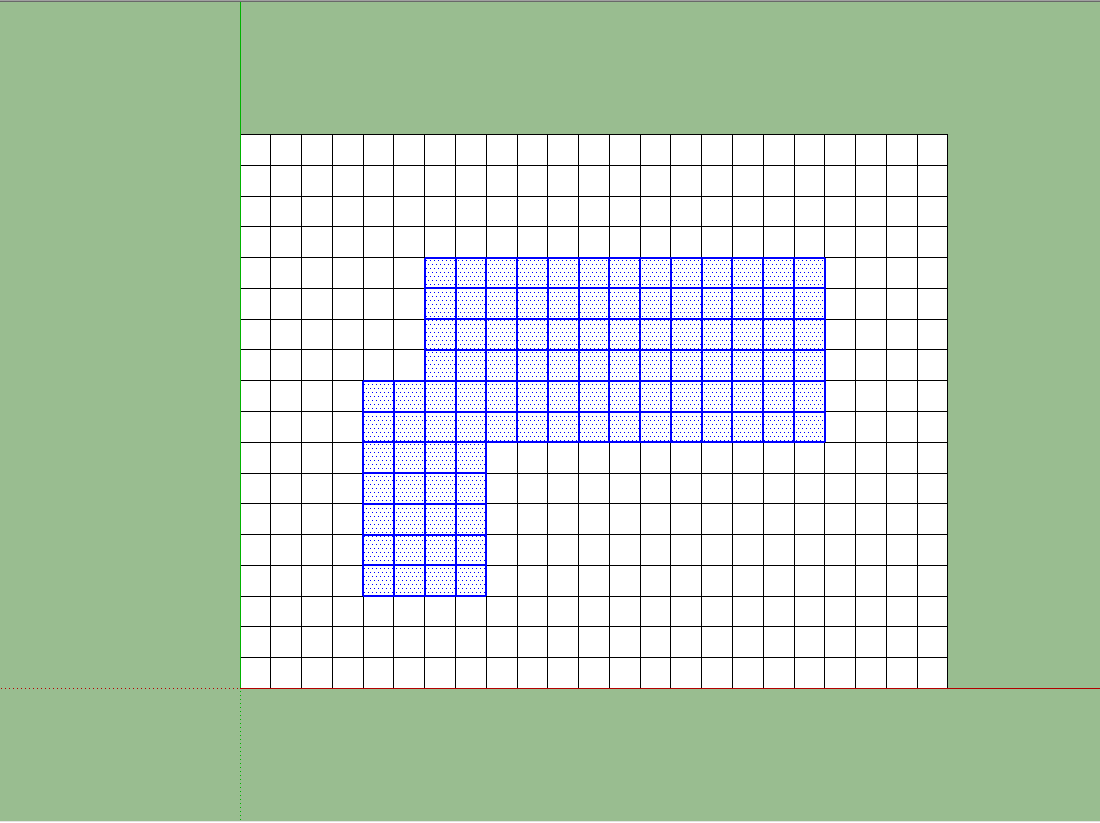

                                First, select needed area


                                Then select smoove tool and adjust diameter. You will see that for smaller diameter selected area will be affected straight, no slopes.


                                Final result

                                1 Reply Last reply
                                Reply Quote 0
                                • pilouP
                                  pilou
                                  last edited by

                                  Ok! THX! More clear now! โ˜€

                                  Frenchy Pilou
                                  Is beautiful that please without concept!
                                  My Little site :)

                                  1 Reply Last reply
                                  Reply Quote 0
                                  • thomthomT
                                    thomthom
                                    last edited by

                                    @solo said:

                                    @unknownuser said:

                                    Being able to put in "s5" in the VCB to control the number of sides before I create a circle or arc... Big Duh!

                                    What? really... DUH!, I never knew that one.

                                    learning all the time.

                                    Sorry, "5s". If you type the S first it changes to the Scale tool. The "5s" even works at any point, you can play with radius and number of sides as much as you like.

                                    Thomas Thomassen โ€” SketchUp Monkey & Coding addict
                                    List of my plugins and link to the CookieWare fund

                                    1 Reply Last reply
                                    Reply Quote 0
                                    • thomthomT
                                      thomthom
                                      last edited by

                                      A more recent Duh I had:

                                      Being able to select only a few edges from a face and offset them instead of the whole face.

                                      Thomas Thomassen โ€” SketchUp Monkey & Coding addict
                                      List of my plugins and link to the CookieWare fund

                                      1 Reply Last reply
                                      Reply Quote 0
                                      • S
                                        sintra
                                        last edited by

                                        This is a funny thread, lots of stories that bring a smile to the face. Well my Duh moment has not yet been solved ๐Ÿ˜† ๐Ÿ˜† i still don't know how to type in more than one dimension when using the tape measure tool ๐Ÿ˜’ ๐Ÿ˜†

                                        I think this thread could run and run and im sure will be very useful for many good idea for the thread Ecuadorian ๐Ÿ‘

                                        Cheers

                                        Darren

                                        1 Reply Last reply
                                        Reply Quote 0
                                        • boofredlayB
                                          boofredlay
                                          last edited by

                                          One for me was when Gaieus was from Gaieus' talk at the Basecamp (I saw the video) and using the rotate tool.

                                          When you click the rotate tool and click the rotation point, don't let go of the mouse button... drag it out to either red or green (or any other snap point you set up) then click to start. This relieves any need for a vertical plane to get your rotation set up.

                                          See image for example.
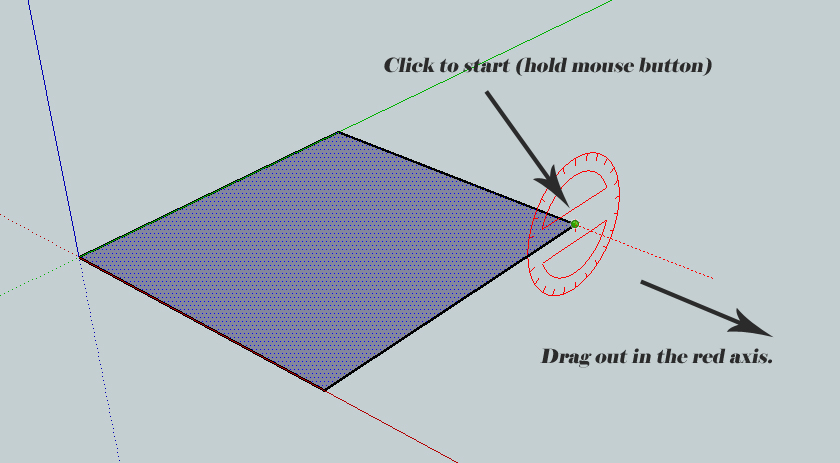
                                          ClickHold.jpg

                                          I have been using SU since V2 and never knew that until last year.

                                          http://www.coroflot.com/boofredlay

                                          1 Reply Last reply
                                          Reply Quote 0
                                          • david_hD
                                            david_h
                                            last edited by

                                            Ive had so many Duh Moments I don't know where to start . . .or rather D'oh!
                                            I have still so many yet to experience I am sure. Maybe you can help me add to myD'uh Collection

                                            I have never gotten into the OUtliner but the one thing I wish I knew how to do with it. . .if it can be done is in working with Nexted blocks and components in "Hide rest of Model" mode that you could have the group in which a component is nested visible but still have the rest of the model invisible? comprenez-vous? Or maybe there is a Ruby for this??? ***please oh please oh please!***Also. . .. we need a little smilie that says "D'UH! and D'OH!"



                                            homer-simpson-doh.jpg

                                            If I make it look easy...It is probably easy

                                            1 Reply Last reply
                                            Reply Quote 0

                                            Hello! It looks like you're interested in this conversation, but you don't have an account yet.

                                            Getting fed up of having to scroll through the same posts each visit? When you register for an account, you'll always come back to exactly where you were before, and choose to be notified of new replies (either via email, or push notification). You'll also be able to save bookmarks and upvote posts to show your appreciation to other community members.

                                            With your input, this post could be even better ๐Ÿ’—

                                            Register Login
                                            • 1
                                            • 2
                                            • 3
                                            • 4
                                            • 5
                                            • 34
                                            • 35
                                            • 1 / 35
                                            • First post
                                              Last post
                                            Buy SketchPlus
                                            Buy SUbD
                                            Buy WrapR
                                            Buy eBook
                                            Buy Modelur
                                            Buy Vertex Tools
                                            Buy SketchCuisine
                                            Buy FormFonts

                                            Advertisement