[Plugin] Greeble 2 released! (Updated August 31st, 2009)
-
Hey, that looks great! I don't know much about shaders, but the image sure looks good. Glad I could help,
Chris
-
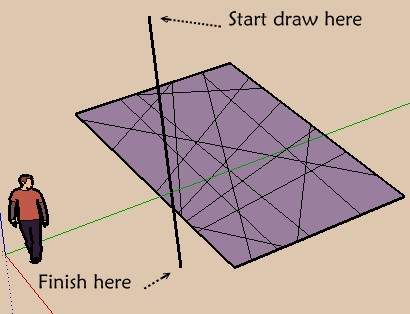
hey guys! i've tried searching and can't find it..... was there ever a plugin that randomly divides a face?
There is one on the web that says it is in production (but that was updated August '08)
Thanks in advance!
-
-
@unknownuser said:
The competitor of this one

Sheesh!, get me in trouble with Jim!
Actually, you'd probably have to say my script is a competitor of protrude, since I wrote mine long after Jim wrote his (and Tig wrote his and Didier had written his
 ) For me it was just a great script to write to help me learn how to write scripts. Its largely inferior to Jims.
Plus I know Jim had been working on a true greeble with little greebles added to all protruded faces. I want him to finish that one!
-
But Zorro2 by Whaat is cool too and give you more control
And works also for a 3D object!
@unknownuser said:
Its largely inferior to Jims.
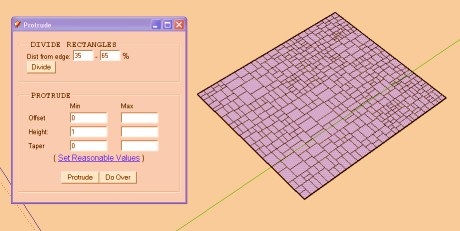
(yes Protrude has just the Button to press between each generation

-
well i had protrude already (go figure)
but when i press 'divide' on a rectangular face it does nothing.... any ideas?
-
You must select face or object not grouped first!
Except that no idea
-
hahah fortunately for me i got THAT far.... i select the face and just click away an nothing happens, maybe i will try to re-download it
[edit] redownloaded and reinstalled with same issue as before.... this is too weird... i can select rectangle, then choose Protrude... the dialogue box pops up, i hit divide and nothing.... weird...
-
@bugmcw said:
hahah fortunately for me i got THAT far.... i select the face and just click away an nothing happens, maybe i will try to re-download it
[edit] redownloaded and reinstalled with same issue as before.... this is too weird... i can select rectangle, then choose Protrude... the dialogue box pops up, i hit divide and nothing.... weird...
It's my fault - it doesn't work on a Mac and I don't have a Mac to try it on. I'm sure I could get it to work. Anyone want to buy me a Mac?
-
i'll model you one if that helps.

-
haha i wont buy you one Jim, but youre more than welcome to test on mine! let me know if i can help!
-
So goto the Protrude thread and ask your problem !
Maybe it's because you have a MacDamned crossing post
-
Ressurecting the dead - or at leas the long forgotten!
But I've updated this script, and its a big enough update that I thought I'd post and let people know. Two main things are that it now works inside of groups and components and does not cause bug splats! (that was a big bug I never noticed until about 3 weeks ago, oops!). Also, the script remembers your settings between uses (but not between SketchUp sessions).
So if you have an old copy (include clf_greeble.rb or an old clf_greeble2.rb) please delete them and install this one.
UPDATE August 31, 2009
2.20:: 2009-08-31-
Fixed a MAJOR bug that would cuase SketchUp to crash when greeble was used inside a group or component. So yes, you can now safely use Greeble inside a group or component!
-
Changed some code that should theoretically speed things up ever so slightly....frankly I don't think it helped.
-
Changed some code to make it run smarter, skip certain methods if they were not being executed.
-
Fixed some code that could cause problems when faces would overlap.
2.21:: 2009-08-31 -
Now user input settings are rembered between script uses.
Download
This script is hosted at http://www.smustard.com/script/Greeble2Chris
-
-
hi,CHRIS your tools are doin magic.
though my heart was shrunk when two of yr tools didnt worked ...
but yr solution(to PIBUZ),of updating component spray worked...
once again thanx..to u and also pibuz -
This thread cannot be in page 11 man
-
Ummm, what?
-
It was probably sunken to page 11 of the Ruby Forum. He must have been surprised how that comes although this is such a great plugin
Roy, there IS a reason; this forum is quite active and not only due to the published plugins but also to the technical discussions between the scripters.
Here is a better (cleaner) list of the plugins published on this forum so far (not totally proof though)
http://forums.sketchucation.com/search.php?keywords=Plugin&terms=all&author=&sc=1&sf=titleonly&sr=topics&sk=s&sd=a&st=0&ch=300&t=0&submit=SearchNote that this list spans over 21 pages itself so something inevitably must be below page 10.
-
SketchUp 6.4.265 on Windows XP
As a newbie, apparently I'm missing something that a more experienced modeler would take for granted.
I downloaded Greeble 2, along with Progress Bar and Offset. Put them in the Plug-ins folder. After a re-start, "Chris Fullmer Tools" appears in Plug-ins menu.
I select a grouped rectangular box with Juniper vegetation texture. I want to add some roughness to the surface. So I select the Greeble tool and enter some numbers. After clicking OK, nothing happens. I also trying selecting just one surface, but no go.
I was assuming the tool would draw a 2D grid with my +/- dimensions, then pull each piece up to a random height. If I could get some kind of response, I could then play with the numbers to get the look I want : pointy pyramids may do the trick.
Do I need to draw a grid before selecting the tool? Is there an auto grid tool? Should I greeble one face at a time? What do I need to do before invoking the Greeble tool?
Thanks for covering my ignorance with your intelligence.
-
Hi jhearcht, it should work. But it does require a grid be drawn first. It will extrude each face, so if you just have one large face, it can extrude that face only. If you have a thousand faces, it then extrudes all those faces.
As a note, this plugin is apparently broken with SketchUp version 8.0 for now. I need to look into a fix for it. (but it should be working with version 6.x like you have).
You could upload your model and I'll see if I can play with it and see if there is some odd error if that would help,
Chris
-
Funny I just reply there




Hello! It looks like you're interested in this conversation, but you don't have an account yet.
Getting fed up of having to scroll through the same posts each visit? When you register for an account, you'll always come back to exactly where you were before, and choose to be notified of new replies (either via email, or push notification). You'll also be able to save bookmarks and upvote posts to show your appreciation to other community members.
With your input, this post could be even better 💗
Register Login


Advertisement