How to do it only with the Follow me tool ?
-
Hi, all experts,
My problem isn 't easy to explain in English for me.
Please look at the attachement.Thanks Hans
-
Hi Hans,
Sorry but the attached file doesn't clarify what you are after.
Wo3Dan
-
wo3dan, i think he is referring to the fact that the following setup doesnt produce the expected results when using the follow me tool.
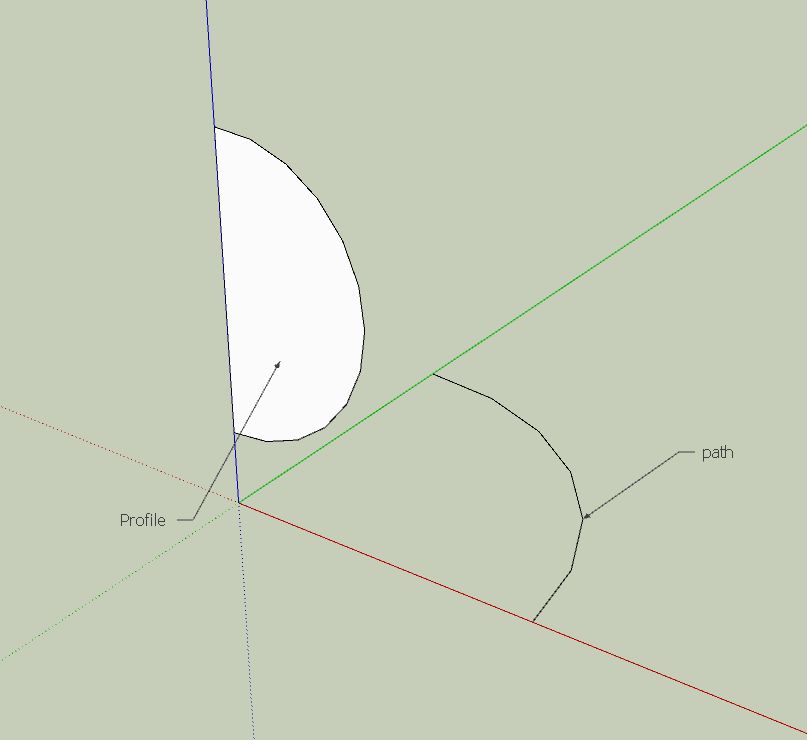
As for a solution, im not really sure. Ive never notice this problem before. Perhaps a bug report is in order.
-
@remus said:
wo3dan, i think he is referring to the fact that the following setup doesnt produce the expected results when using the follow me tool.
[attachment=2:ppmaj6eb]<!-- ia2 -->wodan.JPG<!-- ia2 -->[/attachment:ppmaj6eb]As for a solution, im not really sure. Ive never notice this problem before. Perhaps a bug report is in order.
Remus,
This is indeed my problem.
How to do it with the Follow me tool 2.skp
-
Hans, Remus,
@remus said:
....As for a solution, im not really sure. Ive never notice this problem before. Perhaps a bug report is in order.
It's not a bug and the result is completely predictable.
The 'Follow Me' tool PROJECTS the face to be used on a plane perpendicular to the beginning of the path.
From there on it starts using the projected face which isn't even half a circle anymore!!!%(#FF0000)[To avoid (if you need 1/4 of the sphere) you either create the sphere first and then delete 3/4
OR
as a path you use [1/4 of a circle +1segment] in a way that first segment and end segment start perpendicular to resp. run parallel to the face to be used.]
(of course for this you need to start with a 'path'-circle that has 4n segments i.e. 4, 8, 12, 16 segmemts etc. using 2,3,4,5 segments as the actual path).I noticed another little bug just now that I think wasn't there in SU6 but that has nothing to do with getting a correct 1/4 sphere. I hope I can pinpoint it to report.
Hans, look at your result(s) in plan view (Top+Parallel) to better understand what SU does.
And check the radius which is not constant anymore for different endpoints, top to bottom.Wo3Dan
-
@wo3dan said:
Hans, Remus,
@remus said:
....As for a solution, im not really sure. Ive never notice this problem before. Perhaps a bug report is in order.
It's not a bug and the result is completely predictable.
The 'Follow Me' tool PROJECTS the face to be used on a plane perpendicular to the beginning of the path.
From there on it starts using the projected face which isn't even half a circle anymore!!!%(#FF0000)[To avoid (if you need 1/4 of the sphere) you either create the sphere first and then delete 3/4
OR
as a path you use [1/4 of a circle +1segment] in a way that first segment and end segment start perpendicular to resp. run parallel to the face to be used.]
(of course for this you need to start with a 'path'-circle that has 4n segments i.e. 4, 8, 12, 16 segmemts etc. using 2,3,4,5 segments as the actual path).I noticed another little bug just now that I think wasn't there in SU6 but that has nothing to do with getting a correct 1/4 sphere. I hope I can pinpoint it to report.
Hans, look at your result(s) in plan view (Top+Parallel) to better understand what SU does.
And check the radius which is not constant anymore for different endpoints, top to bottom.Wo3Dan
Thanks Wo3Dan,
If I start and end the path at a midpoint of a segment it works "comme il faut"
Of course the face had to be perpendicular.
Thanks for the class.Hans

Hello! It looks like you're interested in this conversation, but you don't have an account yet.
Getting fed up of having to scroll through the same posts each visit? When you register for an account, you'll always come back to exactly where you were before, and choose to be notified of new replies (either via email, or push notification). You'll also be able to save bookmarks and upvote posts to show your appreciation to other community members.
With your input, this post could be even better 💗
Register Login


Advertisement