Hiding Profile lines/ Edges
-
Hi Susketchr,
Unfortunately Remus is right (I mean not the fact that he is right is unfortunate or what...)
Anyway, you cannot turn profile lines off on only some parts of model.
Lyers on't do any good either because you cannot asign different styles to different layer (only to scenes but this is not the case here).
I'd still uggest to turn proiles off -they are ugl anywy (and you shouldn't "lose edges" when they are turne off).
-
Hi Susketchr, hi folks.
You may try hiding profiles and keeping edges visible.
To hide all edges in the plume, try :
1 - Go to Wireframe Mode.
2 - Select all edges.
3 - Hide them.
4 - Go back to previous Mode (Shaded or Shaded with textures).
Just ideas.
-
You could reduce the size of the profile edges. But it works for the whole model tho
-
Guys,
I think i will turn off the profile lines and make the other objects' textures more darker to make them more visible. This forum is great, i am pleasantly surprised with the number of replies in such a short time. Appreciate all this help guys and keep up the good work.

-
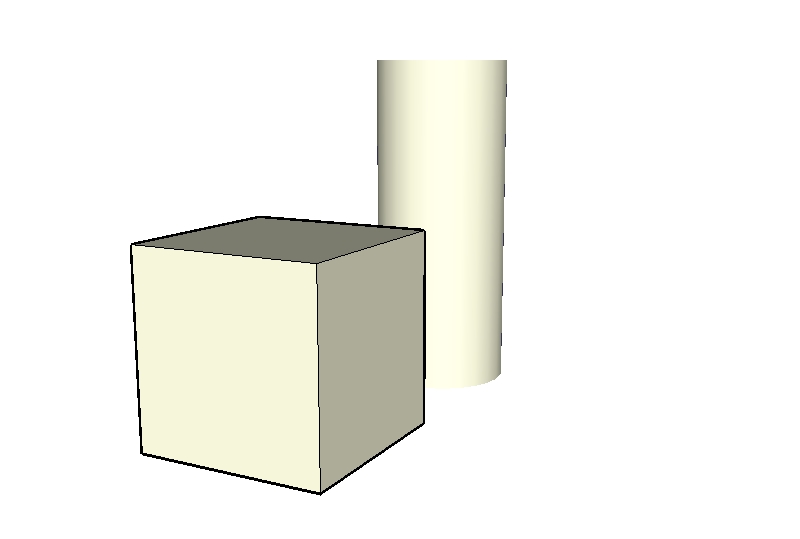
can you post the model of your jet plume? I can't recreate your problem with a simple cylinder... see attached (I have a cube with profiles and a cylinder without)
-
-
or you could create your own style using Style Builder. This way you can play with the Dropout length and Fade Factor and see what comes of it.....
just more ideas... -
@susketcher said:
Mirjman,
Here is the sketchup model file with plume and the rest.susketcher,
The profile lines on the flame are numerous, but not infinite in number. If you're somewhat patient, you can keep rotating the thing and hiding them until you've hidden them all. Using wireframe to see them, Ctrl-A to select them, and a hotkey to hide them, it isn't really all that time consuming and tedious, say, compared to knitting a sweater.
In fact, here, I've done it for you. Just be mighty sure you don't get inside that component and hit Unhide All, or you can do the redo yourself.
~Voder
-
You guys are awesome.

Voder Vocoder,
I had given up on that approach under the impression i am dealing with thousands of line if not infinite. Thank you so very much. -
@susketcher said:
I had given up on that approach under the impression i am dealing with thousands of line if not infinite.
Not really. I'd say there's one for each facet of the cylinder seen edge-on and one for each side of the sawtooth pattern you cut out. Hardly infinite, or even thousands. More like a few dozen or less I'd say.~Voder
-
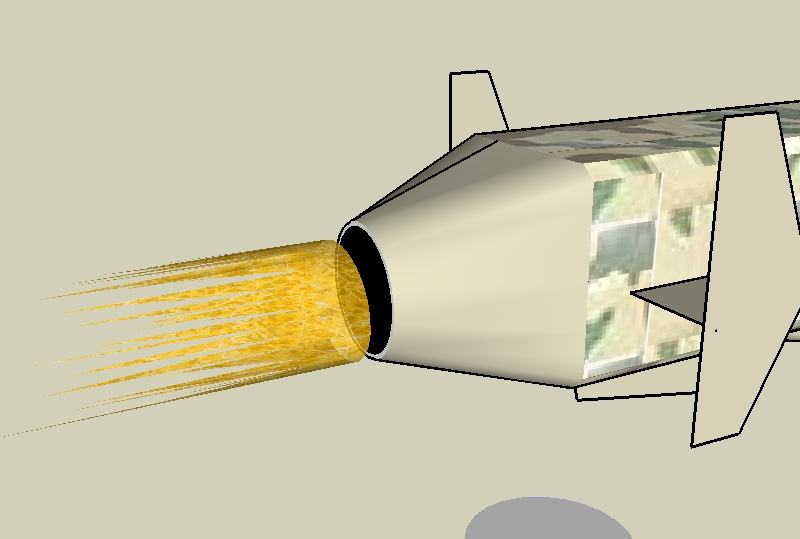
here's how I did it (fastest method):
-
triple click on the jet plume, this selects all
-
hold shift and click on the SURFACE of the plume, this deselects the fire surface but has all the edges selected
-
right click on an edge in the selection and say "hide"
i think this worked because you must have started with a cylinder at some point, similar to my previous post here
-




Hello! It looks like you're interested in this conversation, but you don't have an account yet.
Getting fed up of having to scroll through the same posts each visit? When you register for an account, you'll always come back to exactly where you were before, and choose to be notified of new replies (either via email, or push notification). You'll also be able to save bookmarks and upvote posts to show your appreciation to other community members.
With your input, this post could be even better 💗
Register Login


Advertisement