• Login
sketchucation logo sketchucation
  • Login
Oops, your profile's looking a bit empty! To help us tailor your experience, please fill in key details like your SketchUp version, skill level, operating system, and more. Update and save your info on your profile page today!
⚠️ Important | Libfredo 15.6b introduces important bugfixes for Fredo's Extensions Update

[Plugin] Window Tools: Revised, 4 tools, incl. icons.

Scheduled Pinned Locked Moved Plugins
26 Posts 15 Posters 31.7k Views 15 Watching
Loading More Posts
  • Oldest to Newest
  • Newest to Oldest
  • Most Votes
Reply
  • Reply as topic
Log in to reply
This topic has been deleted. Only users with topic management privileges can see it.
  • T Offline
    tomot
    last edited by 21 Sept 2008, 20:01

    When I started out several weeks ago with the posting of my Simple Glazing Tool plugin, I had no idea at that time, it would have developed 3 other window related plugin. I then felt it was a bit greedy to have these plugins each occupy valuable space in the Plugins menu, which in my particular case is running off the monitor at the moment. Hence I PM'ed Jim Foltz and asked him if he would show me how to assemble these rubies into one menu, with 4 sub-menus. I'm happy and grateful to Jim for providing the new Window Tools plugin menu. And showing me how to Write my methods in a way that they are re-usable, for future projects.

    The installation is as follows:

    1. Unzip WindowTools.zip into the following directory:
      C:\Program Files\Google\Google SketchUp 6\Plugins

    If your using Vista it will be the following directory:
    C:\Program Files (x86)\Google\Google SketchUp 6\Plugins

    The new WindowTools folder, should also be placed in the those respective directories.

    1. Open SU: Under the Plugins menu there will now be a new menu item: Window Tools
      Click Window Tools, to open a submenu, showing 4 window tool titles,
      Glass, Frame, Trim, Mullions.

    2. Goto: View>Toolbars>Window Tools, if you want to have run Window Tools directly
      from the new 4 tool icon bar.

    3. Changing the default glass color:
      Open any Ruby script in Notepad, or a dedicated script editor.
      Look for the following 2 lines: in draw_frame.rb and draw_glass.rb

    base.material=Sketchup;;Color.new(163,204,204) #change RGB Color number here
    base.material.alpha = 0.6  #change opacity number here 
    

    Open the Material Dialog set the color picker to RGB and choose & insert
    your new glass color numbers. Do a Save As, using the same file name and .rb extension.

    1. Revisons:
      Single Glass is now the default.
      Glass now has a vertical and horizontal offset, so it can also be used
      in railings, where one may want a space between adjoining elements.
      Trim has been removed from Glass and Frame, Hence Trim can be added readily also to the
      interior of a window opening.

    I hope you like the new changes and find these tools useful.


    WindowTools.zip

    [my plugins](http://thingsvirtual.blogspot.ca/)
    tomot

    1 Reply Last reply Reply Quote 0
    • P Offline
      pilou
      last edited by 21 Sept 2008, 21:07

      Can you post an image of what the plug is capable?

      Frenchy Pilou
      Is beautiful that please without concept!
      My Little site :)

      1 Reply Last reply Reply Quote 0
      • T Offline
        ton baeten
        last edited by 21 Sept 2008, 22:29

        tomot,

        Thank for your efforts. Nice to see that you integrated the 3 previous plugins into one.
        A simple question: I already installed your 3 plugins.
        Should I delete them before installing your new overall 'Windows Tool'.
        I think that might be wise, but you don't mention that all.
        Please fill me in.

        greetings,
        Ton

        1 Reply Last reply Reply Quote 0
        • T Offline
          tomot
          last edited by 21 Sept 2008, 23:09

          @unknownuser said:

          Can you post an image of what the plug is capable?

          yes see: http://www.sketchucation.com/forums/scf/viewtopic.php?f=180&t=12758

          [my plugins](http://thingsvirtual.blogspot.ca/)
          tomot

          1 Reply Last reply Reply Quote 0
          • T Offline
            tomot
            last edited by 21 Sept 2008, 23:13

            @unknownuser said:

            tomot,
            Should I delete them before installing your new overall 'Windows Tool'.
            I think that might be wise, but you don't mention that all.
            Please fill me in.

            It does not matter when you un-install them before or after,
            and thanks for the reminder

            [my plugins](http://thingsvirtual.blogspot.ca/)
            tomot

            1 Reply Last reply Reply Quote 0
            • P Offline
              pilou
              last edited by 21 Sept 2008, 23:17

              Thx and bravo for the plug! 😎

              Frenchy Pilou
              Is beautiful that please without concept!
              My Little site :)

              1 Reply Last reply Reply Quote 0
              • T Offline
                tomot
                last edited by 22 Sept 2008, 02:46

                Here is what prompted my adventure into Ruby and Windows Tools.
                At that time I had created the simple glazing tool, only for my own use.
                Attached is a picture of my design of a Residence for a Client,
                that I photo shopped into the landscape.
                This House is currently now under construction.
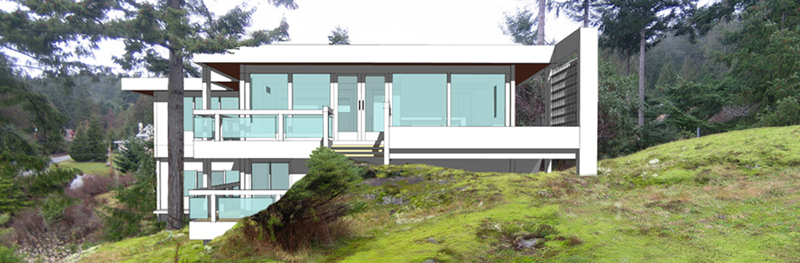

                Pano1.jpg

                [my plugins](http://thingsvirtual.blogspot.ca/)
                tomot

                1 Reply Last reply Reply Quote 0
                • K Offline
                  kobus
                  last edited by 22 Sept 2008, 10:57

                  great plugin, thanks !

                  you should be interested in the future. you will spend the rest of your life there

                  1 Reply Last reply Reply Quote 0
                  • S Offline
                    seasdes
                    last edited by 22 Sept 2008, 12:32

                    Thank you for the plugin Tomot. I do not seem to be able to get it to work as I am anticipating.

                    Is it supposed to cut a double wall?

                    Do you have an idiots guide as how to use it.

                    Seasdes

                    Using Sketchup Pro 2019

                    1 Reply Last reply Reply Quote 0
                    • T Offline
                      tomot
                      last edited by 22 Sept 2008, 14:44

                      @seasdes said:

                      Thank you for the plugin Tomot. I do not seem to be able to get it to work as I am anticipating.

                      Is it supposed to cut a double wall?

                      Do you have an idiots guide as how to use it.

                      Seasdes

                      please check my post http://www.sketchucation.com/forums/scf/viewtopic.php?f=180&t=12072
                      No, It does not cut double walls. It uses the same principles that are used in construction everyday, you need determine where your wall openings are first, before you install the window.

                      [my plugins](http://thingsvirtual.blogspot.ca/)
                      tomot

                      1 Reply Last reply Reply Quote 0
                      • T Offline
                        tomot
                        last edited by 22 Sept 2008, 18:16

                        One should not assume that the Glass Tool or Mullion Tool is capable of defining
                        a rectangular opening only. The opening can be any configuration.
                        As long as the size of the 3 point rectangle is large enough to cover the entire
                        irregular opening. The same holds true for the Mullions. Just make sure those tools
                        are setback sufficiently from the face.
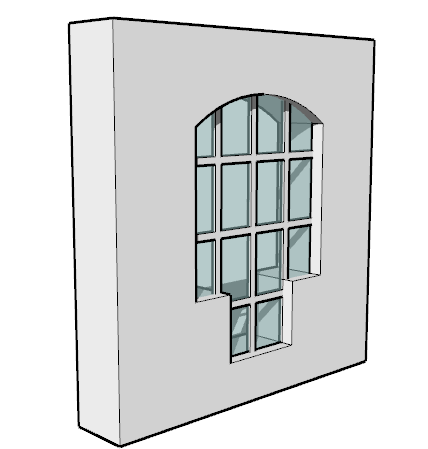

                        window.png

                        [my plugins](http://thingsvirtual.blogspot.ca/)
                        tomot

                        1 Reply Last reply Reply Quote 0
                        • R Offline
                          rv1974
                          last edited by 23 Sept 2008, 04:25

                          Hi Tomot!
                          Can you switch to "cut window" gluing components not groups as the result?
                          There's Didier Bur's ruby to cut thick wall. Even more you could
                          unite 2 scripts.

                          1 Reply Last reply Reply Quote 0
                          • T Offline
                            tomot
                            last edited by 23 Sept 2008, 15:21

                            @rv1974 said:

                            Hi Tomot!
                            Can you switch to "cut window" gluing components not groups as the result?
                            There's Didier Bur's ruby to cut thick wall. Even more you could
                            unite 2 scripts.

                            I'm sorry I don't understand your comments.
                            and can you be more specific: what are the exact names
                            of the scripts you are taking about?

                            [my plugins](http://thingsvirtual.blogspot.ca/)
                            tomot

                            1 Reply Last reply Reply Quote 0
                            • R Offline
                              rcossoli
                              last edited by 24 Sept 2008, 00:52

                              Tanks!!!, I find it very useful, I'm going to try

                              THREEDIMENSIONSWEB dot COM

                              1 Reply Last reply Reply Quote 0
                              • R Offline
                                rv1974
                                last edited by 24 Sept 2008, 04:25

                                @tomot said:

                                @rv1974 said:

                                Hi Tomot!
                                Can you switch to "cut window" gluing components not groups as the result?
                                There's Didier Bur's ruby to cut thick wall. Even more you could
                                unite 2 scripts.

                                I'm sorry I don't understand your comments.
                                and can you be more specific: what are the exact names
                                of the scripts you are taking about?


                                Hi!
                                Your tools produce groups not components. Correct?
                                Components instead of groups are better idea IMHO.
                                Components with "cut opening" and "glue to any plane" (to cut a single plane-wall) would be the best. (See components-architecture-
                                windows for instance).

                                1 Reply Last reply Reply Quote 0
                                • T Offline
                                  tomot
                                  last edited by 24 Sept 2008, 14:43

                                  @rv1974 said:

                                  Your tools produce groups not components. Correct?
                                  Components instead of groups are better idea IMHO.
                                  Components with "cut opening" and "glue to any plane" (to cut a single plane-wall) would be the best. (See components-architecture-
                                  windows for instance).

                                  You have 5 choices available to you:

                                  use existing components,
                                  make your own components,
                                  use Windowizer,
                                  use Window Tools,
                                  design your own Ruby.

                                  In addition once you have made a window with Window Tools, you simply select all the groups right click and make your own component. You can quickly make any number of different windows, and save each as a component.
                                  But, if you prefer to use only a "single wall plane" then simply use Windowizer.

                                  The reason why I made Window Tools is explained here.

                                  301 Moved Permanently

                                  favicon

                                  (www.sketchucation.com)

                                  I have been in Residential design and construction for 39 years, during that time, I have never considered designing a 3d envelope using single planes for my Clients.

                                  [my plugins](http://thingsvirtual.blogspot.ca/)
                                  tomot

                                  1 Reply Last reply Reply Quote 0
                                  • C Offline
                                    cyan.archnet
                                    last edited by 25 Sept 2008, 01:20

                                    Hats off to you for this plugin!, thanks!!

                                    1 Reply Last reply Reply Quote 0
                                    • A Offline
                                      agrazdi
                                      last edited by 25 Sept 2008, 01:44

                                      Are you planning to extend it to draw doors ?

                                      Thanks

                                      agrazdi

                                      1 Reply Last reply Reply Quote 0
                                      • T Offline
                                        tomot
                                        last edited by 25 Sept 2008, 14:49

                                        @agrazdi said:

                                        Are you planning to extend it to draw doors ?

                                        Thanks

                                        agrazdi

                                        Yes, I'm working on this project, however I'm still unclear
                                        as to how many types of doors, should be included.
                                        probably: single, double, and sliding.
                                        at present I have only single door with right and left hand option.

                                        [my plugins](http://thingsvirtual.blogspot.ca/)
                                        tomot

                                        1 Reply Last reply Reply Quote 0
                                        • honoluludesktopH Offline
                                          honoluludesktop
                                          last edited by 25 Sept 2008, 17:08

                                          How about adding a pair of bifolds.

                                          1 Reply Last reply Reply Quote 0
                                          • 1
                                          • 2
                                          • 1 / 2
                                          1 / 2
                                          • First post
                                            7/26
                                            Last post
                                          Buy SketchPlus
                                          Buy SUbD
                                          Buy WrapR
                                          Buy eBook
                                          Buy Modelur
                                          Buy Vertex Tools
                                          Buy SketchCuisine
                                          Buy FormFonts

                                          Advertisement