sketchucation logo sketchucation
    • Login
    Oops, your profile's looking a bit empty! To help us tailor your experience, please fill in key details like your SketchUp version, skill level, operating system, and more. Update and save your info on your profile page today!
    ⚠️ Update | Sketchucation Tools 5.0.8 released with licensing improvements and bugfixes Download

    Modeling leg for table

    Scheduled Pinned Locked Moved SketchUp Tutorials
    sketchup
    8 Posts 7 Posters 1.7k Views 7 Watching
    Loading More Posts
    • Oldest to Newest
    • Newest to Oldest
    • Most Votes
    Reply
    • Reply as topic
    Log in to reply
    This topic has been deleted. Only users with topic management privileges can see it.
    • G
      GLB
      last edited by

      Hi everbody,

      I am having problem modeling the leg of attached table.
      For those who cannot see the detail, it has flutes all around !
      Can sombody give me any clue to solve my poblem, thanks.
      GLB
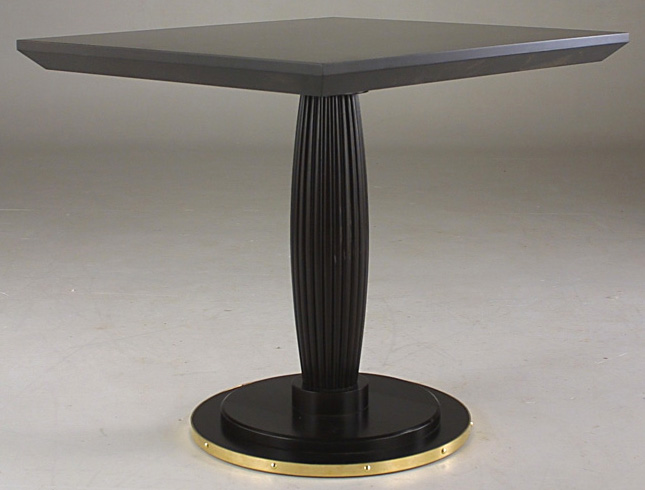

      TB7051NH080.jpg

      1 Reply Last reply
      Reply Quote 0
      • BurkhardB
        Burkhard
        last edited by

        404 Not Found

        favicon

        (www.sketchucation.com)

        You also can try the video tutorial Tips and Tricks.Gaius shows how to make a column.

        http://www.ia-plus.de

        1 Reply Last reply
        Reply Quote 0
        • R
          remus
          last edited by

          Id probably go for the push/pull scale method for this.

          Basically you draw the top of the column, push pull it to get some thickness, scale the bottom face then push pull it again. Scale the bottom face again then push pull it. You keep going like that until your half way down the column so you can copy it down to make the other half of the column.

          http://remusrendering.wordpress.com/

          1 Reply Last reply
          Reply Quote 0
          • D
            dsarchs
            last edited by

            I have to agree with Remus -- that would be the easiest way to approach this.
            The only problem would be getting a smooth and accurate curve. I would either use control points that you snap to or, from an orthographic view, scale until it matches an image behind.

            Knowledge is a polite word for dead but not buried imagination.

            -e.e.cummings

            1 Reply Last reply
            Reply Quote 0
            • soloS
              solo
              last edited by

              Not sure if this is the easiest or best way of doing it however this is how I would probably approach it.

              Create a circle

              http://img227.imageshack.us/img227/8673/footoftable1wj4.jpg

              Extrude it

              http://img222.imageshack.us/img222/6893/footoftable2cz4.jpg

              Using Fredo's 'normal push pull' ruby

              http://img84.imageshack.us/img84/8904/footoftable4hh0.jpg

              Then you remove the top and bottom faces and apply 2 iriterations of Whaat's 'Subdivide and smooth' ruby.

              http://img132.imageshack.us/img132/3586/footoftable5wy0.jpg

              Now using Cphillip's 'Sketchy FFD' ruby you shape the one end as required.

              http://img84.imageshack.us/img84/580/footoftable6pl9.jpg

              And finally you make it a component and duplicate and flip a copy of it hidding edges where they join to get this result.

              http://img135.imageshack.us/img135/7903/footoftable7tl8.jpg

              http://www.solos-art.com

              If you see a toilet in your dreams do not use it.

              1 Reply Last reply
              Reply Quote 0
              • W
                watkins
                last edited by

                Dear Solo,

                Thank you for the very clear tutorial. This is the sort of thing I look for when I log in.

                Kind regards,
                Bob

                1 Reply Last reply
                Reply Quote 0
                • plot-parisP
                  plot-paris
                  last edited by

                  I second that - great tutorial, clear and spot on!

                  and Solo, you really know how to employ all the various scripts! 😎

                  1 Reply Last reply
                  Reply Quote 0
                  • G
                    GLB
                    last edited by

                    Yeah, thanks to all of you for your answers and ideas, and especially to the very clear tutorial from solo !
                    You can also find an easy way I got from other forum, very interesting for all of those who design furniture with SKU :
                    http://www.systemed.fr/Forum/forum_topics.asp?FID=18&PN=1
                    GLB
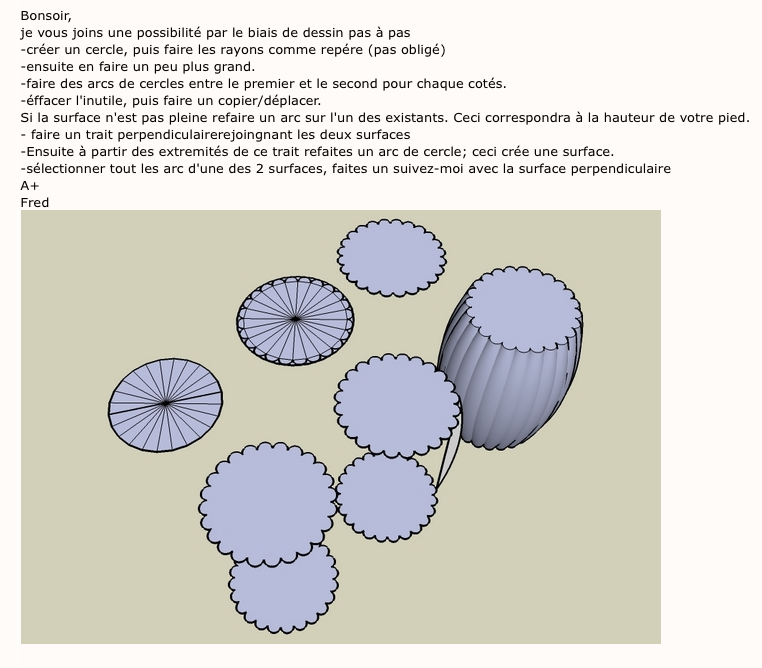

                    Fût colonne cannelée avec renflement.png

                    1 Reply Last reply
                    Reply Quote 0

                    Hello! It looks like you're interested in this conversation, but you don't have an account yet.

                    Getting fed up of having to scroll through the same posts each visit? When you register for an account, you'll always come back to exactly where you were before, and choose to be notified of new replies (either via email, or push notification). You'll also be able to save bookmarks and upvote posts to show your appreciation to other community members.

                    With your input, this post could be even better 💗

                    Register Login
                    • 1 / 1
                    • First post
                      Last post
                    Buy SketchPlus
                    Buy SUbD
                    Buy WrapR
                    Buy eBook
                    Buy Modelur
                    Buy Vertex Tools
                    Buy SketchCuisine
                    Buy FormFonts

                    Advertisement