Help! Sketchup files look terrible in Layout?
-
I dont know what is going on??? I have a floor plan in Sketchup it looks ok in Sketchup, but when I insert it into layout the quality is so poor it looks terrible, when I zoom in on my sketchup model in layout the line thickness is about a foot thick (in Scale)... Whats going on? I have the resolution set to 300 in sketchup. I think I attached the correct file showing this.
Thanks Terry
-
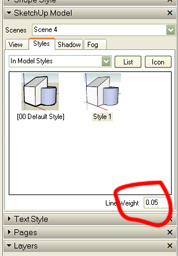
Layout optimises the view to speed things up while you are working on it. you also can assign line thickness to the windows.
-
thank you Tobi,
It's amazing how someone can spend hrs looking for something and it's right there in tiny little box! -
No problem mate.
Post some stuff when your done so we can see your work
-
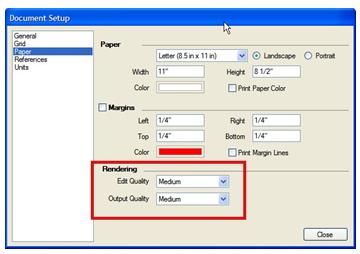
Just to point out an item that Tobobo mentioned above, Layout has settings to allow you to design and arrange your models at a low res state, to allow for better performance, and export at a higher dpi/res.
All this is done through the Document Setup/Paper... Rendering. See attached image
Cheers
CMD


Hello! It looks like you're interested in this conversation, but you don't have an account yet.
Getting fed up of having to scroll through the same posts each visit? When you register for an account, you'll always come back to exactly where you were before, and choose to be notified of new replies (either via email, or push notification). You'll also be able to save bookmarks and upvote posts to show your appreciation to other community members.
With your input, this post could be even better 💗
Register Login


Advertisement