sketchucation logo sketchucation
    • Login
    1. Home
    2. TaffGoch
    3. Posts
    Oops, your profile's looking a bit empty! To help us tailor your experience, please fill in key details like your SketchUp version, skill level, operating system, and more. Update and save your info on your profile page today!
    ⚠️ Important | Libfredo 15.6b introduces important bugfixes for Fredo's Extensions Update
    Offline
    • Profile
    • Following 0
    • Followers 0
    • Topics 7
    • Posts 364
    • Groups 1

    Posts

    Recent Best Controversial
    • RE: New user and first "please help me to model this". thanks

      Marco,

      I use the Taper Maker plugin, which will produce round (or square, etc.) curved tapers. It's a free SketchUp plugin, available here:
      http://www.drawmetal.com/tapermaker

      This plugin should make perfect round-cross-section legs for your table.

      [ EDIT: I see johnsenior1973 beat me to it! ]

      Regards,
      Taff

      posted in Newbie Forum
      TaffGochT
      TaffGoch
    • RE: Create solid-appearing 3d models of a subsurface

      @gealagie said:

      ...I may want to find an app that will re-triangulate/simplify the TIN surface into one with irregularly spaced nodes to more efficiently describe the surface. If anyone has ideas....

      This summer, there was much discussion about simplifying/regularizing terrain TINs, eventually leading to a plugin (written in the "ruby" programming language, by the way.)

      The discussions demonstrate the collaborative "think tank" environment we enjoy here in the Community Forums:
      http://www.sketchucation.com/forums/scf/viewtopic.php?f=15&t=11164
      http://www.sketchucation.com/forums/scf/viewtopic.php?f=180&t=11320

      (You can download the "terrain reshaper" plugin, in the first post of the second discussion - Thanks to Didier!)

      Taff

      posted in SketchUp Discussions
      TaffGochT
      TaffGoch
    • RE: Importing data from Excel

      Allyson,

      You can save your Excel data in three columns (x,y,z) as a '.csv' (comma-separated-values) file. Excel produces a text file containing your x,y,z data.

      The .csv file can be imported into SketchUp, by use of Didier Bur's 'Cloud_V6' plugin, available here:
      http://www.crai.archi.fr/RubyLibraryDepot/Ruby/en_fil_page.htm

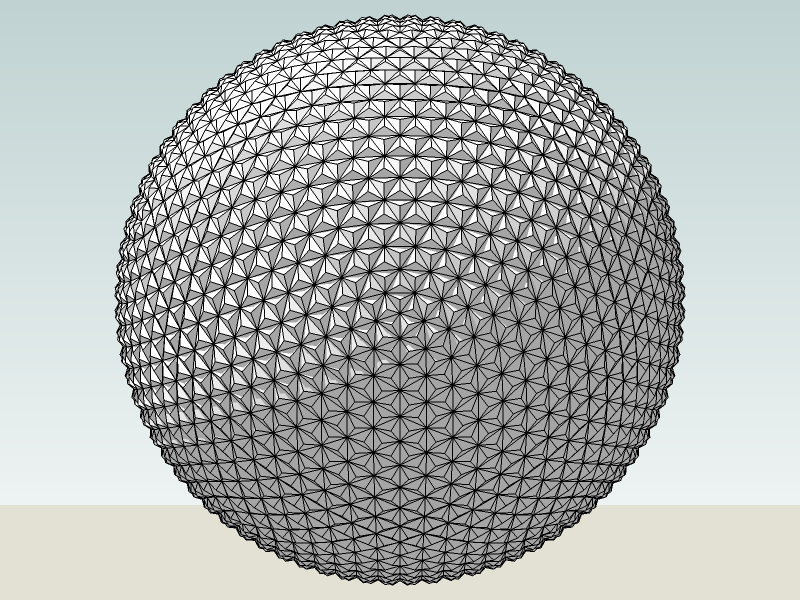
      Note that this plugin will create a guidepoint at each x,y,z location. It can 'skin' the surface, if it's relatively horizontal (such as a topographic surface.) If you have any vertical faces, or 'bottom' faces, or vertices that are 'stacked' over another, the skinning won't work properly. I use the plugin to import vertices for geodesic spheres, and manually connect the data points with the 'line' tool.

      Epcot_Spaceship_Earth.png
      If you have faces that are vertical, or 'beyond' vertical (undercut,) you likely will have to do some manual line connections yourself. Hopefully, this method will give you the start you need.

      Taff

      posted in Newbie Forum
      TaffGochT
      TaffGoch
    • RE: Create solid-appearing 3d models of a subsurface

      Gealagie,

      I encourage you to look into Gaieus's suggestion to use the Cloud_V6 plugin. It can take an x,y,z list (ASCII) of point coordinates, and import them into SketchUp, and 'skin' it with faces, as well.

      I use it to import x,y,z data in the ".csv" spreadsheet file format, one of the formats the Cloud plugin recognizes.

      I've used DEM and DXF in the past, for terrain surfaces, but now defer to Cloud (avoiding data file conversions.)

      Taff

      posted in SketchUp Discussions
      TaffGochT
      TaffGoch
    • RE: Need SketchUp ver. 6.0.514 no links work

      I did find out that the original file name was:
      ( Free version - Mac - 6.0.514 )
      http://dl.google.com/sketchup/gsu6/FM100407ENA.dmg

      But it no longer exists at that location. (Only the new version, PM101494ENA.dmg)

      Maybe the old filename info will help in your search.

      Taff

      posted in SketchUp Discussions
      TaffGochT
      TaffGoch
    • RE: Need SketchUp ver. 6.0.514 no links work

      alphaonerecon,

      How about here:
      http://mac.wareseeker.com/Multimedia-Design/google-sketchup-6.0.514.zip/324985

      Taff

      posted in SketchUp Discussions
      TaffGochT
      TaffGoch
    • RE: Sketchup 7 PRO Download

      rogerra,

      You can download from here...
      http://sketchup.google.com/gsu7/download.html
      ...without having to fill-out the forms.

      Taff

      posted in SketchUp Discussions
      TaffGochT
      TaffGoch
    • RE: Need SketchUp ver. 6.0.514 no links work

      alphaonerecon,

      Don't overlook remus's mention of the Pro version. If you can find and download that version, it will revert to the free version after eight hours of use.

      I compared the SketchUp 6 and SketchUp 7 (Mac) download links here...
      http://sketchup.google.com/gsu6/download.html
      ...and here...
      http://sketchup.google.com/gsu7/download.html
      ...and they appear to be different downloads:
      The Mac Pro 6 version is 66MB, and the Mac Pro 7 version is 75MB.

      You may find that you can indeed download version 6 (Pro) at the first URL above. (Worth a try, anyway, right?)
      Direct link -- http://dl.google.com/sketchup/gsu6/PM101494ENA.dmg

      Regards,
      Taff

      posted in SketchUp Discussions
      TaffGochT
      TaffGoch
    • RE: !!Please help!!

      Nate,

      I suggest you download and install the plugin, UVtools. See this discussion about the tool, and how to use it. Note that it may still be a work-in-progress. Be sure to read all the posts in the discussion, to fully understand how to get the tool to work, as there are no other instructions. All issues are, however, covered in the discussion:

      http://www.sketchucation.com/forums/scf/viewtopic.php?f=180&t=10404

      It's a great tool! (Thanks, again, Whaat.) I even added, to the above discussion, one of my experiments with mapping a globe.

      Regards,
      Taff

      posted in SketchUp Discussions
      TaffGochT
      TaffGoch
    • RE: !!Please help!!

      @unknownuser said:

      **":3czlaesc]...it isn't exactly what i needed for this particular project...

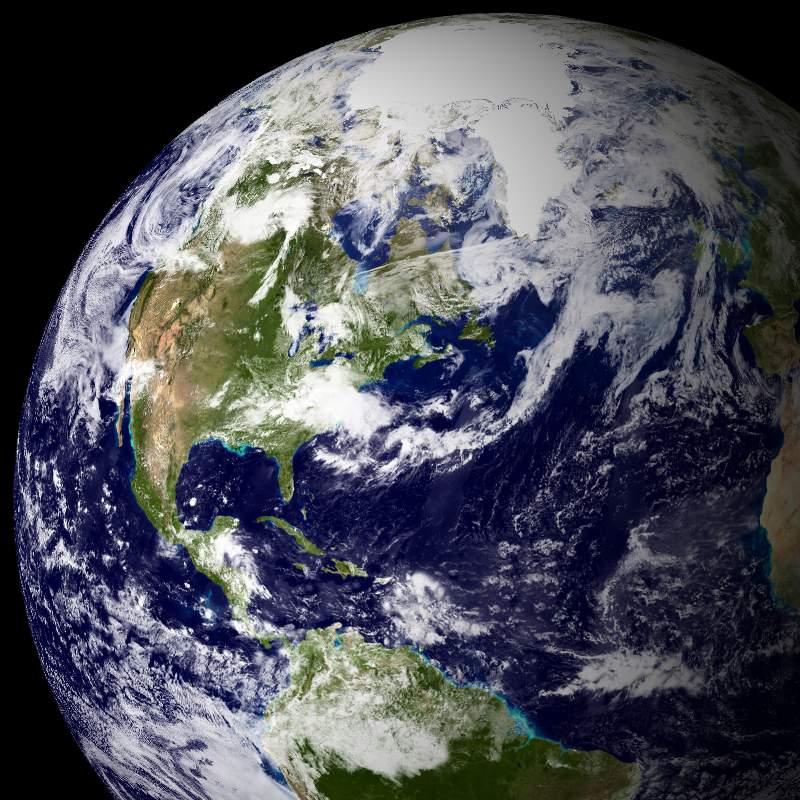
      You were particularly specific in your initial plea for help. You want to transfer a rectangular map onto a sphere?
      The UVtools plugin is the particularly-appropriate means of quickly and easily doing so!

      Note that the referenced discussion is many pages long. Did you review all posts in the thread, on the pages subsequent to page one?

      http://www.sketchucation.com/forums/scf/viewtopic.php?f=180&t=10404

      Taff


      Blue Marble.jpg

      posted in SketchUp Discussions
      TaffGochT
      TaffGoch
    • RE: Texture: how to map it to a bending cylinder

      I based my wrap-around interpretation upon...

      @unknownuser said:

      ...so the lines wrap around the cylinder all the way through...

      ...assuming he meant "...all along the length."

      I first considered using a projection from the side as well, but that would only work with specialized cases (and it works well, as demonstrated by Remus and solo.) I, myself, have put side projections to good use, in the SU modeling of terrain altitude:
      http://sketchup.google.com/3dwarehouse/details?mid=77627ea5941ff3d387ecd6083924dba

      I sought a solution that would work with any geometry, no matter how it twists-and-turns in 3 dimensions. No such luck, without the tedious, repeated sampling/painting. Makes me wonder if our community ruby gurus have pondered this?

      Taff

      posted in Newbie Forum
      TaffGochT
      TaffGoch
    • RE: Texture: how to map it to a bending cylinder

      Voder Vocoder,

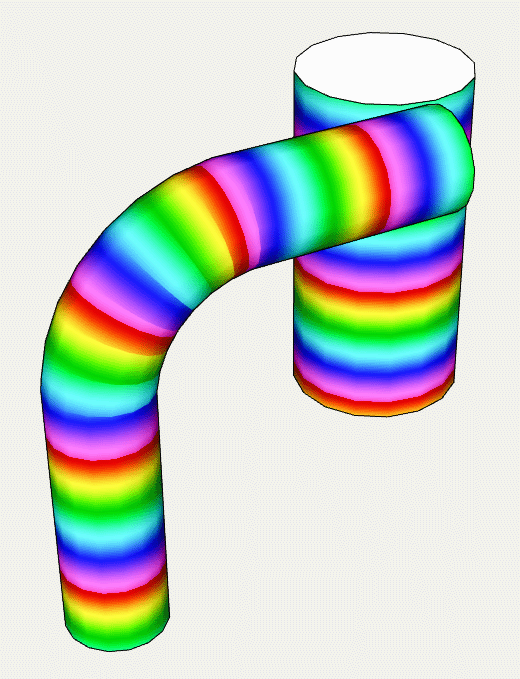
      How would you approach this? (...which is what I think CurryPork may be after.)

      Capture001 28Nov2008.png
      I know that, for me, it was a pain in the butt. I tried "UVtools," but it's obviously inappropriate to the task. Is there, perhaps, a "follow me" type tool for texture, with which I'm not familiar?

      (To obtain the above result, I had to repeatedly sample/paint adjacent faces, with hidden-line viewing turned on.)

      Taff

      posted in Newbie Forum
      TaffGochT
      TaffGoch
    • RE: Strange noise in layers

      salsainglesa,

      I seem to recall that this awkward-sounding beep was due to a ruby plugin. The plugin was calling the "UI.beep" function. I've searched, and found that's the case with the following plugins:

      ContourMaker.rb
      CutListAndMaterials.rb
      Linetool.rb
      Ldraw.rb
      Multiwalltool.rb
      PurgeAll.rb
      SectionCutFace.rb
      Slicer.rb
      Slicer3.rb
      Ultiwalltool.rb
      VolumeCalculator.rb
      ZVolume.rb

      The culprit would have to have something to do with the layers (obviously,) but I haven't poked around in the above plugins to see if any of these access layers. All I can remember is that it had to do with an "older" plugin.

      I did find the following discussion, but it's unclear whether the issue was resolved to the poster's satisfaction:
      http://groups.google.com/group/SketchUp3d/browse_thread/thread/4317cbb9f84d77d8?hl=en

      Perhaps someone else recalls the discussion to which I'm referring?

      Taff

      posted in Newbie Forum
      TaffGochT
      TaffGoch
    • RE: Import geodesic coordinates

      jantglez,

      Welcome to the SCF!

      If you're talking about longitude/latitude, or theta/rho angular (spherical) coordinates for points on the surface of a sphere, SketchUp does not natively support those coordinate systems. SketchUp expects cartesian (x,y,z) coordinates.

      I typically use a spreadsheet to convert from angle/vector coordinates to cartesian coordinates. I then import the cartesian coordinates into SketchUp, using a '.dxf' data file, or '.csv' file (using a ruby plugin.) Both are text data file formats. SketchUp natively supports the import of DXF files. To import a CSV file, you can download and install the "Cloud_V6.rb" plugin from this page...
      Ruby Library Depot
      ...thanks to Didier Bur. (The plugin is 'zipped' as "Cloud_V6.zip")

      The cloud plugin will import points only (i.e.; a "points cloud".) A properly-formatted DXF file can import points, lines and polygons, but, as expected, is a more-complicated file to generate with a spreadsheet.


      Note that I use these methods for geodesic dome constructions (3D Warehouse - Geodesic Collection)

      If you don't need to cover a spherical area, but only a small patch on the surface (such as earth longitude/latitude), then other means may be available to you. I must, apologetically, leave comments on those potential methods to others, who have more experience importing GIS and longitude/latitude survey data.

      Regards,
      Taff

      posted in Newbie Forum
      TaffGochT
      TaffGoch
    • RE: Google Sketchup Pro 7 is out

      Woo-Hoo!

      posted in SketchUp Discussions
      TaffGochT
      TaffGoch
    • RE: Drawing on a curved surface?

      insane...

      Don't overlook the "drape" tool in the Sandbox tools. Here's a recent example:
      http://sketchup.google.com/3dwarehouse/details?mid=68491d5218d5b4ccc34adbe2a4618c46

      You can read about draping, and the sandbox tools, in the Users Guide:
      http://download.sketchup.com/OnlineDoc/gsu6_win/Content/P-Terrain_Modeling/TerrainTool-Drape.htm

      Taff

      posted in Newbie Forum
      TaffGochT
      TaffGoch
    • RE: Can You EASILY Change Protractor Orientation?

      Louis,

      The drag-technique that Voder describes -- demonstrated:
      How do I get the protractor and rotate cursors to do what I want?

      Taff

      posted in SketchUp Discussions
      TaffGochT
      TaffGoch
    • RE: SketchUp WebExporter...

      Luke,

      The WebExporter plugin "facilitates" setting horizontal-rotation camera positions, exporting the pictures, and generating HTML javascript code for display on a website. If you examine the javascript code produced, and the image files created, you'll see that the web code is simply displaying a series of images, with mouse control.

      You can substitute whatever images you want (keeping the names straight, of course.) The web code will still display the series of images, with mouse cursor control. As you have noted, mouse control is for horizontal rotation. If your model approximates a horizontal direction, you can substitute images to do something like this, on José Manuel's blog:
      Modelado con SketchUp
      (Give the images time to load - it may take a little while.)

      If you're familiar with javascript, it shouldn't be too difficult to modify the script produced by the WebExporter plugin, to switch to a vertical axis. With the appropriate images, mouse control will provide the appearance of vertical rotation.

      That's the "manual" way of making such changes.


      To automate the process -- modifying the WebExporter plugin -- it appears that the rubyscript file is plain text, as are the support files (except for "RubyZip.dll" -- for compressing the produced files?) Since the plugin and the produced html files are plain text, it should be possible to produce a "new" vertical-rotation WebExporter plugin, using the original as a boilerplate.


      Getting the existing WebExporter plugin to do other than horizontal? Nope -- that's all it can do.

      Taff

      posted in SketchUp Discussions
      TaffGochT
      TaffGoch
    • RE: Curves help

      @unknownuser said:

      **":3ux7ncb2]...how would i make the sides of the staircase also raise \ like that is you get me whilst curving."

      You aren't likely to easily get the sides to raise using the push/pull tool. (If you do succeed, let us in on the trick.)

      Typically, such geometry is constructed, rather than taking a flat plan and "raising" it. You can use the flat plan as a reference, though, and base your 3D construction on reference points from the plan. You're likely to need the elevation view as well. You can construct without the elevation view, but the 3D-construct will be much more accurate if you include it.

      Here's an example from a past discussion:
      http://www.sketchucation.com/forums/scf/viewtopic.php?f=79&t=12511

      I've posted the same model at the 3D Warehouse:
      http://sketchup.google.com/3dwarehouse/details?mid=c33b5756c92fd31c9e7d0b0047cf94a

      There are tutorials for spiral staircase construction in the warehouse, such as...
      http://sketchup.google.com/3dwarehouse/details?mid=7672fd45565be2b53e4ec0bf8b876793
      http://sketchup.google.com/3dwarehouse/details?mid=3ff892f11dbb05184b13ef41335991d9

      ...and many others...
      http://sketchup.google.com/3dwarehouse/search?q=spiral+stair&styp=m&reps=1&scoring=d&num=50
      ...but most are not tutorials.

      Google has even provided a 3D Warehouse tutorial...
      http://sketchup.google.com/3dwarehouse/details?mid=b9890f8eb19a731583b9bda21bd049d
      ...to go with a post at the official Google SketchUp Blog:
      http://sketchupdate.blogspot.com/2008/07/building-spiral-stairs.html

      There are plugins for creating spirals and helices, however, since you're working from a plan, they aren't likely to help in this specific case. Hopefully, the above references will provide you with the techniques you need to construct the stairs. Let us know how you're getting along.

      Taff

      posted in Newbie Forum
      TaffGochT
      TaffGoch
    • RE: Not sure what to make in SU, need ideas

      @unknownuser said:

      ":35h96pqt]...when I got my phone, that's exactly what I said."

      Aww,Voder,...
      ...I don't know whether to laugh 😆 or cry 😢

      Taff

      posted in Newbie Forum
      TaffGochT
      TaffGoch
    • 1 / 1