sketchucation logo sketchucation
    • Login
    1. Home
    2. pingpink
    3. Posts
    Oops, your profile's looking a bit empty! To help us tailor your experience, please fill in key details like your SketchUp version, skill level, operating system, and more. Update and save your info on your profile page today!
    ⚠️ Important | Libfredo 15.6b introduces important bugfixes for Fredo's Extensions Update
    Offline
    • Profile
    • Following 0
    • Followers 0
    • Topics 16
    • Posts 56
    • Groups 1

    Posts

    Recent Best Controversial
    • Offset + Thickness + Groups

      Hi Everyone ,

      I'm trying to write a code to make a real glass size which I want to make all 3 functions of
      

      Glass Offset , Thickness , and Group's name of " Glass Unit " in one time. From what I can do is to make Glass Offset + Thickness. They are all faces , but I want to convert faces to separate groups at the end. How can I add groups and have a name of glass unit ?

      def face_offset
      
      	model = Sketchup.active_model
      	model.start_operation( "Face Offset" , true)
      	selection = model.selection 
      	entities = model.active_entities 
      	arr = []
      	faces = []
      	selection.each{|entity| 
      	   if entity.class == Sketchup;;Face 
      	     arr.push entity 
      	   end 
      	}
             $face_offset = 13
      	 $glass_thickness = 6
      	 prompts = ["Offset Width [mm] ", "Glass Thickness [mm] "]
      	 defaults = [$face_offset.to_s,$glass_thickness ]
      	 list = ["",""]
      	 input = UI.inputbox prompts, defaults, list, "Offset Face."
      
      	 doffset = input[0].to_f
               $face_offset = doffset
      	 berase = true
      	
      	# 1. Offset Glass + Erase outer faces
          arr_glass = []
      
          arr.each{|entity| 
      	   face  = face_offset1(entity, doffset.mm, berase)
      	   arr_glass.push face
      	} 
      
      	
      	entities.each do |e|
            faces.push e if e.is_a? Sketchup;;Face
      	  
          end
      	
      	# 2. Glass Thickness
          distance = input[1]
       
          faces.each do |e|
            e.pushpull distance.mm, true
      	  
          end
      	
      	# 3. Make all to be glass groups 
      	# faces.each do |e|(g=entities.add_group(e.all_connected)
              # g.name="GLASS UNIT")if e.valid? and e.parent==entities.parent and e.class==Sketchup;;Face
      	# end
          
       
          model.commit_operation 
      end
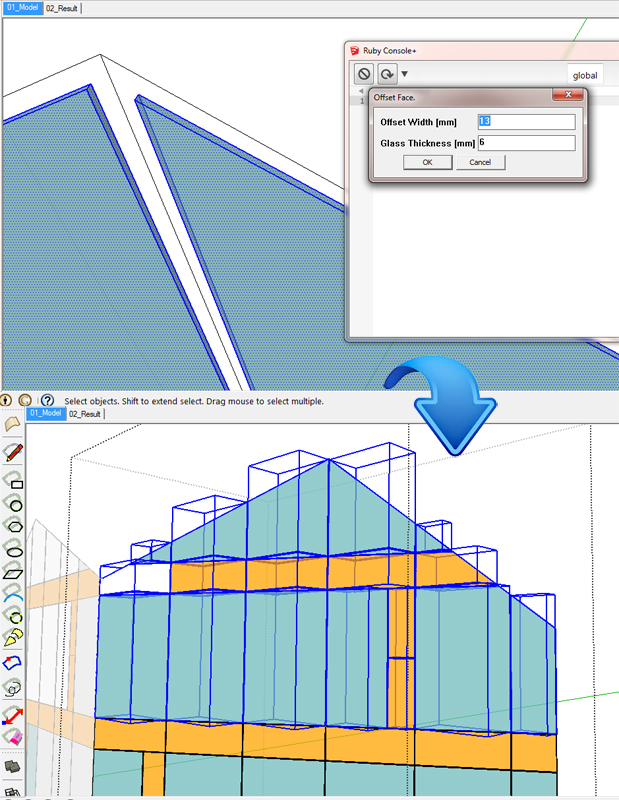
      

      Real_Size_Glass_Groups.jpg

      posted in Developers' Forum
      pingpinkP
      pingpink
    • RE: Material Take-Off by layers

      Wow ! I changed the codes and it can analyze the layers.

      Thank you very very much , Dan !!

       selection.each { |s|
            
            is_group = s.is_a? Sketchup;;Group
            is_component = s.is_a? Sketchup;;ComponentInstance
      
      		if s.layer.name == "Aluminium"
      
      
      ----continue----
      
      }
      
      posted in Developers' Forum
      pingpinkP
      pingpink
    • Material Take-Off by layers

      I'm trying to do a material take-off for the building project.

      I have provided 4 web dialogs to extract data of aluminium , glass , panel ,and cap.

      My problem is that when I select all model , the codes can not differentiate each type of layer selection. For example , web dialog of aluminium report should select only groups or components in a layer " Aluminium " , not combine with other layers. How can I write a condition of model selection in a specific name ?

      selection.each { |s|
            
            is_group = s.is_a? Sketchup;;Group
            is_component = s.is_a? Sketchup;;ComponentInstance
            
           
            if (is_component || is_group) && s.layer.visible?
      
             layers = model.layers
      	       new_layer = layers.add "Aluminium"
      }
      
      posted in Developers' Forum
      pingpinkP
      pingpink
    • RE: Store Patterned Data

      Thank You So much,Tig. It works ! πŸ˜„

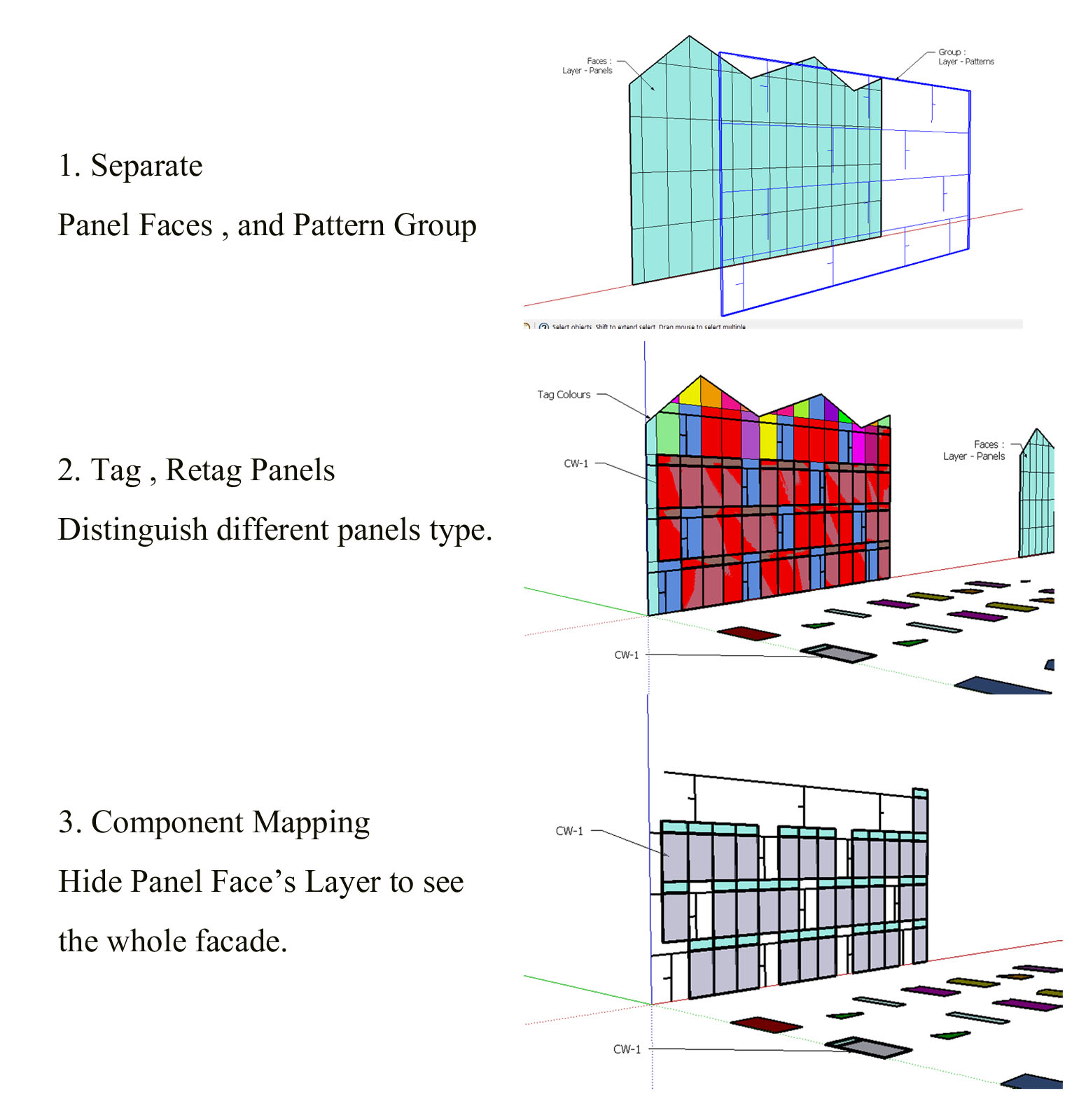
      This is the idea to revise a model from architect by storing data at the first time. And later use to recheck data for tagging panels , and take the panel out in order that the facade engineer can do the life size panels to do mapping back on sub-dividing panels.

      The method I do :
      The subdividing faces are in the "Layer0".
      The patterns are in the Layer-"Patterns".
      So , they are not mix together in the same layer.

      For the shortage time to "delete coplanar edges or patterns" , I have to select edges by degrees and use your code to delete edges because the group edge and original edges are overlap that I have to delete original edges.So , it doesn't affect to bring tagging panels out , and I can recheck the patterned data to do retag panels.

      For the store patterned data , maybe it comprise of 3 functions :

      1.Make edge group
      2.Select Coplanar edges by degrees
      3.Delete Coplanar edges selection

      posted in Developers' Forum
      pingpinkP
      pingpink
    • RE: Store Patterned Data

      I rethink again , maybe I have to separate between panel faces and pattern group ? πŸ˜„


      Method

      posted in Developers' Forum
      pingpinkP
      pingpink
    • Store Patterned Data

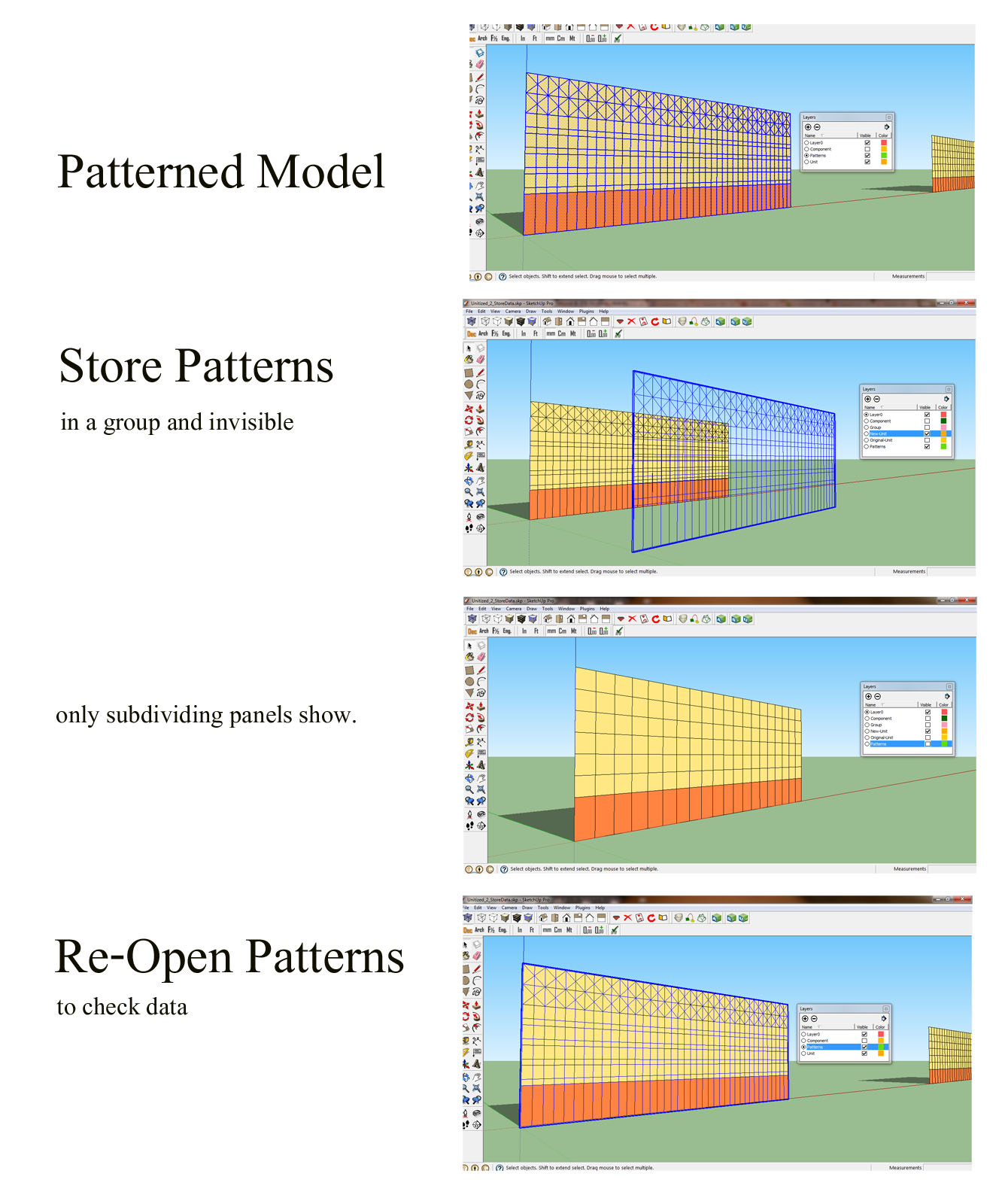
      I'm trying to store patterned data to recheck the design for later use of different coloured panels.

      Process Steps :

      1. Select a patterned model.

      2. The patterns are convert into a group and in a layer "Patterns" and be invisible temporary.

      3. Only the sub-dividing faces are shown , later I can open the patterned group.

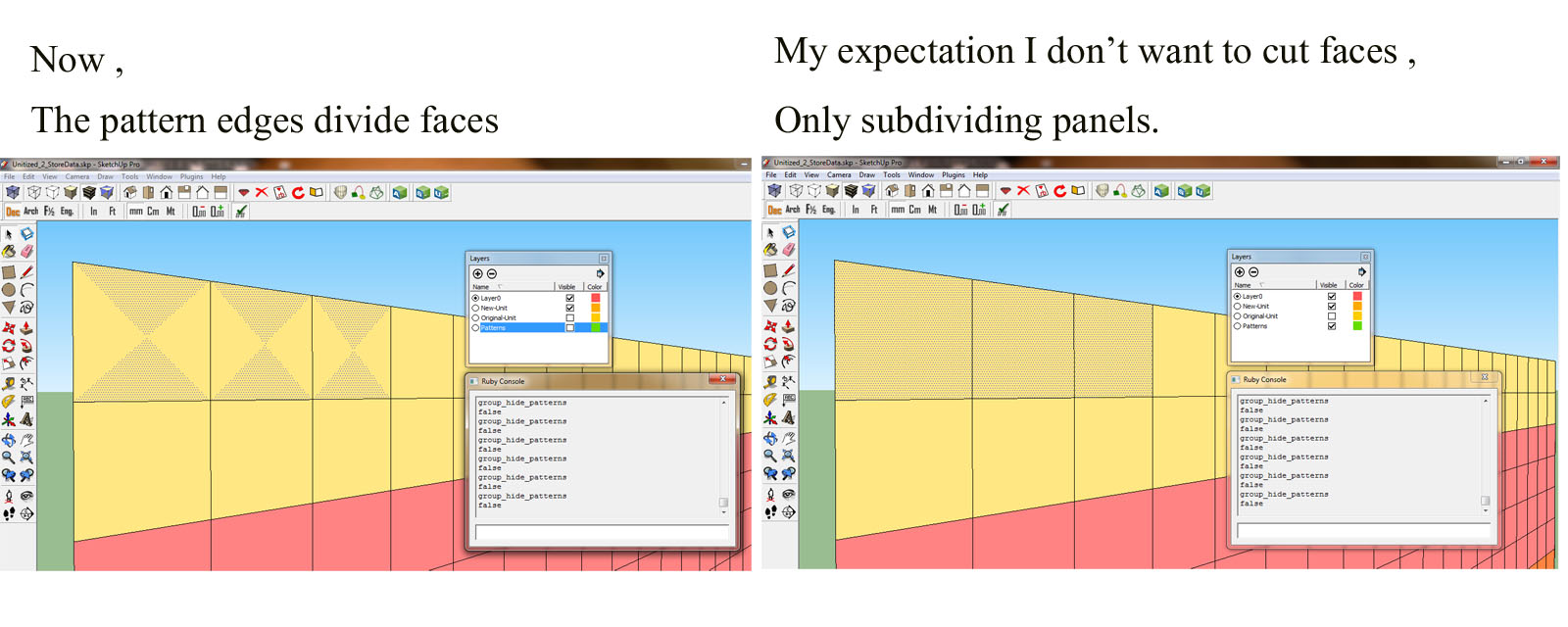
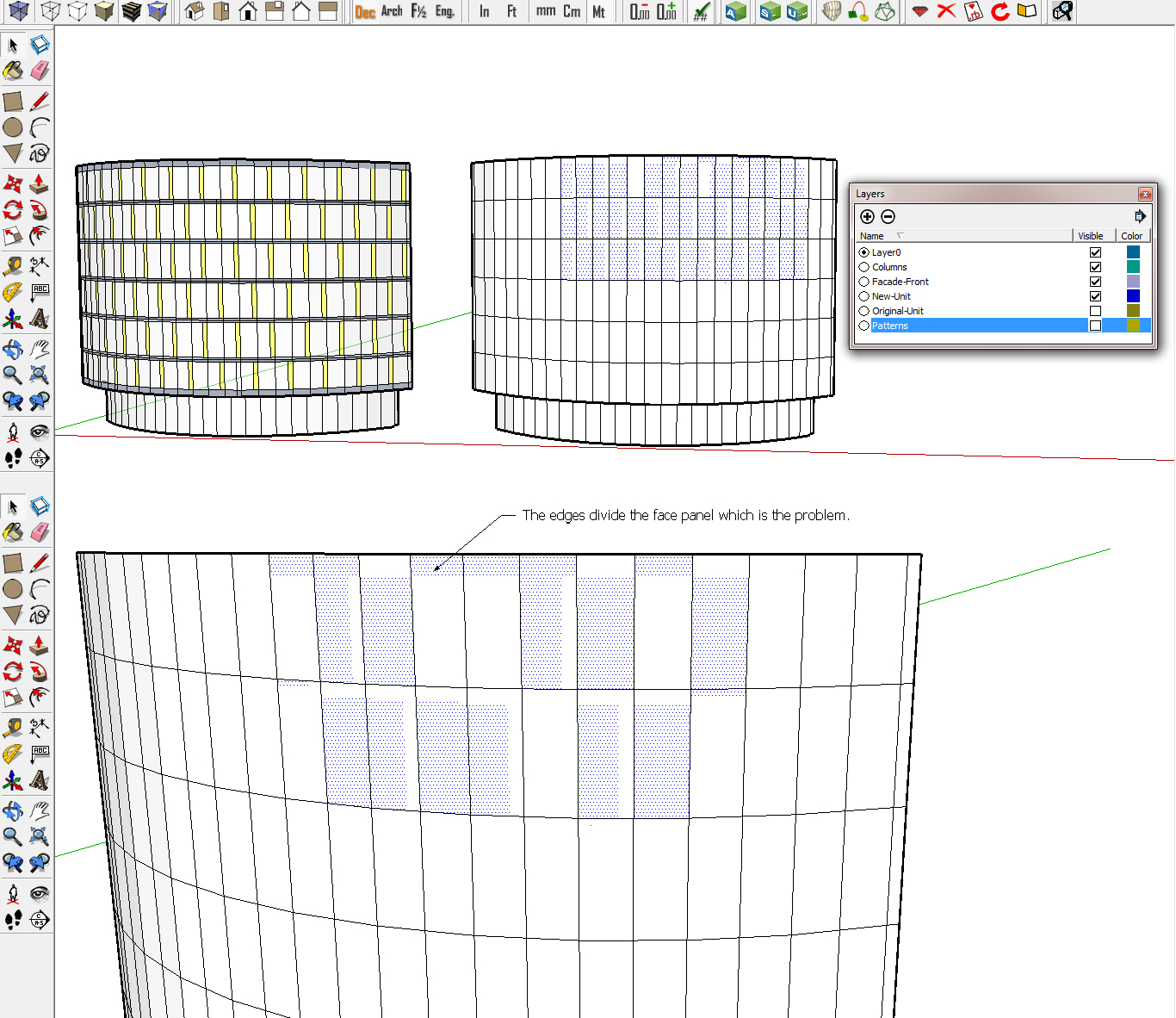
      The problem is the patterned group is copied and invisible , but the edges which are drawn in a layer " Patterns " cut and divide each face that is not a panel. I try to learn the code from Tig's example. Very good example , I wonder how can I clear the edges that cut faces ?

      def group_hide_patterns
      
      #EDGES-GROUP
      
      model=Sketchup.active_model
      edges=[]
      ss=model.selection
      ss.grep(Sketchup;;Face).each{|face| edges << face.edges}
      ss.grep(Sketchup;;Edge).each{|edge| edges << edge}
      edges.flatten!
      edges.uniq!
      edges.compact!
      
      ents=model.active_entities
      group=ents.add_group(edges)
      group.name="patterns"
      
      	edge_layer = model.layers.add("Patterns")
      	if group.name="patterns"
      
      	ss.each{|e|
      	e.layer = edge_layer  if e.is_a? Sketchup;;Group
      
      	}
      	 
      		edge_layer.visible = false
      	end
      
      end
      

      Process Steps


      Problem


      Apply

      posted in Developers' Forum
      pingpinkP
      pingpink
    • RE: Group only edges from a face yet selectcted ?

      Hi ,

      The process :

      1. Store Data - Components , Patterns , Panels of original data from Architect's Model

      2. Tag Part Number - Select Panels ,and distinguish different panels type

      3. Auto Open Patterns - To recheck the original design

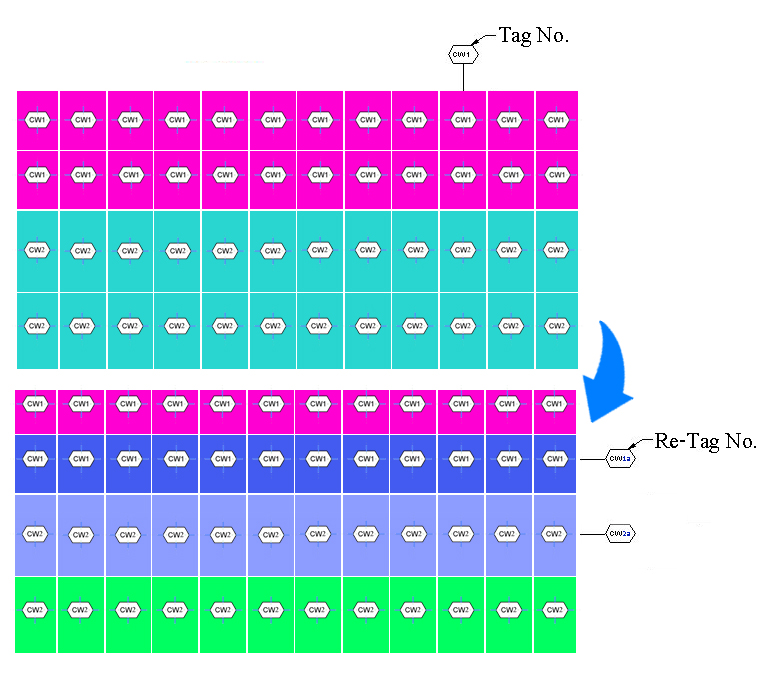
      4. Re-Tag Part Number - The users have to change after checking Patterns , Different patterns have different tag numbers even though they are the same sizes.

      My expectation needs to " Store Data and Recheck Patterns later for a RE-TAG Number correctly " as a facade designer wants.
      
      posted in Developers' Forum
      pingpinkP
      pingpink
    • RE: Group only edges from a face yet selectcted ?

      Yes , Dan , I can group manually and put in a layer 0 , but I have to remodel a Unitized Curtain Wall to count Panels as a whole facade.

      Therefore , when I receive a model from architect, at the beginning I have to store data of patterns in a Layer : Patterns and the visible is false to keep edges. There will be subdividing panels on a model which I can do tagging and extract the size and quantity of panels for entire facade.
      
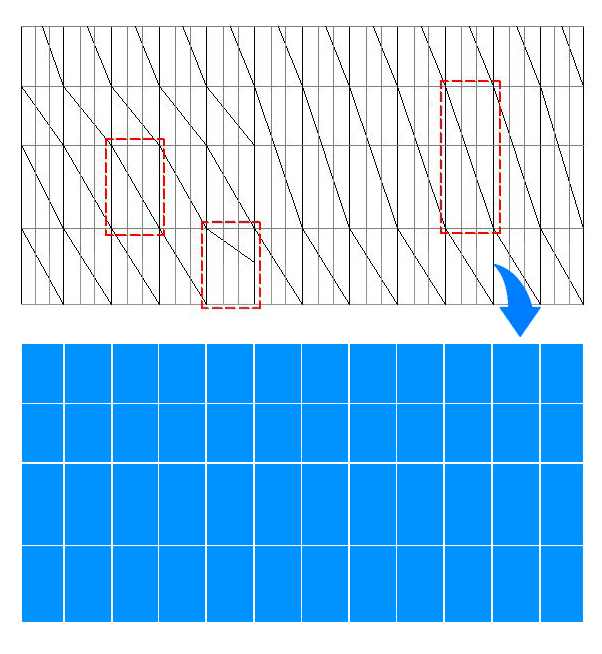
      You can see from my idea's picture. The hiding edges of patterns cut faces to be many pieces in one panel. 
      
      I want to store edges to be group and invisible , so I can toggle layers on-off in my project.
      

      The faces are cut by patterns , I would like to have only outline panels.


      The Principle to Store Data

      posted in Developers' Forum
      pingpinkP
      pingpink
    • RE: Group only edges from a face yet selectcted ?

      I found this very useful for my work , can the Edges-Group collect in a layer " Pattern " and invisible

      I don't know how to write a code

      Thanks.

      edge_layer = model.layers.add("Patterns")
      
      ss.each{|e|
      e.layer = edge_layer  if e.is_a? Sketchup::Edge and group.name="Edges"
      
      }
      
      	edge_layer.visible = false
      
      posted in Developers' Forum
      pingpinkP
      pingpink
    • RE: Display Schematic Models

      Thanks Dan ! , I never realized about this method. My supervisor wants me to switch schemes for " DESIGN COMPARE " at the same position to open and hide layers , then show all schemes by coding. The layers now are overlapped.If I can't do at the end I will do only Switch One by One.
      http://www.youtube.com/watch?v=ZffmxlB5dbk&feature=youtu.be

      posted in Developers' Forum
      pingpinkP
      pingpink
    • RE: Load Component and Rotation

      I respect you !!! I'm a big fan of you. πŸ˜„

      posted in Developers' Forum
      pingpinkP
      pingpink
    • Display Schematic Models

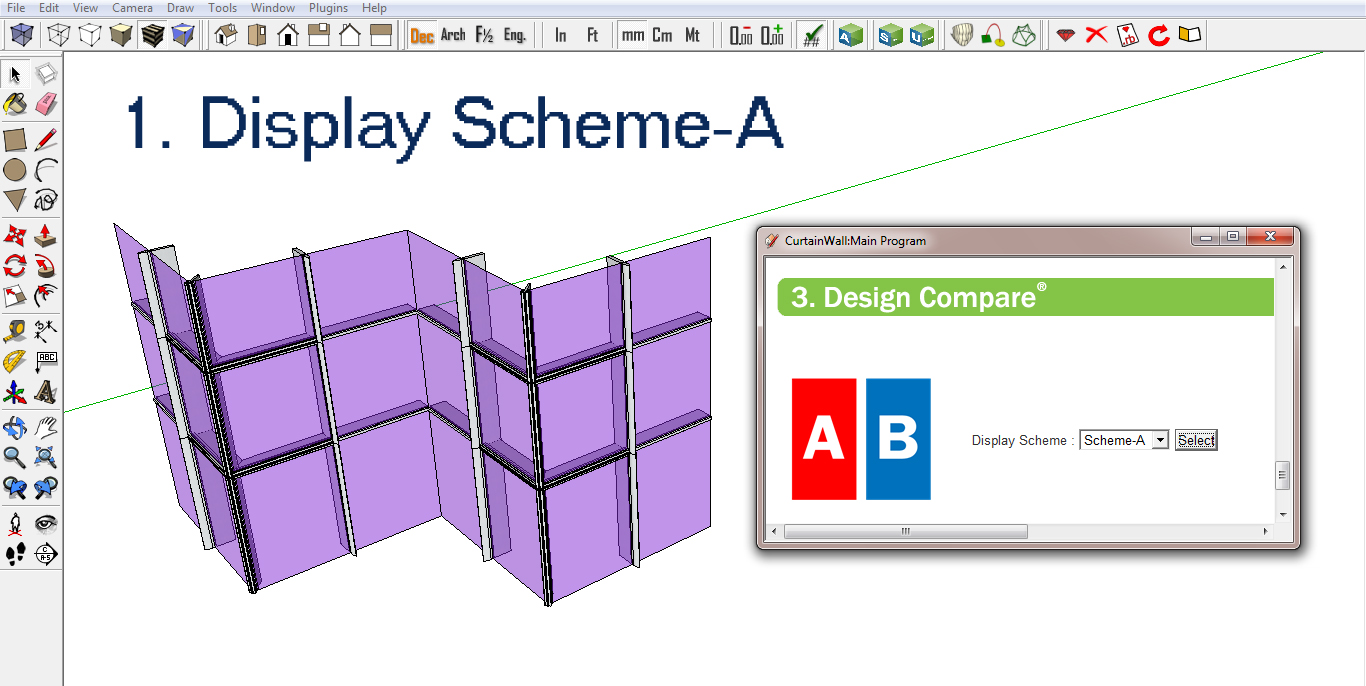
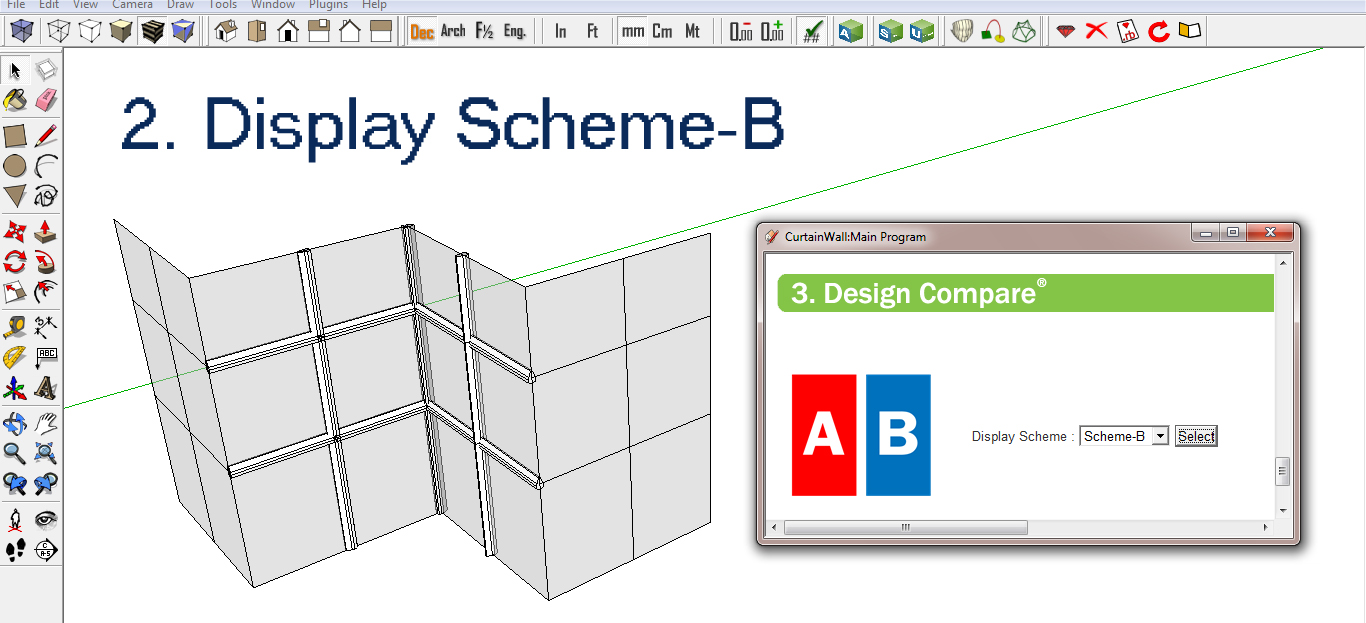
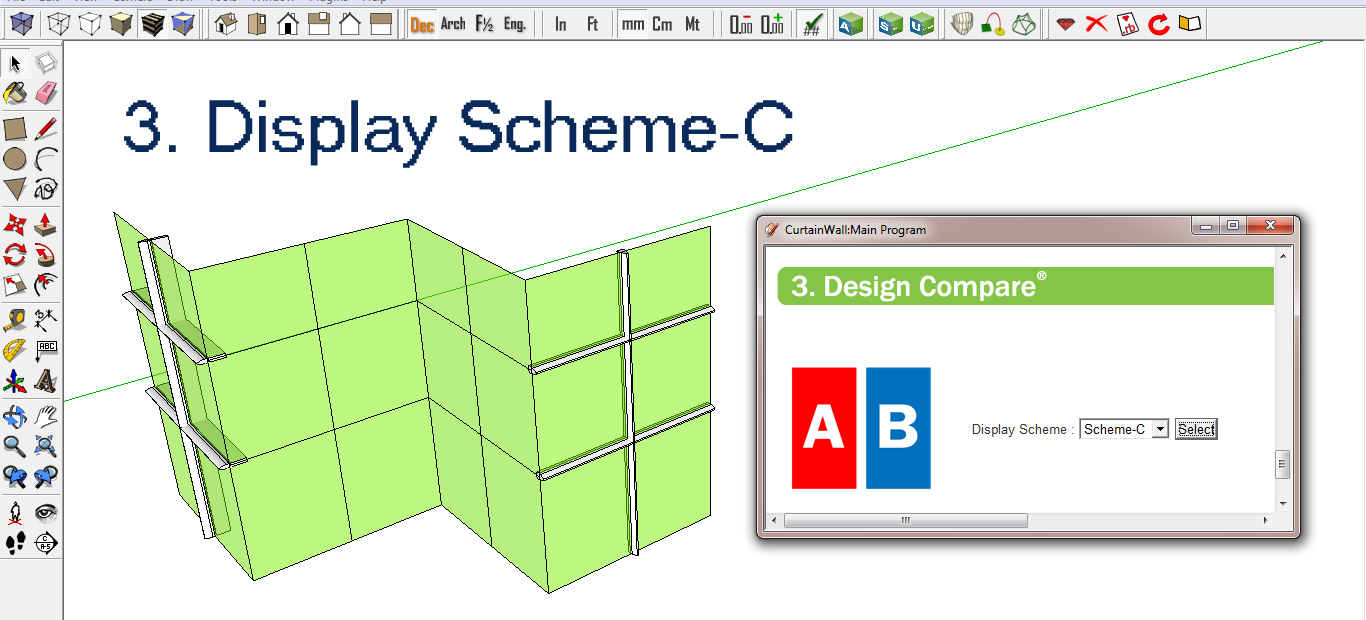
      I'm trying to do a code to create a schematic design A , B , C to keep each type in layers which for the final process , I can display each schematic model at the same position by switching on button. For example , if I select Scheme-B , the model of A and C are invisible.Only Scheme-B display.

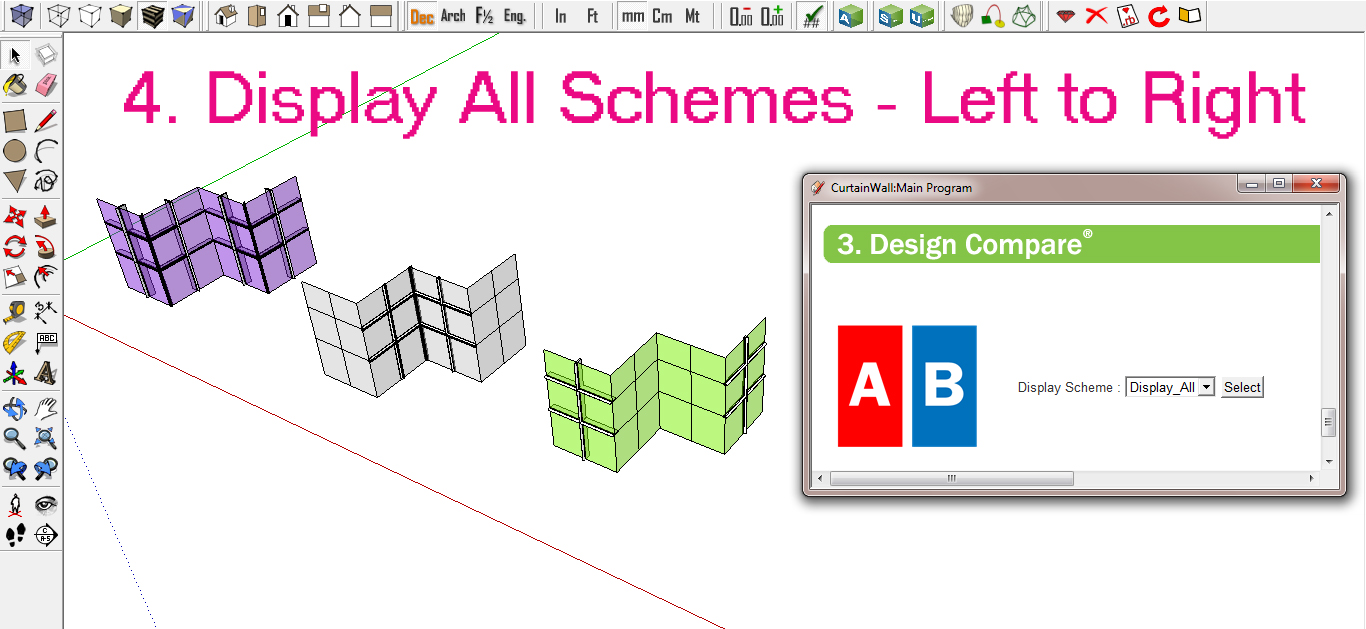
      What I can't do is to " Display All Schemes by ranging left to right " I wonder if there's a way to move group of schematic models to show all ?.

      def create_scheme_A
      
      	model = Sketchup.active_model
      	sel = model.selection
      	entities = model.active_entities 
      
      	edge_layer = model.layers.add("Pattern-A")
      	face_layer = model.layers.add("Glass-A")
      	group_layer = model.layers.add("Aluminium-A")
      
      	sel.each{|e|
      	e.layer = edge_layer  if e.is_a? Sketchup;;Edge 
      	e.layer = face_layer  if e.is_a? Sketchup;;Face
      	e.layer = group_layer if e.is_a? Sketchup;;Group
      	}
      	
        		group1 = entities.add_group(sel) 
      		# Add a layer
      		layer = Sketchup.active_model.layers.add "Scheme-A"
      		# Put the face on the Scheme-A layer 
      		newlayer = group1.layer = layer
      		# entity
      		$entityA = group1.layer
      		# Hide the layer.
      		layer.visible = false
      
      		
      		group2=group1.copy
      		l = Sketchup.active_model.layers.add("Original-A")
      		newlayer = group2.layer = l
      		l.visible = true
      		if group2.explode 
      		instances=[]; entities.each{|e|instances.push(e) if e.typename=="Group"}
      		group_layer.visible = false
      		model = Sketchup.active_model
      		layers = model.layers
      		layers.add "Original-A"
      		activelayer = model.active_layer = layers[1]
      		layer = model.active_layer
      		end
      
      
      end
      
      
       def create_scheme_B
      
      	model = Sketchup.active_model
      	sel = model.selection
      	entities = model.active_entities 
      
      	edge_layer = model.layers.add("Pattern-B")
      	face_layer = model.layers.add("Glass-B")
      	group_layer = model.layers.add("Aluminium-B")
      
      	sel.each{|e|
      	e.layer = edge_layer  if e.is_a? Sketchup;;Edge 
      	e.layer = face_layer  if e.is_a? Sketchup;;Face
      	e.layer = group_layer if e.is_a? Sketchup;;Group
      	}
      	
        		group1 = entities.add_group(sel) 
      		# Add a layer
      		layer = Sketchup.active_model.layers.add "Scheme-B"
      		# Put the face on the Scheme-A layer 
      		newlayer = group1.layer = layer
      		# entity
      		$entityB = group1.layer
      		# Hide the layer.
      		layer.visible = false
      		
      		
      		group2=group1.copy
      		l = Sketchup.active_model.layers.add("Original-B")
      		newlayer = group2.layer = l
      		l.visible = true
      		if group2.explode 
      		instances=[]; entities.each{|e|instances.push(e) if e.typename=="Group"}
      		group_layer.visible = false
      		model = Sketchup.active_model
      		layers = model.layers
      		layers.add "Original-B"
      		activelayer = model.active_layer = layers[1]
      		layer = model.active_layer
      		end
      
      
      end
      
      
      def create_scheme_C
      
      	model = Sketchup.active_model
      	sel = model.selection
      	entities = model.active_entities 
      
      	edge_layer = model.layers.add("Pattern-C")
      	face_layer = model.layers.add("Glass-C")
      	group_layer = model.layers.add("Aluminium-C")
      
      	sel.each{|e|
      	e.layer = edge_layer  if e.is_a? Sketchup;;Edge 
      	e.layer = face_layer  if e.is_a? Sketchup;;Face
      	e.layer = group_layer if e.is_a? Sketchup;;Group
      	}
      	
        		group1 = entities.add_group(sel) 
      		# Add a layer
      		layer = Sketchup.active_model.layers.add "Scheme-C"
      		# Put the face on the Scheme-A layer 
      		newlayer = group1.layer = layer
      		# entity
      		$entityC = group1.layer
      		# Hide the layer.
      		layer.visible = true
      
      		if group1
      		instances=[]; entities.each{|e|instances.push(e) if e.typename=="Group"}
      		group_layer.visible = false
      		model = Sketchup.active_model
      		layers = model.layers
      		layers.add "Scheme-C"
      		activelayer = model.active_layer = layers[1]
      		layer = model.active_layer
      		end
      
      
      end
      
      
      def scheme_A_active
       
      	model = Sketchup.active_model
      	layers = model.layers
      	
      	layer_pattern_A = layers.add("Pattern-A")
      	layer_glass_A = layers.add("Glass-A")
      	layer_aluminium_A = layers.add("Aluminium-A")
      	layer_scheme_A = layers.add("Scheme-A")
      
      	# Open the layer.
      	layer_pattern_A.visible = true
      	layer_glass_A.visible = true
      	layer_aluminium_A.visible = true
      	layer_scheme_A.visible = true
      	
      	
      	layer_pattern_B = layers.add("Pattern-B")
      	layer_glass_B = layers.add("Glass-B")
      	layer_aluminium_B = layers.add("Aluminium-B")
      	layer_scheme_B = layers.add("Scheme-B")
      
      	# Hide the layer.
      	layer_pattern_B.visible = false
      	layer_glass_B.visible = false
      	layer_aluminium_B.visible = false
      	layer_scheme_B.visible = false
      	
      	
          layer_pattern_C = layers.add("Pattern-C")
      	layer_glass_C = layers.add("Glass-C")
      	layer_aluminium_C = layers.add("Aluminium-C")
      	layer_scheme_C = layers.add("Scheme-C")
      	
      	layer_pattern_C.visible = false
      	layer_glass_C.visible = false
      	layer_aluminium_C.visible = false
      	layer_scheme_C .visible = false
      
       end
       
       
        def scheme_B_active
        	 
      	model = Sketchup.active_model
      	layers = model.layers
      	
      	layer_pattern_A = layers.add("Pattern-A")
      	layer_glass_A = layers.add("Glass-A")
      	layer_aluminium_A = layers.add("Aluminium-A")
      	layer_scheme_A = layers.add("Scheme-A")
      
      	# Hide the layer.
      	layer_pattern_A.visible = false
      	layer_glass_A.visible = false
      	layer_aluminium_A.visible = false
      	layer_scheme_A.visible = 
      	
      
      	layer_pattern_B = layers.add("Pattern-B")
      	layer_glass_B = layers.add("Glass-B")
      	layer_aluminium_B = layers.add("Aluminium-B")
      	layer_scheme_B = layers.add("Scheme-B")
      	
      
      	# Open the layer.
      	layer_pattern_B.visible = true
      	layer_glass_B.visible = true
      	layer_aluminium_B.visible = true
          layer_scheme_B.visible = true
      	
      	
          layer_pattern_C = layers.add("Pattern-C")
      	layer_glass_C = layers.add("Glass-C")
      	layer_aluminium_C = layers.add("Aluminium-C")
      	layer_scheme_C = layers.add("Scheme-C")
      	
      	layer_pattern_C.visible = false
      	layer_glass_C.visible = false
      	layer_aluminium_C.visible = false
      	layer_scheme_C .visible = false
      
       end
      
       
       def scheme_C_active
        	 
      	model = Sketchup.active_model
      	layers = model.layers
      	
      	
      	layer_pattern_A = layers.add("Pattern-A")
      	layer_glass_A = layers.add("Glass-A")
      	layer_aluminium_A = layers.add("Aluminium-A")
      	layer_scheme_A = layers.add("Scheme-A")
      
      	# Hide the layer.
      	layer_pattern_A.visible = false
      	layer_glass_A.visible = false
      	layer_aluminium_A.visible = false
      	layer_scheme_A.visible = false
      		
      	layer_scheme_B = layers.add("Scheme-B")
      	layer_pattern_B = layers.add("Pattern-B")
      	layer_glass_B = layers.add("Glass-B")
      	layer_aluminium_B = layers.add("Aluminium-B")
      	
      	# Hide the layer.
      	layer_scheme_B.visible = false
      	layer_pattern_B.visible = false
      	layer_glass_B.visible = false
      	layer_aluminium_B.visible = false
      
      	# Open the layer.
              layer_pattern_C = layers.add("Pattern-C")
      	layer_glass_C = layers.add("Glass-C")
      	layer_aluminium_C = layers.add("Aluminium-C")
      	layer_scheme_C = layers.add("Scheme-C")
      	
      	layer_pattern_C.visible = true
      	layer_glass_C.visible = true
      	layer_aluminium_C.visible = true
      	layer_scheme_C.visible = true
      
       end
      

      S-A.jpg


      S-B.jpg


      S-C.jpg


      S-ALL.jpg

      posted in Developers' Forum
      pingpinkP
      pingpink
    • RE: Load Component and Rotation

      Thank you very much , TIG 😍

      Finally I can load , scale , and rotate sunshades from your advice !!!

      This code works very nice. z < 0 made the components run on the edges.


      def move_compo(edge, compo)
      model = Sketchup.active_model
      start_point = edge.start.position
      end_point = edge.end.position

      #------------- Edit ----------------#

      [highlight=#ffff80:1zu9kjw1]vect = edge.line[1]
      ang = X_AXIS.angle_between(vect)
      ang = -ang if X_AXIS.cross(vect).z < 0[/highlight:1zu9kjw1]
      #------------------------------------#
      cpt = compo.transformation.origin

      xscale = edge.length / 1.m
      tscale = Geom::Transformation.scaling cpt, xscale, 1, 1
      compo.transform!(tscale)

      vect = ORIGIN.vector_to(edge.start.position)

      #------------- Edit ----------------#

      [highlight=#ffff80:1zu9kjw1]tr1 = Geom::Transformation.translation(vect)
      tr2 = Geom::Transformation.rotation(edge.start.position, Z_AXIS, ang)
      compo.transform!(tr2*tr1)[/highlight:1zu9kjw1]

      #------------------------------------#

      end


      Sunshade_Rotate_1.jpg

      posted in Developers' Forum
      pingpinkP
      pingpink
    • RE: Load Component and Rotation

      Thank you so much !
      I try to solve form your suggestion It's rotate , but not place at the edges.
      I don't know why.


      require 'sketchup.rb'

      def insert_file_skp(sFile, point, sName)

      model = Sketchup.active_model
      pants_def = model.definitions.load sFile

      Then define a location, and place our skp there.

      pants_location = point
      transform = Geom::Transformation.new pants_location
      entities = Sketchup.active_model.active_entities
      instance = entities.add_instance pants_def, transform
      instance.name= sName
      return instance
      end

      def move_compo(edge, compo)
      model = Sketchup.active_model
      start_point = edge.start.position
      end_point = edge.end.position

      #------------- Edit ----------------#
      [highlight=#ffff80:1fxmkzqh]vec = edge.line[1]
      ang = X_AXIS.angle_between(vec)
      ang = -ang if X_AXIS.cross(vec).z < 0[/highlight:1fxmkzqh]
      #------------------------------------#
      if start_point.x < end_point.x
      pt = start_point
      else
      pt = end_point
      end
      p pt

      cpt = compo.transformation.origin

      xscale = edge.length / 1.m
      tscale = Geom::Transformation.scaling cpt, xscale, 1, 1
      compo.transform!(tscale)

      vec = pt - cpt

      #------------- Edit ----------------#
      [highlight=#ffff80:1fxmkzqh]tr1 = Geom::Transformation.translation vec
      tr2 = Geom::Transformation.rotation(edge.start.position, Z_AXIS, ang)

      instance1 = compo.transform!(tr1)
      instance2 = compo.transform!(tr2)[/highlight:1fxmkzqh]

      #------------------------------------#

      end

      def insert_Sunshade_Curved
      model = Sketchup.active_model
      model.start_operation( "Add Component", true)
      selection = model.selection
      selection.each{|entity|
      sFile = Sketchup.find_support_file "CurtainWall_Architect/Components/Sunshade/Sunshade_Curved.skp", "Plugins"

       if entity.class == Sketchup::Edge
          edge = entity
      	line = edge.line #vector of edge
      		
      	if (line[1].dot Z_AXIS).abs == 0.0 
      		compo = insert_file_skp( sFile, Geom::Point3d.new(0,0,0), "Sunshade-Curved")
             move_compo(edge, compo)
       
      	end   
      
       end 
      

      }

      model.commit_operation

      end

      Result

      posted in Developers' Forum
      pingpinkP
      pingpink
    • Load Component and Rotation

      Hi ,

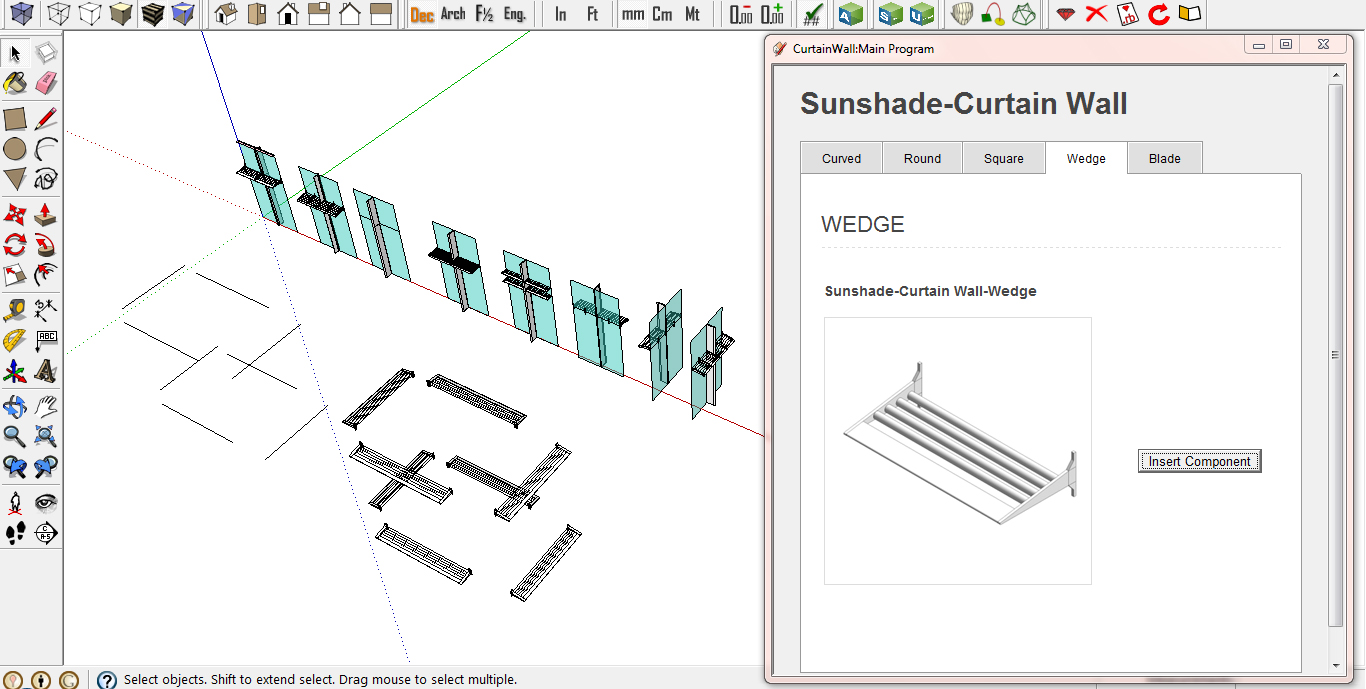
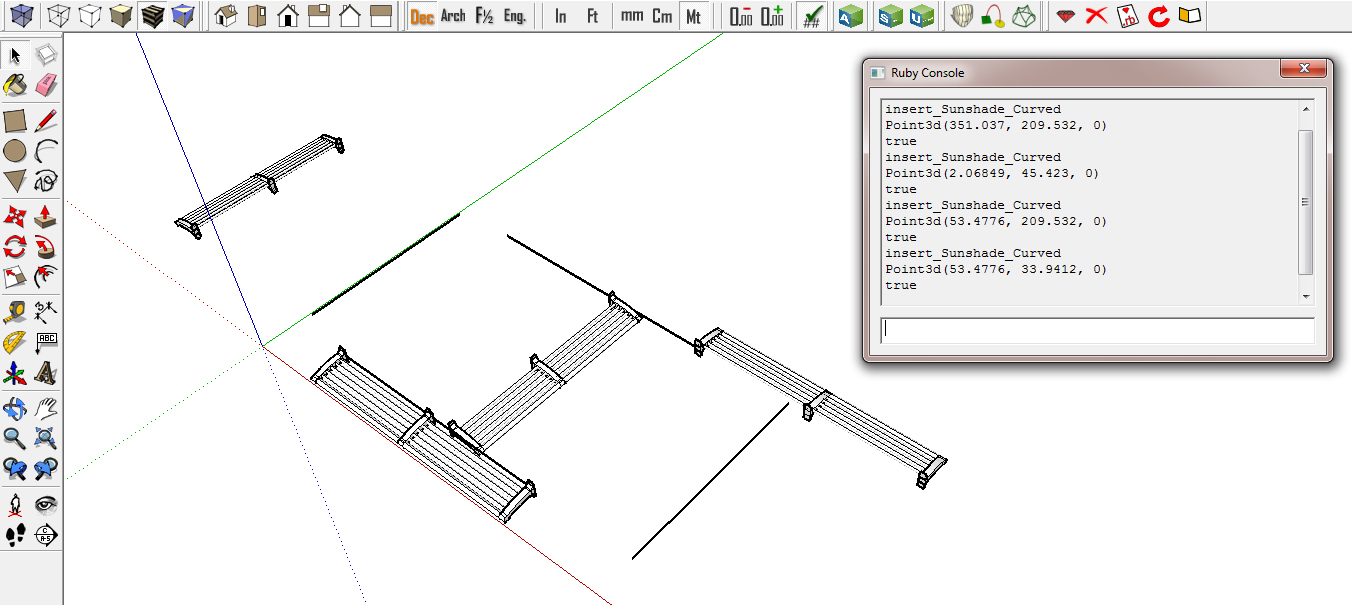
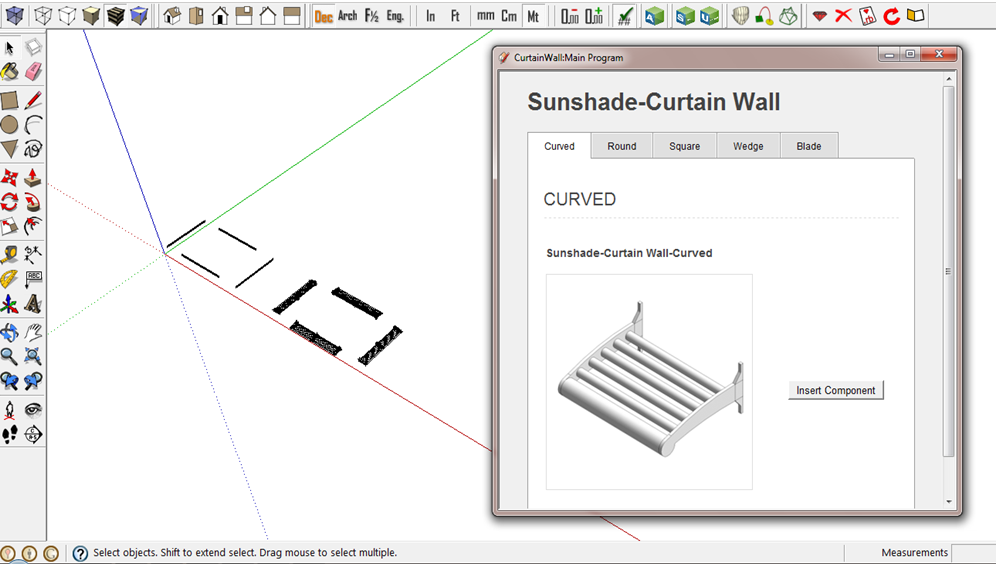
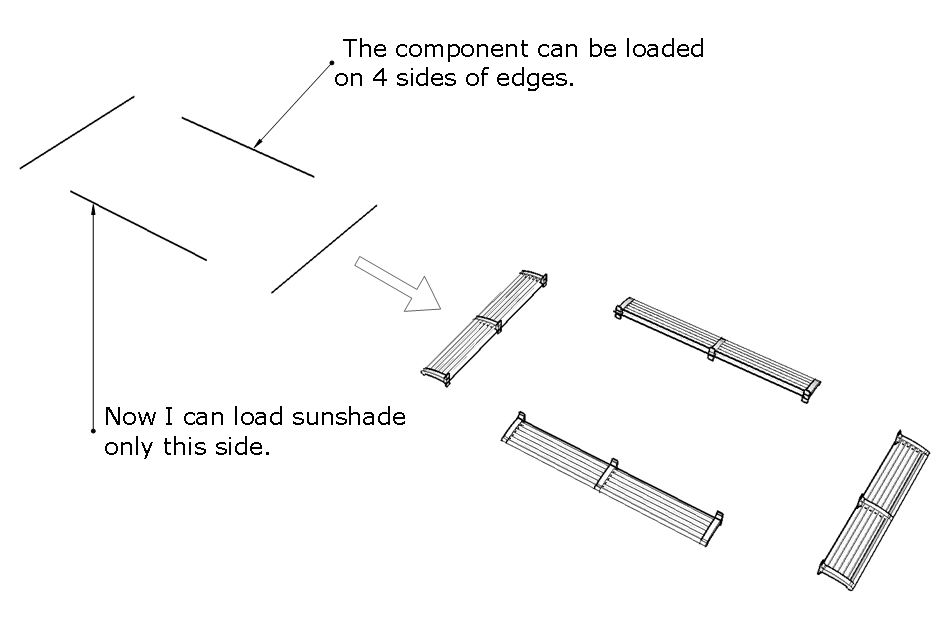
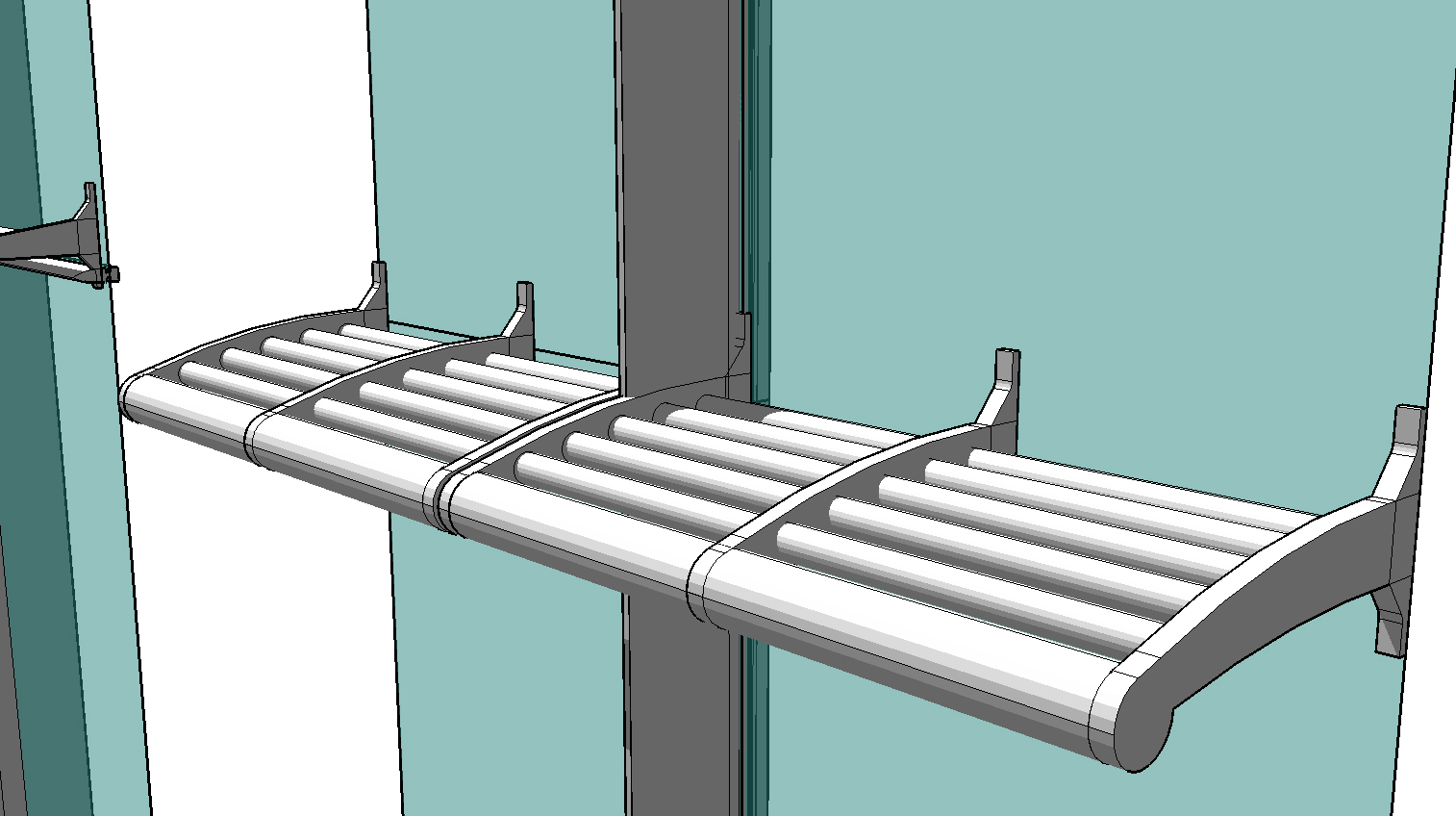
      I'm trying to load a sunshade component in " 4 sides of drawing edges " .
      

      I can do only one side. Anyone can give me any idea how can I load with a rotation in a code ?
      I want the code can apply around a building facade.

      
      require 'sketchup.rb'
      
         def insert_file_skp(sFile, point, sName)
       
         model = Sketchup.active_model
         pants_def = model.definitions.load sFile
         
         # Then define a location, and place our skp there.
         pants_location = point 
         transform = Geom;;Transformation.new pants_location
         entities = Sketchup.active_model.active_entities
         instance = entities.add_instance pants_def, transform
         instance.name= sName
         return instance
      end
      
      
      def move_compo(edge, compo)
        model = Sketchup.active_model
        start_point = edge.start.position
        end_point = edge.end.position
        if start_point.x < end_point.x 
          pt = start_point
        else
          pt = end_point
        end
        p pt
        
      
        ## Z Scale 90 degrees
         cpt = compo.transformation.origin 
        xscale = edge.length / 1.m
        tscale = Geom;;Transformation.scaling cpt, xscale, 1, 1
        compo.transform!(tscale) 
        
        
        vector = pt - cpt
        tr = Geom;;Transformation.translation vector
        compo.transform!(tr)
        
      end
      
      
      def insert_Sunshade_Curved
         model = Sketchup.active_model 
         model.start_operation( "Add Component", true)
         selection = model.selection 
         selection.each{|entity|
         sFile = Sketchup.find_support_file "CurtainWall_Architect/Components/Sunshade/Sunshade_Curved.skp", "Plugins"
      	  	
           if entity.class == Sketchup;;Edge
      	    edge = entity
      		line = edge.line #vector of edge
      		if (line[1].dot Z_AXIS).abs == 0.0 
      		compo = insert_file_skp( sFile, Geom;;Point3d.new(0,0,0), "Sunshade-Curved")
      	        move_compo(edge, compo)			
           end 
         
         } 
      
         model.commit_operation 
      
      end
      

      Sunshade_1.png


      Sunshade_2.png


      Sunshade_4.jpg

      posted in Developers' Forum
      pingpinkP
      pingpink
    • RE: Face-tag number

      Thank you very much,Renderiza !

           I've tested the codes , it works very good.I can see the different panel types by coloured faces. I noticed the same face area of the sloped faces and the upright faces , they have different colours.I don't know why it happens for this time , I will look later.
           I just tried to map components on coloured faces , but I have to select faces and a panel component together to place and copy on the faces.
           Not sure that I have to do the attribute's name on coloured faces to have the same names as component's names for component mapping.
      
      posted in Developers' Forum
      pingpinkP
      pingpink
    • RE: Face-tag number

      Thanks TIG , tt_su

       pi = Math::PI is Math.acos(-1) ?
      
       It has a same result after testing a code.
      
       I read in the link , thinking that it should be put in a pair at the same line.
       There's no errors.It works!
      
       if @cw1.first == nil 
                    if face.area.to_i != @cw2area and face.area.to_i != @cw3area and 
      			  face.area.to_i != @cw4area and face.area.to_i != @cw5area and 
      			  face.area.to_i != @cw6area and face.area.to_i != @cw7area and
      			  face.area.to_i != @cw8area and face.area.to_i != @cw9area and 
      			  face.area.to_i != @cw10area
                  @cw1 << face
                  @cw1area = face.area.to_i   
              end
          end
      
        BUT , it my RE_TagNo.rb seems doesnt't link with the copyout_rotate2_and.rb to bring out the re-tag face panel.
      
      ###### ADDING 
      	faces = sel.grep(Sketchup;;Face)
      	@cw6 = []
      	@cw7 = []
      	@cw8 = []
      	@cw9 = []
      	@cw10 = []
      
      	
      	faces.each do |face|
      		if @cw6.first == nil
                  @cw6area = face.area.to_i
      	
      		elsif @cw7.first == nil
                  @cw7area = face.area.to_i
      
      		elsif @cw8.first == nil
                  @cw8area = face.area.to_i
      	
      		elsif @cw9.first == nil
                  @cw9area = face.area.to_i
      
      		else @cw10.first == nil
                  @cw10area = face.area.to_i
      		end
      	end
      
      if input[1] == "Orange"
         
             #attribute_name = input[0].name
             #face.area.to_i == @cw6area
      	   
             faces.each do |e|	   
      	   e.material = [255,165,0]#Orange
      	   end 
      

      copyout_rotate2_and.rb


      RE_TagNo.rb

      posted in Developers' Forum
      pingpinkP
      pingpink
    • RE: Face-tag number

      Thank you very very much Renderiza !
      After running a code , there's an error about the constant's name of " PI "

      PI = Math.acos(-1)
      

      So , I changed it to be

      pi = Math.acos(-1)
      

      And it works perfectly to copy out the different panel types !

      I'm wondering again , in case of " RE-TAG NO." of face to change a new name and
      a new colour. I defined the variables to relate with the function of copyout_rotate2.rb

      @cw6 = []
      @cw7 = []
      @cw8 = []
      @cw9 = []
      @cw10 = []
      

      But there's a SyntaxError in this part of condition between 'and'...
      Not sure if there's a limitation of values. My intention is to do a copy flat panel at the end result after finished tagging panels , but in some cases of same area panel would have different patterns or materials , so they should have different names , and colours to replace the correct panel components.

      if @cw1.first == nil 
                    if face.area.to_i != @cw2area 
      				and face.area.to_i != @cw3area 
      				and face.area.to_i != @cw4area 
      				and face.area.to_i != @cw5area
      				and face.area.to_i != @cw6area
      				and face.area.to_i != @cw7area
      				and face.area.to_i != @cw8area
      				and face.area.to_i != @cw9area
      				and face.area.to_i != @cw10area
                  @cw1 << face
                  @cw1area = face.area.to_i   
              end
          end
      

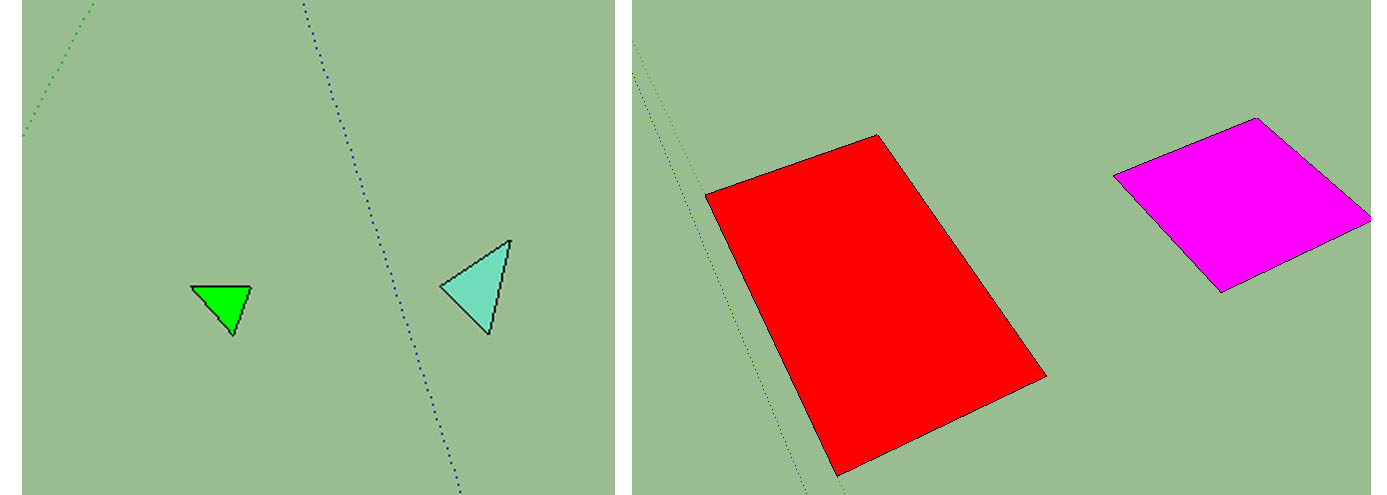
      The RE-TAG IDEA


      Example of re-tag and copy out a panel on a model base


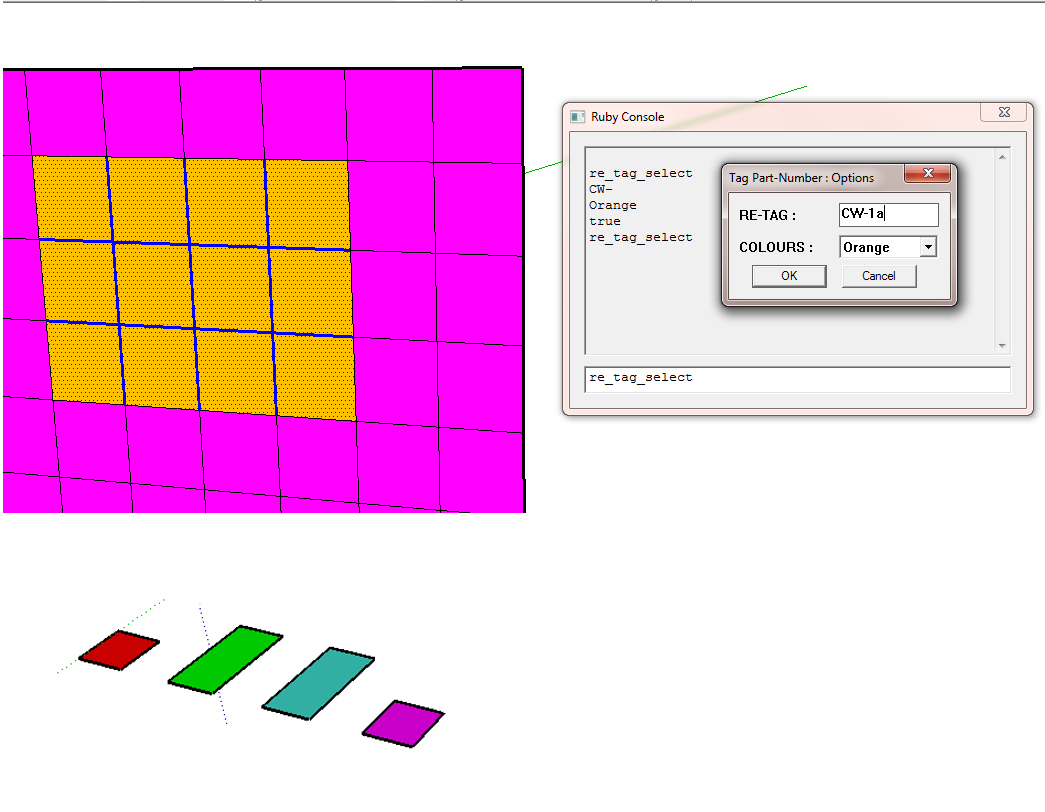
      This is a re-tag option


      Copy out the different coloured faces

      posted in Developers' Forum
      pingpinkP
      pingpink
    • RE: Face-tag number

      Thank you so much ! , The code is amazing to copy tag faces. The group result suits with my code to convert groups to components and create the center axis on the panel plane , but my code can do mapping components on faces only the component which is parallel to the floor, not vertical exactly copy from the model. So , I tried to rotate panels by this code :

         #tr1 = Geom;;Transformation.new([0, -300, 0])
         pt = [300,0,0]
         v = Geom;;Vector3d.new(1,0,0) # The axis position to rotate opanel
         tr1 = Geom;;Transformation.rotation(pt,v,-45.degrees)
         instance = @ents.add_instance(cw1group.definition, tr1)
         instance.transform!(tr1)
      
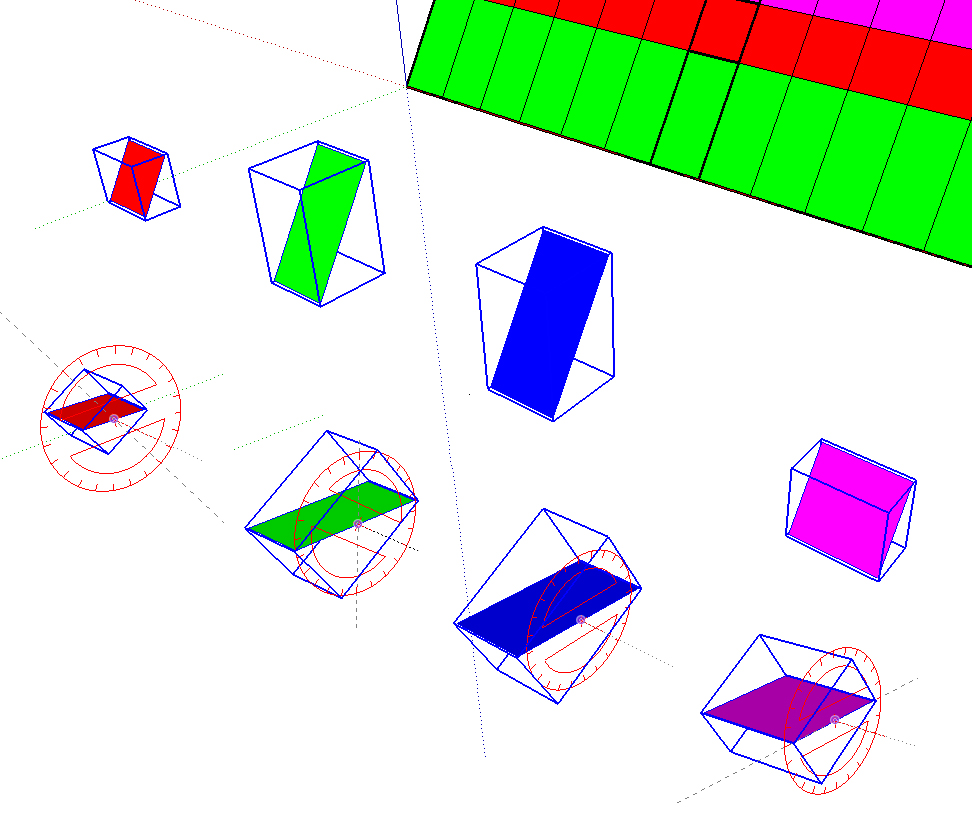
      The code cannot be used properly if there is a slope panel group . The outcome of rotation could not be flat plane rotation. In the image , the rotation have to be like this , so the components can be placed fit onto the subdividing faces.
      
      Ah,I just found the example of rotation in this link. I think it works :    [http://sketchucation.com/forums/viewtopic.php?f=15&t=41419](http://sketchucation.com/forums/viewtopic.php?f=15&t=41419)
      

      Thanks once again for good advice.


      Rotate panels parallel to the floor

      posted in Developers' Forum
      pingpinkP
      pingpink
    • RE: Drop-Down List Options

      Maybe,the problem is about the component , and face color functions . I did it separately in the external files. My webdialog have to be chosen all options and run by clicking. I'm trying to develop the curtain wall structure modeling .I'm not finished all the codes yet.

      I use Window , and SU7 to test a program.

      I changed all the color_value names which you suggest it would cause the conflict about component's color and face's color. It's looked easier in the code. I've attached the files for you If you would like too see. And If you have any suggestions , I love to read for improvement.

      Thank you for helping and teaching me ,Jolran .I keep doing codes every day.I'm trying !
      
      posted in Developers' Forum
      pingpinkP
      pingpink
    • 1 / 1