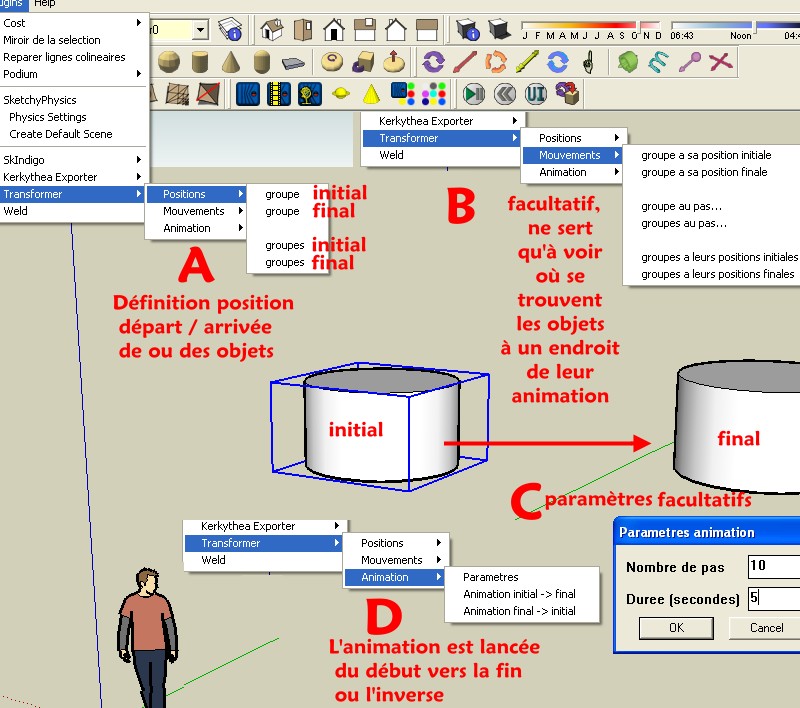
Il est pas clair mon tut du dessus? 
Bon je fais une anim 
Il suffisait pourtant de suivre les point A, b, c, D 
Oops, your profile's looking a bit empty! To help us tailor your experience, please fill in key details like your SketchUp version, skill level, operating system, and more. Update and save your info on your profile page today!
Check out Febhouse | New extensions for Shadow Analysis in SketchUp Download
 P
Offline
P
Offline
Posts
-
RE: Au sujet du Script Transformer
-
RE: Au sujet du Script Transformer
Avec l'aide d'un sympthique Watkins membre du forum anglophone j'ai retrouvé le mode d'emploi de ce fameux "Transformer"
En fait je faisais tout bien, mais j'avais eu le malheur de passer par la case "Paramètres de l'animation", et me fondant sur ce qui était écrit par défaut

Nombre de pas = 10 Durée seconde = 5 ,je mis durée = 2 (secondes) car je suis pressé
et n'obtins qu'un saut du début à la fin! Exit la suave animation
En mettant 100 et 50 (ou 10 et 5 )tout remarcha comme sur des roulettes!
Sinon super simple comme Script! Impeccable !!! 20 sur 20!
(manque juste les mots initial et final dans le premier menu)
Il fait ce qu'on lui demande en 2 coups de cuillère à pot!
Cela serait le top si le résultat de l'animation était produite dans des Onglets de "scènes!"
Avec tout les avantages que cela apporterait !
-
RE: How to animate a sliding door
thx
I ask him if he can make also something like this
You clic some groups or componants in a certain oder and the result will be
one componant by page so a little animation
Maybe this yet exist?His script was good but now SketchyPhysics is more perfomant :
He says the same : use Physics
-
RE: How to animate a sliding door
Hi Watkins
Thx but what should be the result?
Somes "pages" or like the "SketchyPhysics" just an animation on the screen?
I will try again, but seems that I had made that you write and nothing append at the end
-
RE: How to animate a sliding door
Hihi

Cool trick of Mandrake the magicianBut it's not exactly what I want

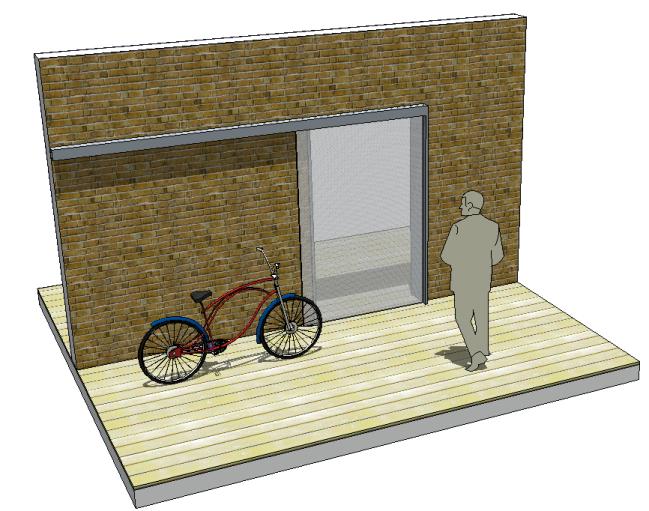
How move the bike in front of the wall and see it during the travel (no need to roll the wheels)
Without the use of Sketchyphysics because I want to export directly the anim inside Kerkythea!
Seems it's not possible at this day to export a SktechyPhysics animation in Kerkythea
I have contacted Didier Bur about his script above: it's so old that he don't remember how it works!
If someone has info about the "Transformer.rb" script, it will be a task
-
RE: Au sujet du Script Transformer
Oui mais l'avantage de pouvoir le faire sans Sketchyphysics, (pour l'instant) c'est qu'on a l'animation entière que l'on peut basculer directement dans Kerkythea! (programme gratoche de rendu d'images )

Alors que les animations faites avec SketchyPhysic ne sont pas exportables en tant que telles

(enfin il me sembleJe vais continuer d'essayer de retrouver comment cela marchait
(voilà ce que c'est ne pas annoter ses codesPendant que je suis là
Il n'y aurait pas un script qui ferait ceci ?
On clic successivement sur des groupes ou des composants et zou cela est transformé en une suite de "pages" ordonnées suivant l'ordre des clics
(que l'on pourra bien sûr après bouger comme on veut, mais bon c'est déjà bien d'avoir un pré classement -
Au sujet du Script Transformer
Ou peut-on trouver quelques indications de fonctionnement sur le script Transformer de Didier Bur?
Il y a quelque chose qui m'échappe, notamment comment "Créer" l'animation une fois le ou les groupes assignés
Il y a création de plusieurs pages ou des "images externes"...?
Je vois bien "animation initial---> final .... mais bon
Merci d'avance! -
RE: Culture "SketchyPhysics" 1, 2...
En fait c'était super simple
Il suffisait de prendre un "Piston" et de lui donner la valeur Mini = 0 Maxi = longueur du trajet souhaité -
RE: Wheel and Door SketchyPhysics2 feature.
So the piston makes the trick
THX
Very simple indeed! -
RE: Wheel and Door SketchyPhysics2 feature.
I found all that want except a simple direct straight move displacement
from A to B of a simple box flying in the air horizontally (without wheel)!
Piston? I don't want the return -
Culture "SketchyPhysics" 1, 2...
Bonjour tout le monde!
Une simple question pour commencer
Comment faire pour qu'une voiture par exemple, démarre toute seule sans l'aide de la souris?
Le terrain étant plat, ne possédant pas sa propre énergie (genre engrenages qui font tourner les roues), mais munie de son "Slider Joint"
Bref comment faire une animation "propre" avec "SketchyPhysics" sans les petites mimines à l'écran
Un simple cube traversant l'écran de gauche à droite : voilà j'en demande pas plus
-
RE: Wheel and Door SketchyPhysics2 feature.
Amazing

Silly question : Terrain is flat
is it possible to start a car without to catch it with the mouse?In one word how to start an animation without see the mouse one the screen?
(when the object has not it own "energy")Thx by advance