sketchucation logo sketchucation
    • Login
    1. Home
    2. aimran
    Oops, your profile's looking a bit empty! To help us tailor your experience, please fill in key details like your SketchUp version, skill level, operating system, and more. Update and save your info on your profile page today!
    🔌 Smart Spline | Fluid way to handle splines for furniture design and complex structures. Download
    A
    Offline
    • Profile
    • Following 0
    • Followers 0
    • Topics 1
    • Posts 3
    • Groups 1

    aimran

    @aimran

    1
    Reputation
    1
    Profile views
    3
    Posts
    0
    Followers
    0
    Following
    Joined
    Last Online
    SketchUp version 2024
    Operating System Windows
    Knowledge of SketchUp Advanced
    What do you use Sketchup for? architecture
    Location Hong Kong

    aimran Unfollow Follow
    registered-users

    Best posts made by aimran

    • [Plugin] GeoLoft v1.0 - Parametric Graph-Driven Lofting

      Demo Video in Youtube

      Hi everyone,
      I’m excited to share my first SketchUp Ruby extension: GeoLoft.
      Coming from AutoLISP and Blender Geometry Nodes, I’ve always loved procedural workflows — so I set out to bring a bit of that logic-driven magic into SketchUp.

      What does GeoLoft do?
      GeoLoft instances a component along any 3D path, but with a twist:
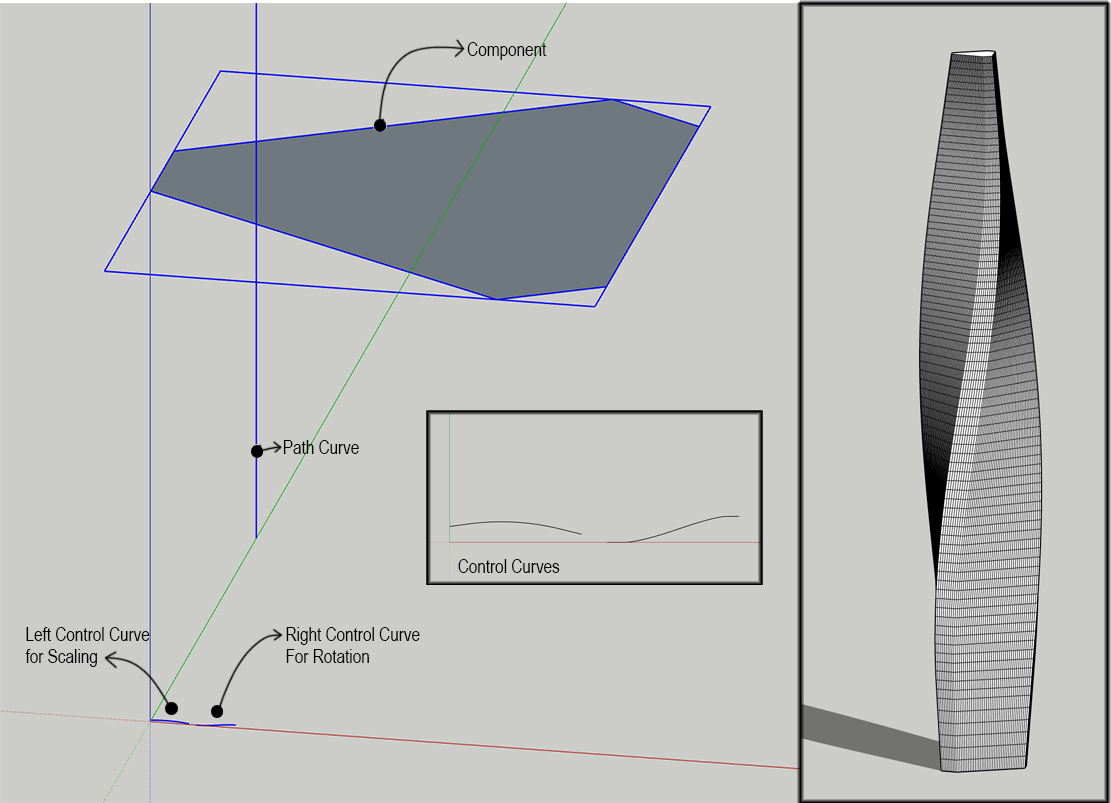
      you can drive Scale and Rotation using 2D “Graph Curves” drawn in the XY plane.
      It also includes a Loft Mode that skins the instances into a clean, manifold mesh.

      Key Features

      • Dual Graph Control
        Left graph controls Scale, right graph controls Rotation.
      • Adaptive Sensing
        Select 1, 2, or 3 curves — GeoLoft automatically detects your setup and adjusts the UI.
      • Cyclic Path Support
        Closed loops (circles, polygons, etc.) are detected automatically, and the seam is healed cleanly.
      • Unit‑Aware Scaling
        Choose between Meters, Inches, or a normalized Ratio (1m box logic).
      • Clean Quad Look
        Geometry is triangulated internally, but diagonal edges are softened/hidden for a quad‑like appearance.
      • Reverse Curve Tool Included
        A companion utility to flip curve direction when the loft starts from the wrong end.

      How to Use GeoLoft

      • Prepare the Path
        Draw any 3D curve or welded polyline to act as your backbone.
      • Create a Profile Component
        This is the shape that will be instanced along the path.
        (The component’s Blue/Z axis follows the path direction.)
      • Draw Your Graph Curve(s)
        Place one or two curves on the ground plane (XY).
      • Left Graph → Scale
      • Right Graph → Rotation
      • How the Logic Works
        GeoLoft “unfolds” your 3D path into a straight line along the Red axis,
        then samples your Graph Curve vertically (Y‑axis) to determine the factor.
      • A graph 10m high → scale factor 10
      • A graph rising from 0 to 1m → smooth interpolation
      • Rotation graphs work the same way
      • Execute
        Select your Component + Path + Graph(s), then click GeoLoft Pro.

      Roadmap / Planned Improvements
      These are features I’m actively exploring for future releases:

      • Grouped Graph Logic
        Allow placing the graph curve inside a group with a grouped rectangle.
        The rectangle becomes the bounding box for remapping — useful when lofting large profiles like floor plans.
      • Independent X:Y Scaling Ratios
        e.g., 1:2 or 0.5:1 scaling.
      • Progress Bar
        Dense lofts can take time; a progress indicator will reassure users that SketchUp hasn’t frozen.
      • Completion Summary
        A small dialog showing:
        “Completed in HH:MM:SS — N faces generated.”
      • Curve Resampling Options
        Equal spacing or equal segment length for smoother, more predictable lofts.

      Credits
      Developed with a focus on procedural geometry and architectural form‑making.
      Thanks to the SketchUcation community for the inspiration and encouragement.
      Special thanks to Google Gemini and MS Copilot for the coding mentorship and for helping translate my Geometry Nodes logic into Ruby.
      Download:WowDesign_GeoTools_1.0.RBZ
      posted in Plugins
      A
      aimran

    Latest posts made by aimran

    • RE: [Plugin] GeoLoft v1.0 - Parametric Graph-Driven Lofting

      Geoloft01.png

      posted in Plugins
      A
      aimran
    • [Plugin] GeoLoft v1.0 - Parametric Graph-Driven Lofting

      Demo Video in Youtube

      Hi everyone,
      I’m excited to share my first SketchUp Ruby extension: GeoLoft.
      Coming from AutoLISP and Blender Geometry Nodes, I’ve always loved procedural workflows — so I set out to bring a bit of that logic-driven magic into SketchUp.

      What does GeoLoft do?
      GeoLoft instances a component along any 3D path, but with a twist:
      you can drive Scale and Rotation using 2D “Graph Curves” drawn in the XY plane.
      It also includes a Loft Mode that skins the instances into a clean, manifold mesh.

      Key Features

      • Dual Graph Control
        Left graph controls Scale, right graph controls Rotation.
      • Adaptive Sensing
        Select 1, 2, or 3 curves — GeoLoft automatically detects your setup and adjusts the UI.
      • Cyclic Path Support
        Closed loops (circles, polygons, etc.) are detected automatically, and the seam is healed cleanly.
      • Unit‑Aware Scaling
        Choose between Meters, Inches, or a normalized Ratio (1m box logic).
      • Clean Quad Look
        Geometry is triangulated internally, but diagonal edges are softened/hidden for a quad‑like appearance.
      • Reverse Curve Tool Included
        A companion utility to flip curve direction when the loft starts from the wrong end.

      How to Use GeoLoft

      • Prepare the Path
        Draw any 3D curve or welded polyline to act as your backbone.
      • Create a Profile Component
        This is the shape that will be instanced along the path.
        (The component’s Blue/Z axis follows the path direction.)
      • Draw Your Graph Curve(s)
        Place one or two curves on the ground plane (XY).
      • Left Graph → Scale
      • Right Graph → Rotation
      • How the Logic Works
        GeoLoft “unfolds” your 3D path into a straight line along the Red axis,
        then samples your Graph Curve vertically (Y‑axis) to determine the factor.
      • A graph 10m high → scale factor 10
      • A graph rising from 0 to 1m → smooth interpolation
      • Rotation graphs work the same way
      • Execute
        Select your Component + Path + Graph(s), then click GeoLoft Pro.

      Roadmap / Planned Improvements
      These are features I’m actively exploring for future releases:

      • Grouped Graph Logic
        Allow placing the graph curve inside a group with a grouped rectangle.
        The rectangle becomes the bounding box for remapping — useful when lofting large profiles like floor plans.
      • Independent X:Y Scaling Ratios
        e.g., 1:2 or 0.5:1 scaling.
      • Progress Bar
        Dense lofts can take time; a progress indicator will reassure users that SketchUp hasn’t frozen.
      • Completion Summary
        A small dialog showing:
        “Completed in HH:MM:SS — N faces generated.”
      • Curve Resampling Options
        Equal spacing or equal segment length for smoother, more predictable lofts.

      Credits
      Developed with a focus on procedural geometry and architectural form‑making.
      Thanks to the SketchUcation community for the inspiration and encouragement.
      Special thanks to Google Gemini and MS Copilot for the coding mentorship and for helping translate my Geometry Nodes logic into Ruby.
      Download:WowDesign_GeoTools_1.0.RBZ

      posted in Plugins
      A
      aimran
    • RE: SCFLicense: Extension Licensing on Sketchucation

      My computer is broken. So I cannot release the license to be used in another computer. Please help.
      Is there a way to sign out the license from the other computer? just like how adobe creative cloud works?

      Ps. I have sent email to support[at]sketchucation[dot]com

      posted in Plugins
      A
      aimran