Volume Calculator v2...
-
TIG,
It's really good news that you've managed to crack the doughnut problem.
This means it will be possible to use the script on for example, walls with door and window openings, Structures with cut-outs etc
...
It will also hopefully mean that no (or very few) volume errors will be generated.
...
I can't believe nobody else has tried this script out / commented, apart from Adam and myself.
I think a script like this will be so useful to many people.
...
One of the advantages with 3d modelling in Autocad using Solids is that it gives you Volumes (as an attribute of each solid).
Now we are getting close to having this ability in SU.
...
If I notice anything else with the latest version of the script (V 2-1) or have any other comments I'll post it here.
...
Thanks once again for all your hard workHoward L'
-
Howard
I am working on solutions for the issue of v2.2...
-
It's a mystery why the Sup upgrade might have caused somethings to work differently.
-
The misplacement of some volumes did occur in testing BUT I thought I'd ironed that out. I'll try a more robust methods. Basically the complication is that when we get the faces in a group inside a group inside a component instance etc we need to work out the transformation(s) and * them together so that the new volume's faces we make are in the place they should be. Sometimes if a group is edited in place then made part of something else it can recall its earlier transformation...
-
Forms with holes in (donuts) are now fixed - volumes are faced and calculated correctly - It was an easy fix... I forgot that some face edge loops could be internal and not needed to make the main face initially... now after the main face is made these inner loops are faced and immediately erased to make the holes.
-
I'll try using AdamB's ideas about 'manifold' checking before volume making, and your ideas about reporting etc...
It might not get sorted this side of Christmas though...
-
-
Hi,
I tried using this plugin. But it dint initialise.
Here's what I did. I saved the plugin in the 'plugins' folder. Then started sketchup. But was unable to find the calculator menu anywhere.
Is anyone facing such a problem? any solutions?regards
Pritam -
@3dmodellers said:
Hi,
I tried using this plugin. But it dint initialise.
Here's what I did. I saved the plugin in the 'plugins' folder. Then started sketchup. But was unable to find the calculator menu anywhere.
Is anyone facing such a problem? any solutions?regards
PritamWith most scripts if you open them in a text editor there are instructions written at the beginning...
'Volume' is a right-click context-menu item - there is NO top-bar menu item. You just select a group/component (or more) and you will get 'Volume' on the context-menu... -
Well, I tried it. I have never had a need for knowing volumes, but you wouldn't know it an engineer approached me yesterday about determining the volume for a piping project in which I used the TIG's pipealongpath script to produce a "snake shaped" pipe. The calc took a while but it worked. :}
So a big thank you, TIG!
(TIG: That might be a good option for pipealongpath, have it give the volume for either the interior or exterior diameter extrusion in form of a text label. Maybe it could simply call the part of the volume calculator script that does the computation).
-
Erm, can't activate the volume calculator.
I can't really understand the instructions when I opened volumecalculator2.rb in notepad.Here is what the author said:
@unknownuser said:
First select a Group or Component that has faces that form a
volume, then use the right-click Context-Menu and choose 'Volume'.
If there is the Plugins Menu Item 'Volume' you can aso pick that.
(see the end menu section on how to activate that option...)
You can make multiple selections and they are processed in turn.None of that really worked.
I have a Plugins menu, saying Cost instead of Volume (probably from other plugins that came with the package).
The right click context menu also has no Volume to speak of. -
did you move the file marked 'volume calc (some more filename stuff here).rb' into the plugins directory? if not, you need to move everything you downloaded to program files->google->sketchup->plugins otherwise the tool will not appear in sketchup.
-
@sephodwyrm said:
Erm, can't activate the volume calculator.
I can't really understand the instructions when I opened volumecalculator2.rb in notepad.Here is what the author said:
@unknownuser said:
First select a Group or Component that has faces that form a
volume, then use the right-click Context-Menu and choose 'Volume'.
If there is the Plugins Menu Item 'Volume' you can aso pick that.
(see the end menu section on how to activate that option...)
You can make multiple selections and they are processed in turn.None of that really worked.
I have a Plugins menu, saying Cost instead of Volume (probably from other plugins that came with the package).
The right click context menu also has no Volume to speak of.Scripts (xxx.rb) go in your SUp.../Plugins/ folder. Is it in there ? Is it still pure text with a.rb suffix - you didn't word-process it or save it as xxx.rb.txt ???
Volume Calculator's help says:
"First select a Group or Component that has faces that form a
volume, then use the right-click Context-Menu and choose 'Volume'."
You do NOT get a Plugins menu item unless you change the last part of the script as instructed (it involves removing ###'s so that that menu instruction becomes active. MOST people use the context-menu)...
To calculate a volume test... make a faced cube and then make a group of all of its geometry. Select just that cube-group and then right-click to get a context-menu... near the bottom you get an option 'Volume', choose it and you should then get a dialog asking for units etc... the volume is made and text added showing it ? -
Thanks for the quick reply.
I didn't know that you have to make the <<object>> into a <<component>> first before calculating the volume.
That is a very important step that I overlooked.
You may want to highlight that in the instructions that you have to <<componentalize>> before calculating the volume. -
@sephodwyrm said:
Thanks for the quick reply.
I didn't know that you have to make the <<object>> into a <<component>> first before calculating the volume.
That is a very important step that I overlooked.
You may want to highlight that in the instructions that you have to <<componentalize>> before calculating the volume.It doesn't have to be a 'component'. It can also be a plain 'group'...
-
I had some hassle getting Sketchup to recognize the .rb scripts, but after five restarts it did.
So I made a 36“ by 12” square, used Offset to cut out the center with 2“ walls, and then used the Volume calculator.
I got an answer, 1.73 cu ft. But I also got a warning that I had ”Ambiguous Form“.
So apparently this calculator doesn't like hollow objects. Are there any other scripts that might tolerate hollow objects?
BTW, the official instructions on installing scripts are wrong for OS X: it says to use the plugins folder inside the Sketchup package when it should say to use the plugins folder in /Application Support/Google Sketchup6
-
Dear JKirk,
Try the attached with TIG's V1.8 volume calculator. The large group is a 1000 mm cube with a 600 mm cube removed. The small group is a 600 mm cube. Set the accuracy to 1%. You should get 0.784 cu m and 0.216 cu m. You will find V1.8 in the Ruby section.
Regards,
Bob
-
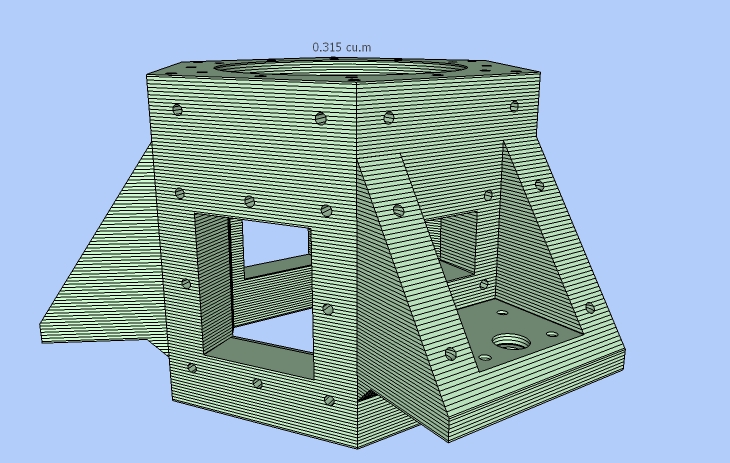
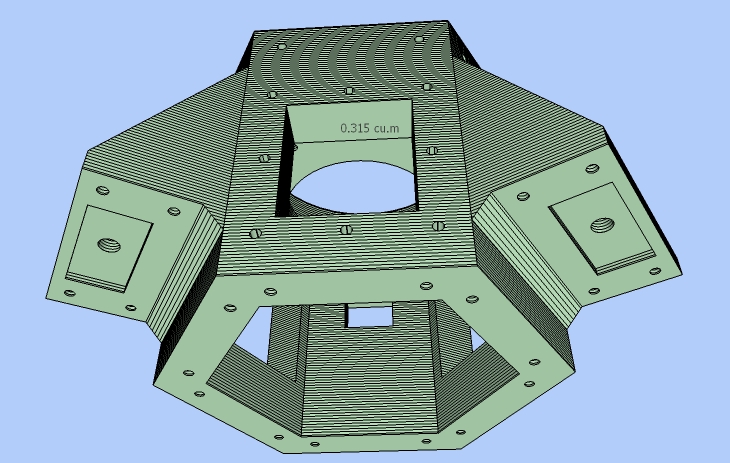
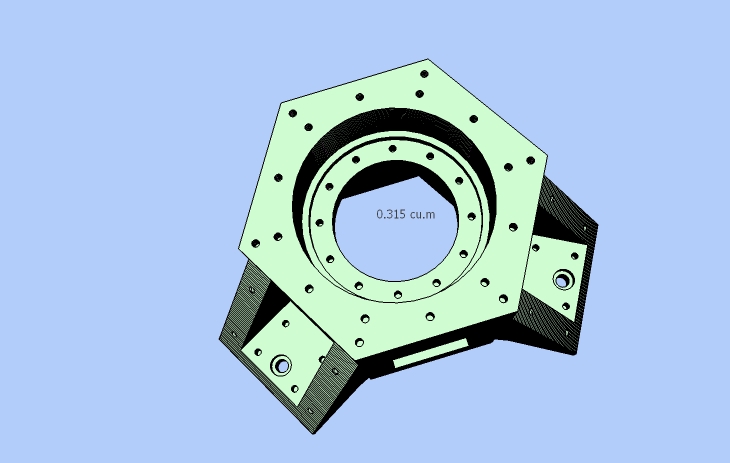
This is just to show that TIG's V1.8 works well with quite complex shapes (I have posted this before, but what the heck!).
The below images show the volume slices for a 1% accuracy volume calculation, which took many minutes to complete.
Regards,
Bob




Advertisement