sketchucation logo sketchucation
    • Login
    Oops, your profile's looking a bit empty! To help us tailor your experience, please fill in key details like your SketchUp version, skill level, operating system, and more. Update and save your info on your profile page today!
    ⚠️ Update | Sketchucation Tools 5.0.8 released with licensing improvements and bugfixes Download

    [Plugin] Volume Calculator2...

    Scheduled Pinned Locked Moved Plugins
    64 Posts 23 Posters 90.5k Views 23 Watching
    Loading More Posts
    • Oldest to Newest
    • Newest to Oldest
    • Most Votes
    Reply
    • Reply as topic
    Log in to reply
    This topic has been deleted. Only users with topic management privileges can see it.
    • pilouP
      pilou
      last edited by

      Simply add it inside the folder Plugins of (Google) Sketchup πŸ˜„
      Instructions are in the header of the file: you can read it by a simple text editor (bloc note)

      In this case just after a speedy use : you must create a goupe or a component before
      Clic on this Group or Component and then "Volume" will appear on the "Right clic" πŸ˜‰

      Seems work like a charm πŸ‘
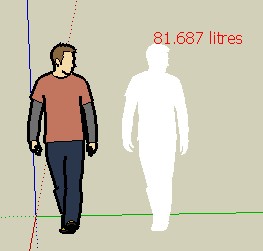
      This guy is this one πŸ˜„


      Brice.jpg

      Frenchy Pilou
      Is beautiful that please without concept!
      My Little site :)

      1 Reply Last reply
      Reply Quote 0
      • pilouP
        pilou
        last edited by

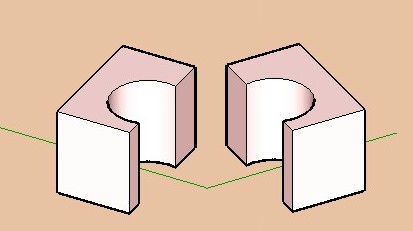
        Seems that is the same for all volumes with holes 😐
        A solution is to cut the volume in 2 parts and add the volumes results πŸ˜‰
        Now the calculator works! 😎


        cube.jpg

        Frenchy Pilou
        Is beautiful that please without concept!
        My Little site :)

        1 Reply Last reply
        Reply Quote 0
        • W
          watkins
          last edited by

          Dear Gurkesaft,

          Try TIG's version 1.8. It works fine with through holes

          Regards,
          Bob

          1 Reply Last reply
          Reply Quote 0
          • S
            svetik
            last edited by

            This is sad- what does v2.1 exist for? 😒

            1 Reply Last reply
            Reply Quote 0
            • W
              watkins
              last edited by

              Dear TIG,

              Do you think you might have time to look at your latest, fast version of the volume calculator? I am still using V1.8 as V2.1 seems to fail when challenged with one of my models.

              Kind regards,
              Bob

              1 Reply Last reply
              Reply Quote 0
              • TIGT
                TIG Moderator
                last edited by

                V2 was a quicker alternative way of accurately calculating volumes. v2 does it by 'slicing'...

                Use v1 for more complex shapes (slow)
                or use v2 for simpler shapes (quicker)

                • see which suits you best...

                I currently don't have time to sort out v2 - if anyone else wants to tweak it, please feel free...

                .

                TIG

                1 Reply Last reply
                Reply Quote 0
                • W
                  watkins
                  last edited by

                  Dear TIG,

                  Okay, I will do that. Thanks for the response.

                  Kind regards,
                  Bob

                  1 Reply Last reply
                  Reply Quote 0
                  • free agentF
                    free agent
                    last edited by

                    is there any way to force a volume, i have a bottle design here and the client needs it to be 500ml and wants to know what the resulting dimensions would be.

                    http://i167.photobucket.com/albums/u143/FreeAgent84/bug.gif

                    1 Reply Last reply
                    Reply Quote 0
                    • AdamBA
                      AdamB
                      last edited by

                      @unknownuser said:

                      is there any way to force a volume, i have a bottle design here and the client needs it to be 500ml and wants to know what the resulting dimensions would be.

                      If you know the current volume with the current dimensions, then you'll need to scale the current design by:

                      3√(targetvolume / currentvolume)

                      Adam

                      Developer of LightUp Click for website

                      1 Reply Last reply
                      Reply Quote 0
                      • free agentF
                        free agent
                        last edited by

                        see a good reason to have payed attension in math class... i'll try

                        http://i167.photobucket.com/albums/u143/FreeAgent84/bug.gif

                        1 Reply Last reply
                        Reply Quote 0
                        • thomthomT
                          thomthom
                          last edited by

                          @unknownuser said:

                          see a good reason to have payed attension in math class... i'll try

                          Did you ever say: "I'll naver have use of that!"..?

                          Thomas Thomassen β€” SketchUp Monkey & Coding addict
                          List of my plugins and link to the CookieWare fund

                          1 Reply Last reply
                          Reply Quote 0
                          • AdamBA
                            AdamB
                            last edited by

                            BTW Thats "cube root" not "3 times squareroot"

                            Perhaps TIG could be persuaded to add a function to Volume Calc that does this since I can see it must be pretty common to be wanting to get to a target volume.

                            Now if three men take four days to dig.. nevermind..

                            Adam

                            Developer of LightUp Click for website

                            1 Reply Last reply
                            Reply Quote 0
                            • W
                              watkins
                              last edited by

                              Dear Adamm & TIG,

                              Could the volume calculator be updated so that the newer, faster script doesn't fall over with multiple internal volumes? I am currently using V1.8 as that seems to work well for complicated shapes, but it does take a long time when the precision goes up. Further, while easily calculated by hand (once one knows the volume), could an editable drop-down list of densities be added so that the script works out the mass as an option. Typical densities would be for concrete, steel, wood, water, sand etc.

                              Another option would be to assign materials properties to components (is this possible?), and then to get the script to work on an assembly (such as a wooden cabinet), treating each component separately (volume and mass) returning a table (spreadsheet) of volumes and masses with the total mass. This could be useful in assessing loading, lifting and shipping requirements. The calculations for C of G are very similar to those for volume (slicing the model), so that is yet another option, as is moments of inertia.

                              I'm sure you are both very busy, but I offer these few thoughts for consideration.

                              Regards,
                              Bob

                              1 Reply Last reply
                              Reply Quote 0
                              • AdamBA
                                AdamB
                                last edited by

                                First off, "Volume Calculator" is TIG's baby not mine!

                                The analytic method for Volume calc (the fast one) will not give the right answer if you have "open geometry". You can find all open edges by running a script like this (doesn't recurse into groups/components):

                                def findleaks(ents = Sketchup.active_model.entities)
                                
                                	for ent in ents 
                                		next unless ent.kind_of? Sketchup;;Edge
                                		
                                		if ent.faces.length == 1
                                			Sketchup.active_model.selection.add ent
                                		end
                                	end
                                end
                                

                                The problem is there isn't a real simple way of automatically closing those "leaks".

                                Adam

                                Developer of LightUp Click for website

                                1 Reply Last reply
                                Reply Quote 0
                                • free agentF
                                  free agent
                                  last edited by

                                  woohoo it worked thanx adamB

                                  http://i167.photobucket.com/albums/u143/FreeAgent84/bug.gif

                                  1 Reply Last reply
                                  Reply Quote 0
                                  • TIGT
                                    TIG Moderator
                                    last edited by

                                    I'd better jump in here...

                                    I made the early versions of Volume calculate by slicing the selected component or group into pieces and totting up the face-cut areas - like crude 'calculus'... It had levels of accuracy as it takes a while to slice and calculate a lot of faces. Often simple shapes return reasonably accurate volumes with few slices...

                                    Adam suggested a 'clever' way of calculating the volume - it has the advantage of being very fast and accurate but is prone to falling over it the faces aren't complete etc...

                                    That's why there are two versions out there.

                                    I would like to fix the fast version much as you ask. It could also include density and CofG etc: however, I am very busy on other things - I will publish something as soon as I can... but no promises...

                                    If anyone else would like to adopt my 'Volume' code and re-do it please feel free [I did something similar with Mirror.rb a while back - completely rewriting the method, but still gave Frank Wiesner the initial credit for having the original ideas up to 2.5 - now on 3.1 ?]...
                                    .

                                    TIG

                                    1 Reply Last reply
                                    Reply Quote 0
                                    • W
                                      watkins
                                      last edited by

                                      Dear TIG and Adam,

                                      Thank you for taking my request/suggestions seriously.

                                      Regards to you both.

                                      Bob

                                      1 Reply Last reply
                                      Reply Quote 0
                                      • W
                                        watkins
                                        last edited by

                                        Dear TIG,

                                        Do you think you might find a moment to take a look at your volume calculator. As I wrote before, the 'faster' version falls over when applied to a shape with cavities. A faster, working version would be good as then one could use the higher precision without the time overhead.

                                        Other improvements might include:

                                        1. Mass calculation (volume x density), with a editable drop down menu of typical densities (glass, concrete, soil, sand, water, steel, plastic etc)

                                        2. Centre of Gravity

                                        3. Moments of inertia

                                        Kind regards,
                                        Bob

                                        1 Reply Last reply
                                        Reply Quote 0
                                        • P
                                          piyono
                                          last edited by

                                          Sorry to go OT, but I can't seem to get Sketchup 7.1.4871 to recognize the volume plugins. I've dropped them into the /Plugins folder with the rest of my plugins, all the rest of which work fine.

                                          Any ideas?

                                          Piyono

                                          1 Reply Last reply
                                          Reply Quote 0
                                          • TIGT
                                            TIG Moderator
                                            last edited by

                                            @unknownuser said:

                                            Sorry to go OT, but I can't seem to get Sketchup 7.1.4871 to recognize the volume plugins. I've dropped them into the /Plugins folder with the rest of my plugins, all the rest of which work fine.

                                            Any ideas?

                                            Piyono

                                            It's a right-click context-menu item only - available if you have a group or component-instance selected... There's no menu item - if that's your point ? ❓

                                            TIG

                                            1 Reply Last reply
                                            Reply Quote 0

                                            Hello! It looks like you're interested in this conversation, but you don't have an account yet.

                                            Getting fed up of having to scroll through the same posts each visit? When you register for an account, you'll always come back to exactly where you were before, and choose to be notified of new replies (either via email, or push notification). You'll also be able to save bookmarks and upvote posts to show your appreciation to other community members.

                                            With your input, this post could be even better πŸ’—

                                            Register Login
                                            • 1
                                            • 2
                                            • 3
                                            • 4
                                            • 1 / 4
                                            • First post
                                              Last post
                                            Buy SketchPlus
                                            Buy SUbD
                                            Buy WrapR
                                            Buy eBook
                                            Buy Modelur
                                            Buy Vertex Tools
                                            Buy SketchCuisine
                                            Buy FormFonts

                                            Advertisement