sketchucation logo sketchucation
    • Login
    Oops, your profile's looking a bit empty! To help us tailor your experience, please fill in key details like your SketchUp version, skill level, operating system, and more. Update and save your info on your profile page today!
    Mac User? | Join the Rayscaper Beta for Mac Learn More

    [Plugin] Skin.rb

    Scheduled Pinned Locked Moved Plugins
    237 Posts 66 Posters 205.7k Views 66 Watching
    Loading More Posts
    • Oldest to Newest
    • Newest to Oldest
    • Most Votes
    Reply
    • Reply as topic
    Log in to reply
    This topic has been deleted. Only users with topic management privileges can see it.
    • V
      Voder Vocoder
      last edited by

      Ah.

      And what of my other earlier question? When you reported this as a bug during version 5 Beta testing, what was @Last's response? Did they acknowledge it as a bug?

      ~Voder

      1 Reply Last reply
      Reply Quote 0
      • jujuJ
        juju
        last edited by

        @unknownuser said:

        I'm hoping I can get the problem I'm having sorted out. I've tried downloading and re-downloading the skin.rb with the icons but I just can't get it to show. I've made sure it's placed correctly, made sure it has been enabled, tried moving the icons from the skin folder to the main plugins folder (where the skin.rb resides) doesn't make a difference.

        Any ideas people?

        BUMP

        Save the Earth, it's the only planet with chocolate.

        1 Reply Last reply
        Reply Quote 0
        • V
          Voder Vocoder
          last edited by

          @unknownuser said:

          Any ideas people?

          It's pretty obvious, Juju, but you didn't mention that you checked the DB Tools toolbar. Did you?

          ~Voder

          1 Reply Last reply
          Reply Quote 0
          • jujuJ
            juju
            last edited by

            @voder vocoder said:

            @unknownuser said:

            Any ideas people?

            It's pretty obvious, Juju, but you didn't mention that you checked the DB Tools toolbar. Did you?

            It's there all right, but what are the icons (the image files contained in the "skin" folder within the plugins folder) for then?

            Save the Earth, it's the only planet with chocolate.

            1 Reply Last reply
            Reply Quote 0
            • V
              Voder Vocoder
              last edited by

              @unknownuser said:

              @voder vocoder said:

              @unknownuser said:

              Any ideas people?

              It's pretty obvious, Juju, but you didn't mention that you checked the DB Tools toolbar. Did you?

              It's there all right, but what are the icons (the image files contained in the "skin" folder within the plugins folder) for then?

              Those images are the icons (command buttons) that appear on the DB Tools toolbar. There are four images in the skin sub-folder--a large and a small icon for each of the the two commands, Clean and Skin. The two that are used for the toolbar depends on whether you have "Use large tool buttons" checked under preferences. I suggest you put the image files back in the skin sub-folder so they will show up on the toolbar.

              ~Voder

              1 Reply Last reply
              Reply Quote 0
              • A
                architectboy
                last edited by

                Hello, friends, long time no see. Lament no longer over the fact that this script is not in development. I've recently gotten back to working on this script and have a new version for you all.


                The loooong awaited upgrade

                1 Reply Last reply
                Reply Quote 0
                • V
                  Voder Vocoder
                  last edited by

                  Darrel,

                  I'm delighted to see you back, and I'm excited that there's a new version. Would you mind explaining a bit about the new options?

                  Thanks for this.

                  ~Voder

                  1 Reply Last reply
                  Reply Quote 0
                  • R
                    remus
                    last edited by

                    Oooh, what a nice surprise.

                    http://remusrendering.wordpress.com/

                    1 Reply Last reply
                    Reply Quote 0
                    • ToboboT
                      Tobobo
                      last edited by

                      Thanks Mate

                      Toby

                      Philippians 4:13

                      I can do everything through him who gives me strength.

                      1 Reply Last reply
                      Reply Quote 0
                      • W
                        watkins
                        last edited by

                        Dear Darrel,

                        I note that the new script adds something extra. Do you have a User Guide document to explain how best to use this script?

                        Kind regards,
                        Bob

                        1 Reply Last reply
                        Reply Quote 0
                        • M
                          maxosmedia
                          last edited by

                          SU crash!!! 😞 Without tears and comments
                          (SU 6.4.245, MacOS 10.4.11)
                          Previous versions Skin.rb work perfect

                          1 Reply Last reply
                          Reply Quote 0
                          • A
                            architectboy
                            last edited by

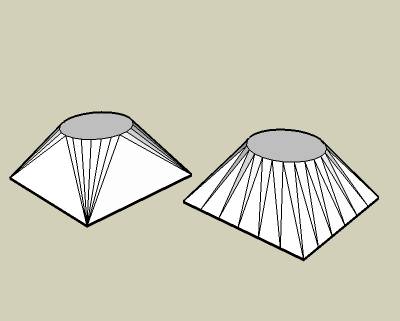
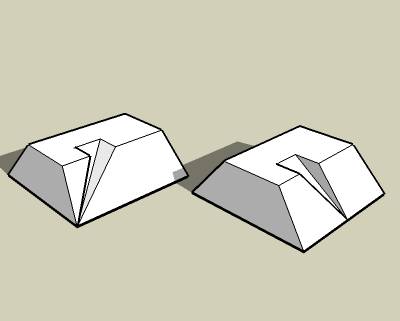
                            Skin.rb was originally designed to only "skin", or connect, the sides, but it became evident that it sometimes should "prep", or prepare the sides for skinning by splitting the edges. I came up with two methods for skinning the sides and two methods for preparing the sides. I used to have a button for each method, but now I have one skin button and the settings dialog sets what methods skin.rb uses. I hope that you can figure it out. If someone can explain it better than me, please do.

                            1 Reply Last reply
                            Reply Quote 0
                            • V
                              Voder Vocoder
                              last edited by

                              @unknownuser said:

                              ...it became evident that it sometimes should "prep", or prepare the sides for skinning by splitting the edges.

                              Darrel,

                              It's not obvious to me what the benefit of prepping is. The granularity of the resulting shape is still determined by the original edges, is it not?

                              Thanks,

                              ~Voder

                              1 Reply Last reply
                              Reply Quote 0
                              • A
                                architectboy
                                last edited by

                                Voder, prepping the edges creates the effect that the edges are connected, not just the vertices.Example1.jpgExample2.jpg

                                1 Reply Last reply
                                Reply Quote 0
                                • pilouP
                                  pilou
                                  last edited by

                                  these icons have disapeared?


                                  why.jpg

                                  Frenchy Pilou
                                  Is beautiful that please without concept!
                                  My Little site :)

                                  1 Reply Last reply
                                  Reply Quote 0
                                  • ToboboT
                                    Tobobo
                                    last edited by

                                    Darrel,

                                    Thanks for the script but it crashed sketch up and i'm not sure what all the settings mean?

                                    Toby

                                    Philippians 4:13

                                    I can do everything through him who gives me strength.

                                    1 Reply Last reply
                                    Reply Quote 0
                                    • GaieusG
                                      Gaieus
                                      last edited by

                                      Cool Darrel, works just fine with my machine. Thanks for coming back. A lot of us were indeed quite curious where you could be. πŸ˜‰

                                      Nice options, too! πŸ‘

                                      Gai...

                                      1 Reply Last reply
                                      Reply Quote 0
                                      • kmeadK
                                        kmead
                                        last edited by

                                        Good day.

                                        I am a MacOS user and unfortunately, version 23 does not appear to work any longer. V22 does, so I don't know what the issue is. It doesn't crash SU but doesn't do anything beyond have the buttons toggle and change color. Nothing untoward happens just no change in state of the model.

                                        Mac OSX v10.5.5 MacBook Pro 2.33, 3gb Ram, 256 ATI X1600

                                        The earlier versions have worked fine until this point.

                                        Many thanks.

                                        Karl

                                        I created Dilbertville, sorry about that...

                                        1 Reply Last reply
                                        Reply Quote 0
                                        • A
                                          architectboy
                                          last edited by

                                          Pilou, thank you for the test case. I used it in debugging this version. Hopefully this fixes the problems you guys have been having. The test case still takes my computer several minutes to sort through those 61000 entities and to delete 9000 edges, I don't get how your computer could do it in three seconds πŸ˜• .


                                          Version 2.4

                                          1 Reply Last reply
                                          Reply Quote 0
                                          • pilouP
                                            pilou
                                            last edited by

                                            3 seconds again for the function "Clean selection" with your new version 2.4 😎
                                            My comput has 5 years old so with up to date machine that will be instantaneous!
                                            Of course I select all the model before launch the Clean Selection!
                                            Only edges on "flat" faces are erased!
                                            That is I suppose the normal use of the function "Clean Selection"?
                                            Maybe I have not calculate tools like your "sort" on my comput processor?
                                            That maybe explain the 3 seconds result?
                                            (for other manipulations like move copy etc...my comput with this model is go down on its knees! πŸ˜‰
                                            Model by Steph3D
                                            PS Existing before 2 icones (rectangle with little red points) for divide in same numbers edges of facets : are they disapeared?
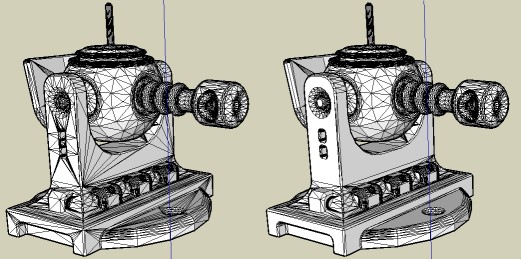


                                            test.jpg

                                            Frenchy Pilou
                                            Is beautiful that please without concept!
                                            My Little site :)

                                            1 Reply Last reply
                                            Reply Quote 0

                                            Hello! It looks like you're interested in this conversation, but you don't have an account yet.

                                            Getting fed up of having to scroll through the same posts each visit? When you register for an account, you'll always come back to exactly where you were before, and choose to be notified of new replies (either via email, or push notification). You'll also be able to save bookmarks and upvote posts to show your appreciation to other community members.

                                            With your input, this post could be even better πŸ’—

                                            Register Login
                                            • 1
                                            • 2
                                            • 3
                                            • 4
                                            • 5
                                            • 6
                                            • 7
                                            • 8
                                            • 11
                                            • 12
                                            • 6 / 12
                                            • First post
                                              Last post
                                            Buy SketchPlus
                                            Buy SUbD
                                            Buy WrapR
                                            Buy eBook
                                            Buy Modelur
                                            Buy Vertex Tools
                                            Buy SketchCuisine
                                            Buy FormFonts

                                            Advertisement