A Pencil Style for ya...
-
Thanks for all the nice comments on the style. So warm & fuzzy.
Regarding styles and macs...
I don't use a mac but I think I'm correct with this information as it really relates to both macs and pc's. Styles are indeed just zip archives renamed with the .style extension in place of the .zip extension. The files are not meant to be clicked on and opened. (You can do it a pc too if you direct the computer to open the .style extension with a unzipping application).To use downloaded styles in SketchUp you need only to have it in a folder and then use SU's 'add' feature direct SU to include that folder's content in the available styles. I made this instruction sheet for FormFonts. What I do and recommend is organizing your styles in different folders. For instance I have a folder where I put styles downloaded from the forums -- that way I can keep track of the source.
Regards, Ross
-
thanks, very clear.
Still, I just wanted to make some changes to a style and zip the folder again (by right clicking an choosing "create archive") after my photoshop work. When I zip the files into one I can no longer make it an .style file. When I type .style instead of .zip my OSX changes the file name in .style.zip and such a file is unreadable by SU.Strange but maybe I am totally not making a zipped files in the way SU can read it.
[frv]
-
Hi frv
Maybe you could try emailing the file .style.zip file to yourself and then rename it to just .style when you save it with the download manager (assuming macs still have the download manager the os used to have). If that does work remember avoid 'opening' the style as it seems that action will reassociate the particular file with archiving.Regards, Ross
-
thanks for the workaround, will try it later but can't help thinking there must be a better way to convert .zip to a .style. I did not find anything using google.
[frv]
-
Ross, I put your pencil style to a test... Thanks!! I love it!!
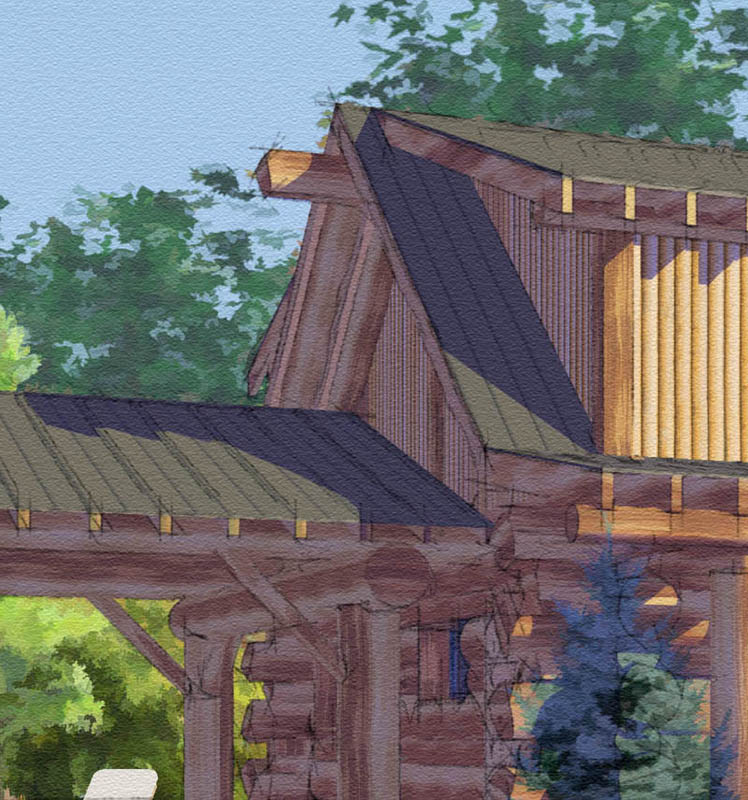
-
Wow, that looks great.

-
Well I finally got around to trying this style out and it is not showing up in my styles window at all. I have the style placed in the Styles folder along with all the other new ones I have downloaded but this one is not registering in SU. Any suggestions?
-
Eric, I couldn't find it at first either. I was expecting it to come up as RMFF pencil style, but it shows up as just "pencil". Hope that helps.
-
Well there you go, thanks Tina.

-
Actually this problem with styles on a Mac has existed since SU6 was introduced. A Mac generally will see this as a zip file and as a result will unpack it so you see its requisite parts in a folder. I reported this on the old forum and tried to assist style creators in posting the files so they could be reliably downloaded. In addition depending on how compressed the image files were the styles would fail to work.
This is a bug in the format for styles. To the best of my knowledge, I have never seen a Mac user created style, though I could be wrong.
-
I'm sorry but I still don't get that. (Perhaps I'm 'slow').
On a mac can't you use the styles provided/installed by Google? They of course have the same .style extension that is really just a renamed .zip format. If they work why wouldn't it work to just save a style downloaded here to the same folder? The thing about being able to open it and see its contents on a mac sounds irrelevant to me. On my pc I can open & see the contents too --- but you aren't supposed to be 'opening' them.
-
Ross:
What happens on a Mac is it will download zip file and you can't get the OS or SU to see it as a "style". Sometimes the changing the suffix to .style from .zip will work but not always.
Why it doesn't work reliably and consistently is beyond me (as well).
In addition SU will often work unreliably in regards to different styles, some will take the place of others (click on one the display changes, click on another and the name highlights but the style doesn't actually change) and then SU will often crash. This occurs on my PPC and my Intel Macs.
Karl -
Ross,
Thanks for your hard work and generosity!
Ken
-
hi..
all of these things that the mac users are saying are true.. sort of.
i spent the last hour or two trying to get to the bottom of this and i found out a few things.. one of them being a real solution which i'll get to at the end..
one fix is to use firefox and right click the link to the style.. select "save link as..." and type in the name with the extension .style... the package will download and will work as a style in sketchup.. note that by using this method, the icon for the style package will be a blank white paper looking thing...
all of the other download methods i tried (including the same thing as above except via safari) will bring the package in with various forms of cardboard box looking icons... os x is looking at these styles as a known format (zip) although it shouldn't recognize a .style file...
if you simply change the .zip to .style on these boxes, they will not be recognized by sketchup even though they appear to be named correctly and are in the right location..
my ah ha moment came by accident... i already had one 'RMFF_Pencil.zip' package on my desktop which i renamed to 'RMFF_Pencil.style'... i forgot about that one and downloaded it again.. this time, when i tried to change .zip to .style, i received the following warning ---- The name "RMFF_Pencil.style" with extension ".zip" is already taken. Please choose a different name. ----
so, even though i thought i was changing the extension name, it was still being seen as a .zip.. i (and i suspect a lot of mac users) are really renaming the file to RMFF_Pencil.style.zip because of a finder preference that a lof of us have probably chosen.. go to the finder preferences and select 'advanced'.. click show all file extensions and you'll now see what's going on.. you'll see your .style.zip things..
now when you rename the file to .style without the .zip, a warning will appear --- Are you sure you want to change the extension from ".zip" to ".style"? If you make this change, your document may open in a different application. ----
select "use .style" and you're good to go.. (note - the icon will not change to the blank paper however, a double click on it will not automatically expand it.. os x doesn't know what it is now and you're given the -- there's no default app to deal with this thing -- warning.. you have to manually open it in an expander to see those xml files..
that style looks real nice... good night.
jeff[EDIT] -- re: the icons..

the one on the left is the blank paper looking thing.. this is how the file will look when brought in thru firefox using the method i described above.. the next two are different looking .zip icons (and will vary depending on which browser is being used) ... the fourth one is how the .styles that are installed with sketchup look...
the zipper type (2nd from left) will in fact change to the blank paper once you've correctly named it as a style... the cardboard box will stay the same even after a correct name change... any of them besides the zipper type will work in sketchup as long as the proper extension is used.. -
Thanks for your investigation Jeff.

Regards, Ross
-
it's a weird preference because it doesn't really change much.. it's not as if i had all of these files on my computer without their extensions showing.. everything shows .jpg, .txt, .skp, .zip, etc. regardless of my selection on that preference.. it is turned off by default and there was never an instance prior to this that made change it..
the only other file type that i've found to be affected by this is .webloc..






Advertisement