Disappearing Sandbox-MAC
-
Here is, hopefully, another clue.
The toolbar of Flattery is always on,
and that of Mirror is always off.Ckeched with a friend, he has same trouble.
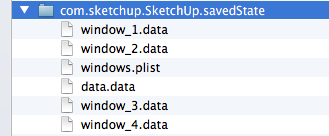
Could it be in there ? User/Library/Saved Application State
-
@mariocha said:
Could it be in there ? User/Library/Saved Application State
nah.. that's where osx stores the last state of an application in case you reboot or a crash / power failure... the apps will open back up with the same files open etc..
it would be in your preferences .plist
user/ library/ preferences/ com.google.sketchup(version).plist
all the possible toolbars will have an entry: SketchUp.Toolbars.Curviloft.Visible then a string type 1 for on or 0 for off
with su2013, the plist is:
user/ library/ preferences/ com.sketchup.SketchUp.plistthat one has a single expandable entry called Toolbars.. all the possible toolbars are listed under this single entry then a number type 1-on 0-off
-
fwiw, you can close sketchup then trash (or move) your preferences .plist then relaunch su..
sketchup will create a new one upon relaunching but it will act as if it's the first time you installed it (i.e.- everything reverts to default).. all of the toolbars should be visible upon this first launch (stacked on top of each other in the top left corner)
move it to the desktop then relaunch sketchup.. if it fixes the problem then great.. if not, trash the new one then put the old .plist back in there so you don't have to set everything up again.
-
Hi Jeff,
I did more than trash de prefs, I deleted all the app and its files (with an app delete soft).
Re-installed, only Solar North is visible at first launch, but then no more. And same bug for other palettes.
Looked at the com.sketchup.SketchUp.plist file, all toolbar integers are set to 1, indeed.
But do you mean that you do not have this bug on your OS X? -
@mariocha said:
But do you mean that you do not have this bug on your OS X?
right.. all is functioning normally* on my computers (a macpro and a mbp).. 10.7 on the mp & 10.8 on the mbp..
su 8 pro and sketchup make2013 on both*normal meaning the toolbars remember their on/off state between sessions (except for a few due to the ruby writer's coding- skindigo, profile builder, sds, perp face tools)
-
@unknownuser said:
right.. all is functioning normally* on my computers (a macpro and a mbp).. 10.7 on the mp & 10.8 on the mbp..
su 8 pro and sketchup make2013 on bothOh ! I did not realized that. I thought you also had the problem.
Mountain Lion ? 10.8.5 ? -
@mariocha said:
Oh ! I did not realized that. I thought you also had the problem.
Mountain Lion ? 10.8.5 ?no, no problem here.. and apparently the su team can't reproduce it either.
im on 10.8.4 but .5 was just released so i'm assuming you had the problem with earlier version on mLion as well.
just out of curiosity, what do you have the gatekeeper preference set to? (System prefs -> Security & Privacy -> General )
Allow applications downloaded from
?mine is set to 'Anywhere'
-
yes on 10.8.4 as well.
"Allow applications downloaded from" is set to -Mac App store and identified devs..
euh.. why




Advertisement