Materials in Sketchup post onedrive removal.
-
Some issues I have are now gone but, opening the mats file in appdata gives nothing but an empty folder.
I am admin but chasing rainbows atm. Any pointers? Clues?
-
What path is selected for Materials in Preferences>Files?
Which version of SketchUp?
-
Standard installation, sketchup 2024 and 2026.
-
I presume you are referring to your own custom materials?
Is this the same in both versions of SketchUp?
Have there ever been materials in the User/AppData/ ... /Materials folder or were you saving them on OneDrive?
-
I was not but onedrive is an arse. Reinstallation does not fix the issue. Possible uninstall, clean install. Best I can come up with.
-
I am talkikng the standard mats in the relevant sketchup mats folders.
-
So here?
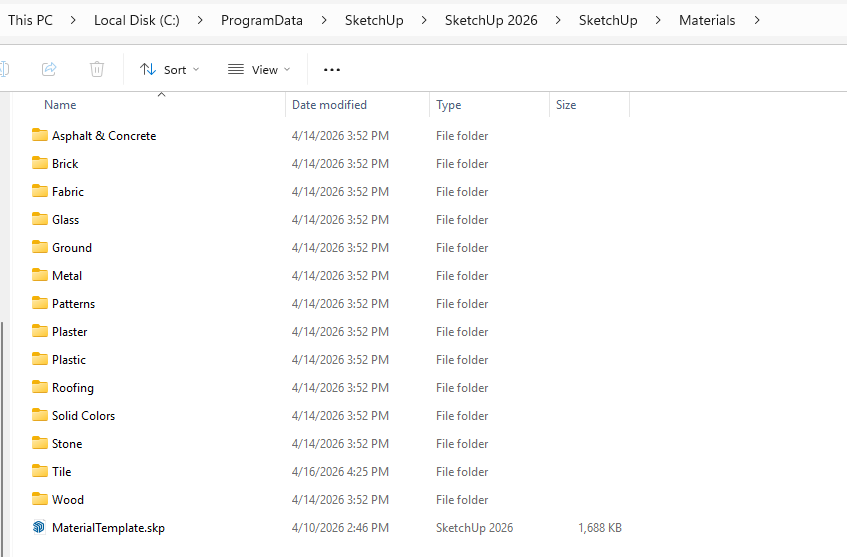
Try repairing the installation. Right click on the downloaded installer, choose Run as administrator, then pick the Repair option. Then do a cold reboot of the computer. Any change?
-
No, I tried that early doors.


Hello! It looks like you're interested in this conversation, but you don't have an account yet.
Getting fed up of having to scroll through the same posts each visit? When you register for an account, you'll always come back to exactly where you were before, and choose to be notified of new replies (either via email, or push notification). You'll also be able to save bookmarks and upvote posts to show your appreciation to other community members.
With your input, this post could be even better 💗
Register Login


Advertisement