sketchucation logo sketchucation
    • Login
    Oops, your profile's looking a bit empty! To help us tailor your experience, please fill in key details like your SketchUp version, skill level, operating system, and more. Update and save your info on your profile page today!
    ⚠️ Important | Libfredo 15.6b introduces important bugfixes for Fredo's Extensions Update

    Problem flowify

    Scheduled Pinned Locked Moved SketchUp Tutorials
    15 Posts 2 Posters 462 Views 2 Watching
    Loading More Posts
    • Oldest to Newest
    • Newest to Oldest
    • Most Votes
    Reply
    • Reply as topic
    Log in to reply
    This topic has been deleted. Only users with topic management privileges can see it.
    • pilouP Offline
      pilou
      last edited by pilou

      I believe that you must have your surface made with these 4 curves! πŸ˜‰

      Tig has a cool one for that! πŸ˜‰ Extrude Tool and take the first one πŸ˜„
      (pick Profil 1, rail 1, rail 2, profil 2 )

      Frenchy Pilou
      Is beautiful that please without concept!
      My Little site :)

      1 Reply Last reply Reply Quote 0
      • pilouP Offline
        pilou
        last edited by

        As your object to project is very heavy that can take several minutes to do! πŸ€“
        Object to project must be an only one object and not an object of objects! πŸ€“

        [attachment=0:2lby85ww]<!-- ia0 -->flowify.jpg<!-- ia0 -->[/attachment:2lby85ww]

        Frenchy Pilou
        Is beautiful that please without concept!
        My Little site :)

        1 Reply Last reply Reply Quote 0
        • S Offline
          stefan81222 Newcomers
          last edited by

          so i downloaded and installed extrude tools..i just don't understand very well what i have to do to my solid with that tools...should i select the figure? make it new with that tools? I don't understand...

          1 Reply Last reply Reply Quote 0
          • pilouP Offline
            pilou
            last edited by

            It's for make your target surface!
            You must draw first 4 separated curves (but connected by their extremities)
            Call the first TIG Extrude Tool
            Click the left Profile 1 (the red one above)
            Click one Rail 1 ( up green curve) 2
            Click second Rail 2 ( bottom green curve )
            Click the right Profile 2 ( red curve again)

            Like this you can create any surface defined (here 4 ) by 3 or 4 curves (Coons Surfaces)
            (in case of 3 curves click twice on the Rail)

            You can now apply your Flowify with confidence! β˜€

            Frenchy Pilou
            Is beautiful that please without concept!
            My Little site :)

            1 Reply Last reply Reply Quote 0
            • S Offline
              stefan81222 Newcomers
              last edited by

              I'm sorry...but I can't...I try and try...can you tell me where am I going wrong?I create the curve..but all I get with the extrude edges by rail plugin is that...help


              test.skp

              1 Reply Last reply Reply Quote 0
              • pilouP Offline
                pilou
                last edited by

                Your 4 curves are maybe not welded themselve?
                And your drawing is curious ! It's a canoe ?
                I have just keept your 2 Profiles and draw any 2 other rails...
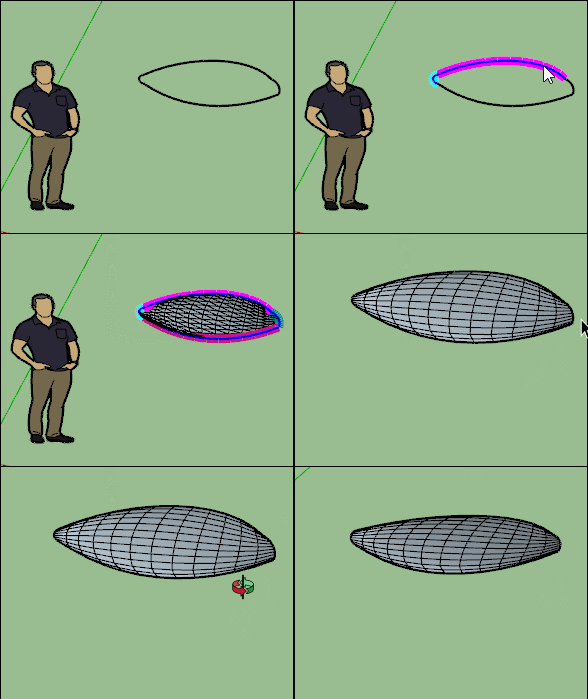
                GIF-t.gif

                Frenchy Pilou
                Is beautiful that please without concept!
                My Little site :)

                1 Reply Last reply Reply Quote 0
                • S Offline
                  stefan81222 Newcomers
                  last edited by

                  not a canoe heheh...so if I make curves at random the plugin works...the shapes come to me...but when I try to do it with the empty profile I drew of the sofa...it can't do it... I don't understand where I went wrong in creating that specific profile...


                  test sofa.skp

                  1 Reply Last reply Reply Quote 0
                  • pilouP Offline
                    pilou
                    last edited by

                    it's not version 2017! πŸ˜‰

                    Frenchy Pilou
                    Is beautiful that please without concept!
                    My Little site :)

                    1 Reply Last reply Reply Quote 0
                    • S Offline
                      stefan81222 Newcomers
                      last edited by

                      sorry...


                      test sofa 2.skp

                      1 Reply Last reply Reply Quote 0
                      • pilouP Offline
                        pilou
                        last edited by

                        Yes it's that!

                        You must redraw your curves for have 4 curves welded!
                        Use the Fredo Bezier plugin for have automatically 4 curves welded!
                        https://sketchucation.com/pluginstore?pln=BezierSpline

                        In another case you can use the recurve plugin for weld curves selected!
                        https://sketchucation.com/pluginstore?pln=recurve

                        Frenchy Pilou
                        Is beautiful that please without concept!
                        My Little site :)

                        1 Reply Last reply Reply Quote 0
                        • S Offline
                          stefan81222 Newcomers
                          last edited by

                          but
                          Diggsey: Recurve v1.5
                          it doesn't seem to work on sketchup pro 2022...it is installed but I can't find it in the control panel...

                          1 Reply Last reply Reply Quote 0
                          • pilouP Offline
                            pilou
                            last edited by

                            It's a contextual menu on the right Click when something is selected! πŸ˜‰

                            Frenchy Pilou
                            Is beautiful that please without concept!
                            My Little site :)

                            1 Reply Last reply Reply Quote 0
                            • 1 / 1
                            • First post
                              Last post
                            Buy SketchPlus
                            Buy SUbD
                            Buy WrapR
                            Buy eBook
                            Buy Modelur
                            Buy Vertex Tools
                            Buy SketchCuisine
                            Buy FormFonts

                            Advertisement