Open With ... SUp 2021
-
So I downloaded 2022, but for now I'd like to stay with 2021 but when I R click the file I don't see 2021 under 'Open With'.
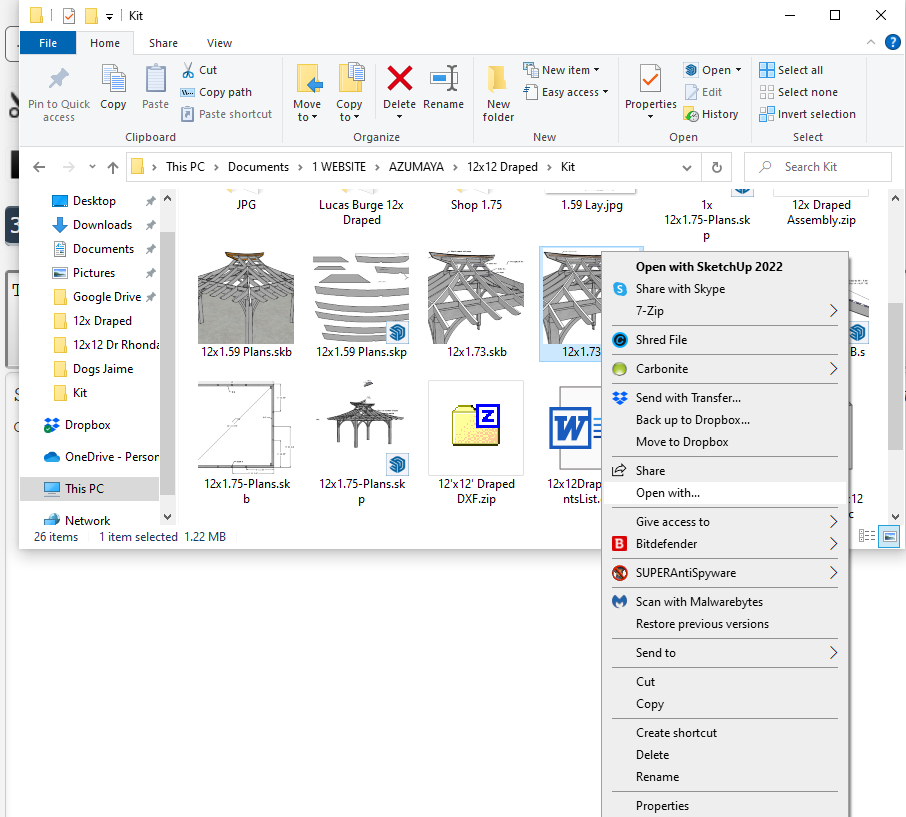
-
Uninstall 2022 and repair the installation of 2021 by right clicking on the downloaded installer and choosing Run as administrator. Or just open SU2021 and open your files from the there.
-
Right on Dave, I removed 2022, but when I look at the 2021 installer I have two,
SketchUpPro-2021-1-332-116 and SketchUpPro-2021-0-1,I should run the SketchUpPro-2021-1-332-116?
-
Run the newest one.
-
Thanks for the help Dave!


Hello! It looks like you're interested in this conversation, but you don't have an account yet.
Getting fed up of having to scroll through the same posts each visit? When you register for an account, you'll always come back to exactly where you were before, and choose to be notified of new replies (either via email, or push notification). You'll also be able to save bookmarks and upvote posts to show your appreciation to other community members.
With your input, this post could be even better 💗
Register Login


Advertisement